Healthcare payment processing for medical clinics
Healthcare payment processing for a medical clinic handles more than the visit fee: patient balances after insurance, uninsured services and written payment plans. RapidCents covers all three with reception terminals, payment links, a virtual terminal and recurring charges, and RapidBridge posts payments into clinic software such as Jane App, Cliniko and Tebra.

- PCI DSS Level 1
- SOC 2 Type II
- All major card brands: Visa · Mastercard · Amex · Interac debit
- Interchange-plus available
- Canadian support
How medical clinics get paid
Medical clinics, from family practices and walk-in clinics to specialist offices, get paid in five ways: at the desk on the day, after insurance has paid its share, for uninsured services, through payment plans patients sign, and by phone. The sixth job runs the other way: refunding what a patient overpaid. Each job differs in who pays, what sets off the charge and the record finance needs.
Visit payments at the front desk
The patient pays the visit fee or plan co-payment at check-in or checkout. A medical clinic payment terminal at reception accepts tap, chip and PIN, and a supported iPhone or Android phone running Tap to Pay can act as a second checkout on busy days. A patient who forgot a card gets a payment link before leaving. Finance sees each sale, by staff member, in the day's transactions.
Balances after insurance
The patient owes whatever the insurer or benefits plan did not pay, and the amount can be known only after the claim is processed, sometimes weeks after the visit. Staff collect it remotely, by payment link or over the phone. If a patient wants to pay part now and the rest later, a link can accept a partial amount. Finance gets each payment with its invoice or statement number attached.
Uninsured service fees
Forms, reports, cosmetic procedures and visits by patients without coverage are paid by the patient, or by the employer, insurer or law firm that asked for the work. Patients pay at the desk or by payment link, usually before the service or before a document is released. A third-party payer receives an invoice instead. Finance sees each fee as its own payment, apart from claim activity.
Consented payment plans
A patient with a larger balance, such as the fee for an uninsured procedure, agrees in writing to pay it in a fixed number of charges. The stored card is charged on each agreed date through Recurring Payments. If a card keeps declining after the automatic retries, staff send a payment link for that installment. Finance sees each scheduled charge and its result in the Merchant Dashboard.
Payments by phone
Some patients, or family members paying for them, call to settle a balance. Staff key the card in the Virtual Terminal under their own login, with address and security-code checks. When the caller is not the cardholder, staff send the cardholder a payment link instead of keying the card. Finance can see in the audit log who took each payment.
Refunds of overpayments
When a claim is reprocessed, or a plan pays more than expected after the patient paid an estimate at the desk, the patient is owed a credit. An authorized manager refunds it to the original card from the Merchant Dashboard. If the patient has already disputed the charge with their card issuer, answer the dispute instead of refunding, or the patient may be refunded twice. Finance sees each refund as its own line.
Payment pages for specialized businesses
Some businesses in this sector take payments differently enough to need their own page. Each one covers its own payment jobs, software questions and buyer FAQs.
Audiology & Hearing Clinics
Take consultation fees, hearing-device deposits and fitting balances in the clinic or by link, and send trial…
Podiatry & Foot Care Clinics
Collect consultation fees, custom orthotic deposits, fitting balances and recurring foot-care visits with…
Speech Therapy Practices
Collect weekly session fees, assessment packages and late-cancellation fees from parents and adult clients…
Occupational Therapy Practices
Take cards at the clinic or a client's kitchen table, send invoice links to employers and families, and keep…
Telehealth Providers
Collect virtual visit fees before or after the session, handle late cancellations and refunds, and bill…
How do medical clinics collect patient balances after insurance?
Medical clinics bill a patient balance after insurance once the insurer or benefits plan has processed the claim, and collect only what is certain at the visit itself. Your practice software records the patient's portion; RapidCents collects it through patient balance payment links sent by email or text, or at the terminal on the next visit. The claim and the payment stay separate records, joined by an invoice or statement number.
How the balance reaches the patient
The claim result lands in your practice software and the patient portion appears on the account. Staff create a payment link for that exact amount, put the invoice or statement number in the reference field and send it by email or text, or print it as a QR code on a paper statement. The patient opens the link, pays on a page built for phones and receives a receipt automatically; staff see the link marked paid in the Merchant Dashboard and record the payment against the invoice.
Estimates at the desk
Some clinics collect an estimated patient portion at the visit and settle the difference after the claim. If you do, tell the patient the amount is an estimate and expect two outcomes: a small balance to send by link, or an overpayment to refund. Collecting only fixed amounts at the desk, such as a co-payment, means fewer refunds later.
What to set up first
Decide who may send links and who may change an amount. Write one standard link description, such as “Account balance”, so no diagnosis or procedure appears in the email, the text or the receipt. Match link expiry to your statement cycle, and decide whether patients may pay part of a balance, since payment links can be set to accept partial amounts.
When the balance is questioned or changes
If a patient questions the balance, hold further reminders until billing has checked the claim. If the insurer reprocesses the claim, correct the balance in your practice software first, then cancel the open link and send a new one for the corrected amount. Where the patient already paid too much, a manager refunds the difference to the original card, so the refund sits on the same payment record.
A balance after a minor procedure, paid by link
Say a patient's benefits plan pays most of a minor in-office procedure and leaves a remainder. When the claim result arrives, the front desk sends a payment link with the statement number as the reference. The patient pays from a phone two days later, the receipt reads “Account balance”, and the billing coordinator matches the payment to the statement and then to the deposit in the settlement report.
How should clinics collect uninsured service fees?
Collect uninsured service fees at or before the time of service, from whoever asked for the work, using a fee the payer saw in advance. Most uninsured medical service payments are tied to one visit or one document, so a tap at reception or a payment link sent at booking covers them. When an employer, insurer or law firm asked for a report, invoice that organization instead.
What counts as an uninsured service
An uninsured service is anything the patient's public or private plan does not pay for, such as completed forms and letters, medical-legal reports, travel health consultations, cosmetic procedures, some vaccines and visits by patients without coverage. Coverage differs by plan and by country, so your billing team decides what is uninsured; RapidCents collects the fee you set.
Set the fee before the service
Post your uninsured fee list at reception and on your website, and quote the fee when the appointment is booked. Decide when payment is due: at booking by payment link, as a deposit for a longer procedure, at the desk on the day, or before a completed document is released. If the patient cancels within your policy, refund the payment to the original card. A fee the patient saw before booking is easier to stand behind if it is questioned.
Missed-appointment fees and stored cards
If your professional rules allow a missed-appointment fee, write the policy down, show it at booking and get the patient's permission before you keep a card on file for that purpose. Record that permission so you can produce it if the patient disputes the charge. Without it, send the fee by payment link instead.
Third-party payers
When an employer, insurer or law firm requests a report, send that organization an invoice with a payment link through RapidCents Invoicing, addressed to the requester rather than the patient. Keep clinical findings out of the invoice, since the report itself carries them, and release the report once the invoice shows as paid if your policy allows.
A form for a new employer, paid at booking
Say a patient starting a new job needs a pre-employment medical form completed. Reception quotes the fee from the posted list when booking and sends a payment link. The patient pays before the appointment, the receipt reads “Uninsured service fee”, and the completed form is handed over at the visit with nothing left to collect.
RapidCents products for medical clinics
Four products carry these jobs: the Virtual Terminal for phone payments under role permissions, Payment Links for balances and uninsured fees, Recurring Payments for consented plans, and the Merchant Dashboard for refunds, staff access and reports. Payment Terminals and Tap to Pay cover the front desk.
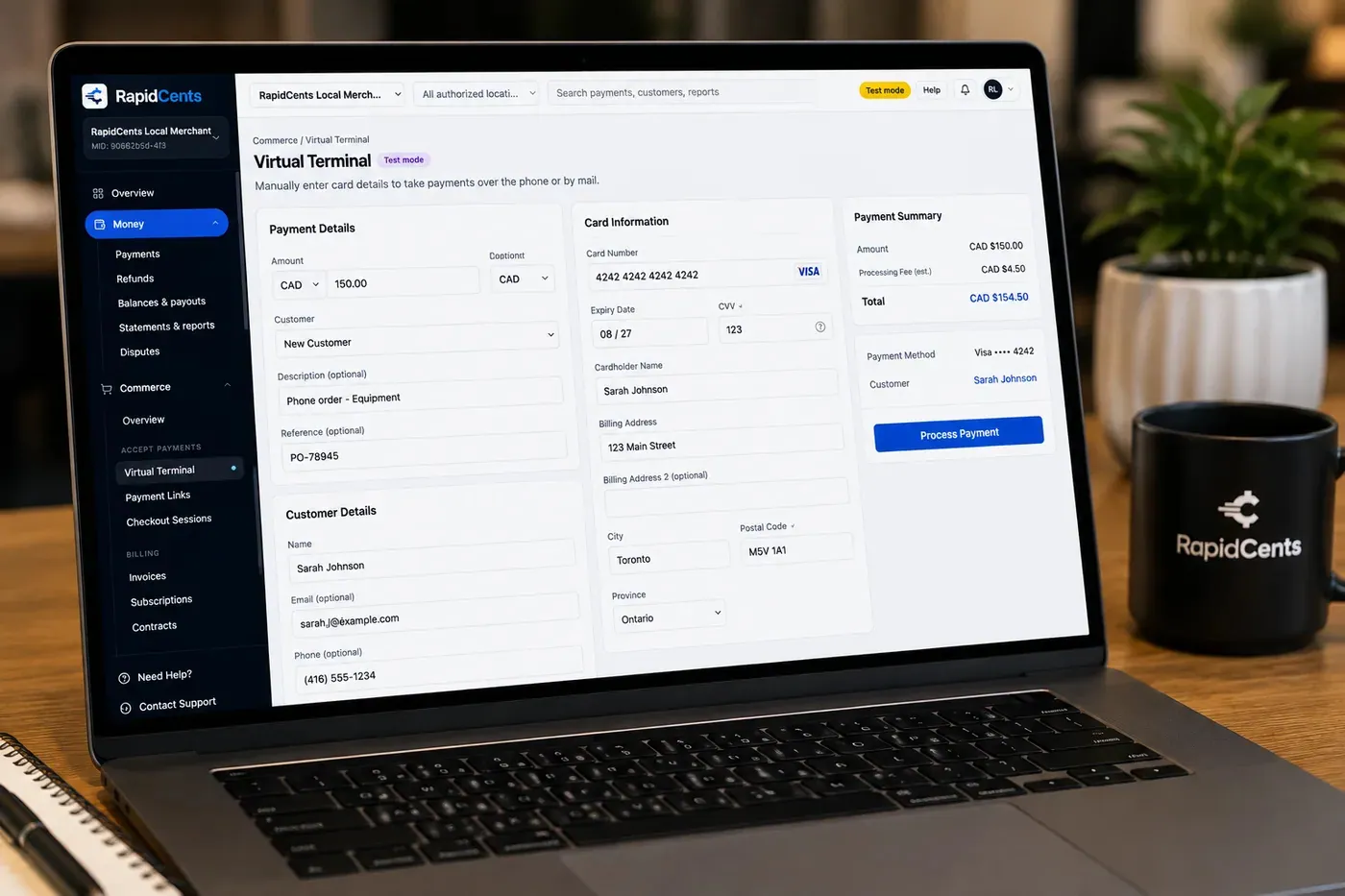
The RapidCents virtual terminal: payment details, card number, expiry and CVV keyed by hand on the left, with a payment summary on the right showing the amount, the estimated processing fee and a Process Payment button. Virtual Terminal
The RapidCents virtual terminal lets authorized staff enter mail-order and telephone-order payments through a…
Explore
The RapidCents payment links screen listing created links with their amount, status, click count and whether they have been paid, beside a phone showing the branded page a customer opens to pay $2,500.00. Payment Links
RapidCents payment links let staff generate branded pay-by-link URLs for invoices, deposits, balances and…
Explore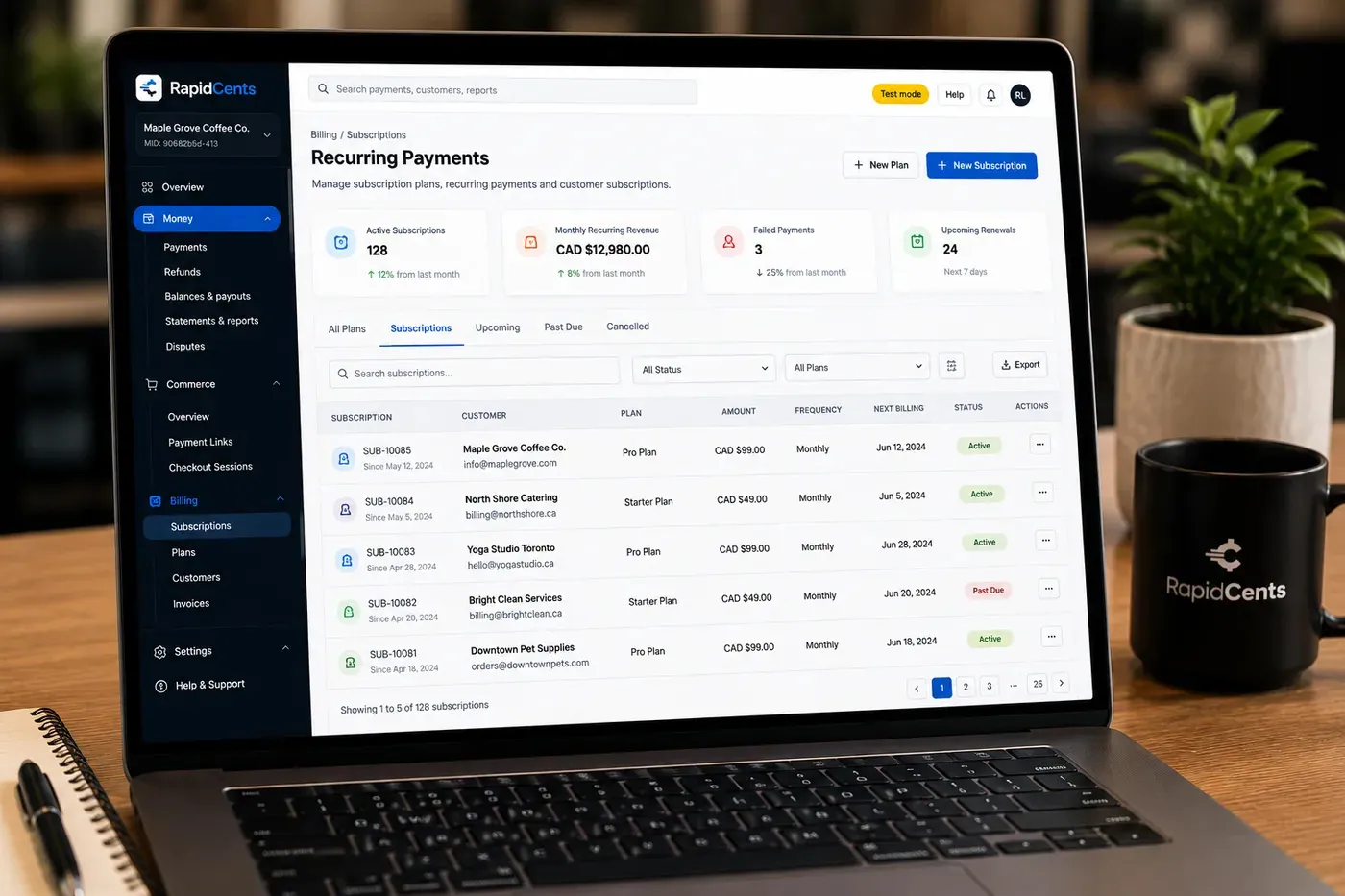
The RapidCents recurring payments screen showing active subscriptions, monthly recurring revenue, failed payments and upcoming renewals, above a list of subscriptions with their plan, amount, frequency and next billing date. Recurring Payments
RapidCents recurring payments manage subscription plans, membership renewals and installment schedules with…
Explore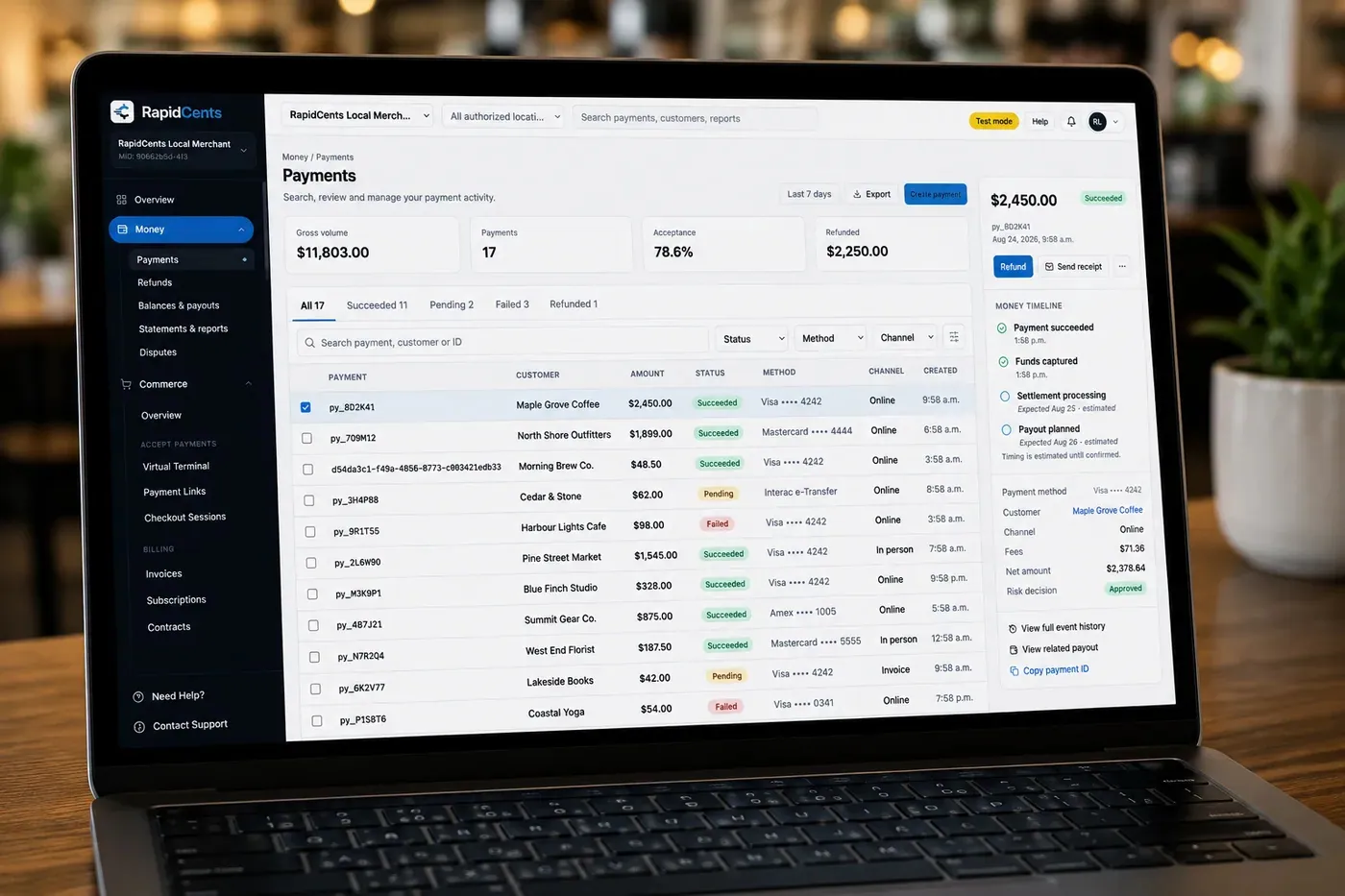
The RapidCents payments screen: gross volume, payment count, acceptance rate and refunds across the top, a filterable transaction list below, and a money timeline on the right tracing one payment from capture to planned payout. Merchant Dashboard
The RapidCents merchant dashboard gives owners, managers and finance staff a single signed-in view of live…
Explore


How do consented patient payment plans work?
A patient payment plan is a written agreement to pay a balance the patient already owes in set charges on set dates, using a card the patient authorizes you to store. RapidCents runs recurring patient payment plans through Recurring Payments, with a notice before each charge, automatic retries and Account Updater. It is a collection schedule, not a loan: RapidCents does not lend to your patients.
How a plan runs
Once the patient has signed, staff save the card in the Secure Card Vault as a token, set the dates in Recurring Payments and let the schedule run. Nobody writes a card number on paper or keeps it in the practice software, and Account Updater refreshes many expired or reissued cards before they decline.
What the agreement covers
Before the first charge, the patient agrees to the total, the number and amount of charges, the dates, the card to be used, what happens if a charge declines and how to cancel or pay off early. Contracts & eSignatures can send that agreement for signature, and the signed copy belongs in the patient's billing file, not the clinical chart. If a plan adds interest or a fee, consumer-credit rules may apply, so have your advisor review the terms.
When a charge fails or the balance changes
A declined charge is retried automatically. If it still fails, staff contact the patient and send a payment link for that installment rather than asking for a new card number over the phone. If an insurer later pays part of the balance, end the current schedule and, with the patient's agreement, set a new one for what remains, or refund any overpayment.
An uninsured procedure in four charges
Say a patient chooses an uninsured procedure and cannot pay the full fee at once. The patient signs an agreement for four equal monthly charges, the card is stored with consent, and the first charge runs on the day of the procedure. When the third charge declines, the automatic retry succeeds, and the plan finishes on schedule without a phone call.
What drives medical office credit card processing costs?
Medical office credit card processing costs depend on which cards patients use and how each card is taken. Under RapidCents interchange-plus pricing, the interchange on each patient's card, which the card networks set, is passed through at cost; on top of it come the markup listed in your RapidCents Fee Schedule and any equipment or service fees that apply to your setup. There is no fixed term to wait out: the agreement continues month to month.
Which cards your patients use
Interchange differs by card. Personal debit cards generally cost less to accept than credit cards, premium rewards cards cost more than basic credit cards, and commercial cards, such as one an employer uses to pay for a report, usually sit higher again. A clinic where most patients tap debit has a very different cost profile from one that bills employers by card.
How each card is taken
A card tapped or inserted at reception is a card-present payment. Payment links for balances, keyed phone payments and plan charges to a stored card all count as card-not-present, a category that generally attracts higher interchange. Moving balances from paper statements to payment links shifts your mix toward card-not-present, so a fair comparison uses the mix you expect after the change, not only last year's.
Refunds, disputes and equipment
Overpayment refunds, card disputes and hardware can all add to a month's cost. Your Fee Schedule sets out how refunds and disputes are priced, and your representative will show you whether terminals are bought or rented and what each additional reception desk or location adds, so you can compare quotes on the same footing.
Total operating cost, not just processing
Processing is one line of the total. Count any fees your practice software charges for its own payments feature, the staff hours spent chasing balances by phone, and printing and postage for paper statements. A lower quote can still cost the clinic more if balances sit unpaid for weeks because patients have no easy way to pay.
What to gather before you compare
Before comparing, pull two or three recent processing statements and note your card mix, your average visit ticket, how payments split between reception, links, phone and plans, and your monthly refund and chargeback volume. Fee Check splits an uploaded statement into interchange and markup, which gives you a baseline; a written RapidCents quote built on the same mix then gives you a like-for-like comparison.
How RapidCents works with TELUS CHR, Accuro EMR and other clinic software
RapidCents integrates with many major platforms through APPIE and RapidBridge, and RapidBridge works with Jane App, Cliniko, Tebra and many other health apps. The right option depends on your software vendor and version, and your RapidCents representative will walk you through how a payment reaches the patient account.
TELUS CHR
TELUS CHR is an electronic medical record that clinics use for charting, scheduling and billing, so it is where a patient balance or uninsured fee is created. Tell your RapidCents representative which edition you run, and they will show you how payments and receipts connect. Until that is set up, staff take the payment in RapidCents and record it against the invoice in TELUS CHR.
Accuro EMR
Accuro EMR handles scheduling, charting and billing, and private-pay invoices for uninsured services typically start there. The best option depends on your deployment and version, and your RapidCents representative will walk you through it. Meanwhile staff can record each RapidCents payment against the Accuro invoice, matched by invoice number.
Jane App
RapidBridge works with Jane App, so a RapidCents card payment posts against the Jane invoice you already have open, without changing how your team uses Jane. Staff still reconcile deposits from RapidCents reports. Your representative will show you how this sits beside any processing you already run through Jane.
Cliniko
RapidBridge works with Cliniko, so a RapidCents payment link or terminal payment is recorded against the patient's invoice in Cliniko you already have open. Your clinic keeps the booking and notes workflow it knows, and your RapidCents representative walks you through the setup for your account.
Tebra
RapidBridge works with Tebra (Kareo), so a card payment posts to the patient account you already have open instead of being retyped into the patient ledger. If statements and card collection already run through Tebra, your representative will show you how to move them over without losing open balances.
Other EMRs, billing systems and claim portals
RapidCents integrates with many major platforms through APPIE and RapidBridge. For any other EMR, billing service or insurer claim portal, tell your representative which software, edition and version you use, and they will show you how the amount reaches RapidCents and how the payment returns to the patient account.
Payment options for medical clinics in Canada
Medical clinics in Canada can accept Interac debit, by tap or chip and PIN, as well as Visa, Mastercard and American Express at reception, and can run consented payment plans on a stored card or, where enabled, by EFT or pre-authorized debit (PAD). Deposits settle in Canadian dollars (CAD). What each patient owes still depends on the provincial plan and any private benefits.
Uninsured services under provincial plans
Provincial health plans pay for insured services, so clinics collect from patients, or from the employer or insurer that asked, for uninsured services such as forms, reports and many travel health services. Provincial colleges set rules on disclosing those fees and, in some provinces, on annual block fees; RapidCents collects the payment, and your fee policy follows your college's guidance.
Benefits claims and the patient's share
When your clinic submits claims through TELUS Health eClaims or an insurer's portal, the response can show what the plan pays and what the patient owes before the patient leaves. That response stays in the claims system; the card payment for the patient's share is a separate RapidCents record, matched by invoice number.
Canadian EMRs and GST/HST
TELUS CHR and Accuro EMR setups differ by province, and your RapidCents representative will show you where an uninsured invoice is recorded in yours and how card payments post against it. Some uninsured services, such as cosmetic procedures, can attract GST/HST; your accountant decides what applies, and your billing system adds it to the invoice before the card is charged.
PAD agreements for payment plans
A payment plan paid by pre-authorized debit needs a PAD agreement from the patient that sets out the amounts, the timing and how to cancel. A plan on a stored card needs the same clarity, recorded as written consent to store and charge the card.
Setup, switching and patient payment reconciliation checklist
Once your account is approved, switch in an order that protects open balances: take inventory, test the new flow, move live payments, then reconcile at the close of every clinic day. Stored cards, active payment plans and refunds still owed need the most care, so list them before you move a single desk. A clinic can keep taking payments throughout if the old account stays open during the overlap.
Take inventory
List every stored card and the consent behind it, each active payment plan with its dates and remaining balance, open payment links and invoices, refunds still owed, the terminals you use and who owns them, and every system that records payments. Export transaction, refund and dispute reports from your current processor before you change anything.
Plan for stored cards
The card tokens behind patients' payment plans and missed-appointment permissions stay with your current processor unless both providers agree to a migration. If a migration is not available, ask patients on active plans to authorize their card again, and time each restart between charge dates so nobody is charged twice or skipped.
Test before moving live payments
On your new account, run a terminal sale, a refund, a payment link, a phone payment and one scheduled charge. Check that link texts and receipts carry no clinical details, that each staff role sees only what it should, and that the test deposit matches your settlement report.
Overlap the old and new accounts
Keep the old account open while refunds and disputes on its payments can still arrive, since a card dispute can come months after a visit. Move one channel at a time if that suits your clinic, such as payment links first and terminals second, and tell staff which system handles which payment.
Map references and roles
Use the same invoice or statement numbers in payment link references that your practice software uses, so staff can match payments without opening a chart. Set roles before training: reception takes payments and sends links, while a manager refunds and voids. Clinic groups can add Multi-Location for a merchant ID per site with roll-up reporting.
Reconcile every day
At the end of each clinic day, compare three numbers: the day sheet in your practice software, the RapidCents settlement report and, once it lands, the bank deposit. RapidCents connects settled transactions, fees and refunds to QuickBooks Online and Xero, and SAP and NetSuite import settlement files. For any other accounting system, use the CSV export.
Payment questions from medical clinics
What should a clinic look for in a payment provider for balances after insurance?
Look for a provider that can send the exact balance by payment link, carry your invoice or statement number with the payment, accept partial payments and refund to the original card. With RapidCents, staff send the link by email or text once the insurer or benefits plan has processed the claim, and the patient pays from a phone or computer. If the claim is reprocessed, staff cancel the open link and send one for the corrected amount. The claim and the patient portion stay in your practice software, where staff post each payment by its reference number.
What does a clinic need from a payment provider to charge for uninsured services?
A clinic needs three ways to collect uninsured service fees before or at the visit: a terminal at reception, payment links sent at booking, and invoices for an employer, insurer or law firm that requested a report. Charge a fee the patient or requester saw in advance, and keep receipt descriptions generic, such as “Uninsured service fee”. If a patient cancels within your policy, a manager refunds the payment to the original card. Your billing team decides what is insured; the payment only collects the fee you set.
What consent does a recurring patient payment plan need?
A recurring patient payment plan needs the patient's written agreement, before the first charge, to the total, each charge amount, the dates, the card to be stored and how to cancel. That agreement is also your permission to store the card. From a payment provider, look for tokenized card storage, a notice before each charge, automatic retries and an account updater for expired or reissued cards, which RapidCents Recurring Payments provides. The plan collects money the patient already owes; it is not a loan.
How should front-desk payment permissions be set up?
Give each person their own login and only the access their job needs. A common setup lets reception take terminal payments, send payment links and key phone payments, while only a manager can issue refunds or void transactions. RapidCents role permissions in the Virtual Terminal and Merchant Dashboard enforce that split, and the audit log shows who did what when a day sheet does not balance. Review roles whenever someone leaves or changes jobs.
Which payment options can a medical clinic in Canada offer?
A medical clinic in Canada can take payment at reception by Interac debit, Visa, Mastercard or American Express, and away from it through payment links, keyed phone payments, recurring card charges for consented plans and, where enabled, EFT or pre-authorized debit (PAD) bank payments. Deposits settle in Canadian dollars. Your RapidCents representative sets up the methods for your clinic, and coverage is for the provincial plan or the patient's benefits to decide, not the payment method.
Can payment receipts and links leave out clinical details?
Yes. A card receipt proves payment, not treatment, so it can show your clinic name, the date, the amount, the payment method and a statement number with nothing clinical. In RapidCents, the descriptions and reference fields on links and invoices carry whatever staff type, so set a rule: account or statement numbers only, never a diagnosis, procedure or specialty. The itemized receipt a patient sends to an insurer comes from your practice software. Your representative will show you how your business name appears on patients' card statements.
Which payment processor is best for medical clinics, and what should we compare?
No single processor is best for every clinic: the right one is the processor whose written quote and workflow fit yours. Check how each handles balances after insurance, uninsured fees and payment plans; what you pay in interchange, markup and equipment; how settlement reports match your day sheet; what support you get; and what your practice software allows. If you are comparing patient payment collection software, ask which processor sits behind it, then compare written quotes built on your own statements.
What fees should a medical clinic expect for card payments at the desk and online?
A clinic's card costs come in three parts: the interchange on each card, which depends on the card type and on whether it was tapped, keyed or paid online; the processor's markup; and any equipment or service fees. Under RapidCents interchange-plus pricing, interchange is passed through at cost, the markup comes from your Fee Schedule, and the agreement runs month to month with no fixed term. Cards tapped or inserted at reception generally carry lower interchange than payment links, phone payments and stored-card charges. Your Fee Schedule shows how refunds and disputes are priced; upload a statement to Fee Check to see the same split for your current provider, and compare it with a written quote on the same mix.
Can we use RapidCents with TELUS CHR or Accuro EMR?
RapidCents integrates with many major platforms through APPIE and RapidBridge, and RapidBridge works with Jane App, Cliniko and SimplePractice. The right option for TELUS CHR or Accuro EMR depends on the vendor and version. Tell your RapidCents representative which edition you use, and they will walk you through how payments, receipts and invoice numbers connect to it. Meanwhile, staff can record each payment against the EMR invoice by its number.
How can a clinic reduce card disputes and keep stored card details safe?
Make every charge recognizable and agreed, and keep card numbers out of your own systems. Use written consent for stored cards and plans, a business name patients recognize on their statements, a receipt for every payment and a published refund policy. In RapidCents, Payment Tokenization and the Secure Card Vault hold card numbers so your practice software never has to, role permissions decide who may key or refund a card, and Disputes and Chargeback Protection keeps alerts, evidence and response deadlines together. No tool can promise a dispute win, and card security does not replace your health-privacy duties.
How can a medical clinic switch payment providers without losing billing records?
Export your billing records before anything changes, then test the new account before you move live payments. That means transaction, refund and dispute reports from your current provider, plus a list of stored cards, active payment plans, open links and refunds owed. In RapidCents, run a sale, a refund, a link and a scheduled charge first. A processor-to-processor card migration happens only if both providers sign off on it; where that is not possible, patients on active plans give their card and consent again. Keep the old account open until its disputes and refunds are finished.
What MCC is used for healthcare clinics?
MCC 8099, medical services and health practitioners not elsewhere classified, is commonly associated with general healthcare clinics. Your RapidCents representative sets the right category with you from what your clinic actually does, since the card networks also define narrower codes for some practice types, such as physicians' offices and dental practices. Describe your services accurately when you apply, including any products you sell.
Related healthcare and wellness industries
Dental, physiotherapy, optometry and veterinary clinics run the same front-desk payments, stored-card consent and payment plans, with different coverage rules and software. Their pages show how those jobs change for each type of practice.
Dental Clinics
Take treatment plan deposits at the front desk or by text, run in-house installment plans…
Physio & Chiropractic
Collect visit fees and patient portions at the front desk or in the treatment room, sell…
Veterinary Clinics
Take deposits when owners sign surgery estimates, charge wellness plans monthly with…
Pharmacies
Collect the patient portion once your dispensing system has adjudicated the claim, ring…
Medical Spas
Collect treatment package deposits, bill monthly memberships and ring up retail at…
Optometry
Take exam fees and copays at checkout, deposits when frames and lenses go to the lab…
Gym & Fitness Studios
Bill monthly dues on stored cards, recover failed payments, sell class packs at the front…
Salons & Spas
Take booking deposits, charge no-show fees to cards clients agreed to store, collect tips…
Take the next step
See what patient card payments cost your clinic
Upload your latest processing statement and Fee Check separates the interchange your clinic paid from the markup on top. Then compare it with a RapidCents quote priced on the same mix of reception, payment link, phone and payment plan transactions.
- No obligation
- Canadian payment specialists
- Secure statement upload