NewChargeback Protection + Fee Intelligence for high-volume merchants. Get a savings analysis and a review of your dispute handling.See how it worksDetails
Chargeback Protection + Fee Optimization
See how it works: high-volume merchants get automated dispute evidence, interchange optimization, and real-time savings visibility.
A slim all-screen terminal that takes the sale however it arrives
Rivo Touch is for businesses in the USA. Branded-model buyer evaluating a touchscreen terminal and supported mixed payment workflows; separate hardware presence from keyed-payment eligibility. The sections below separate the workflow, the control and its limit, and the account facts to confirm before you rely on them.
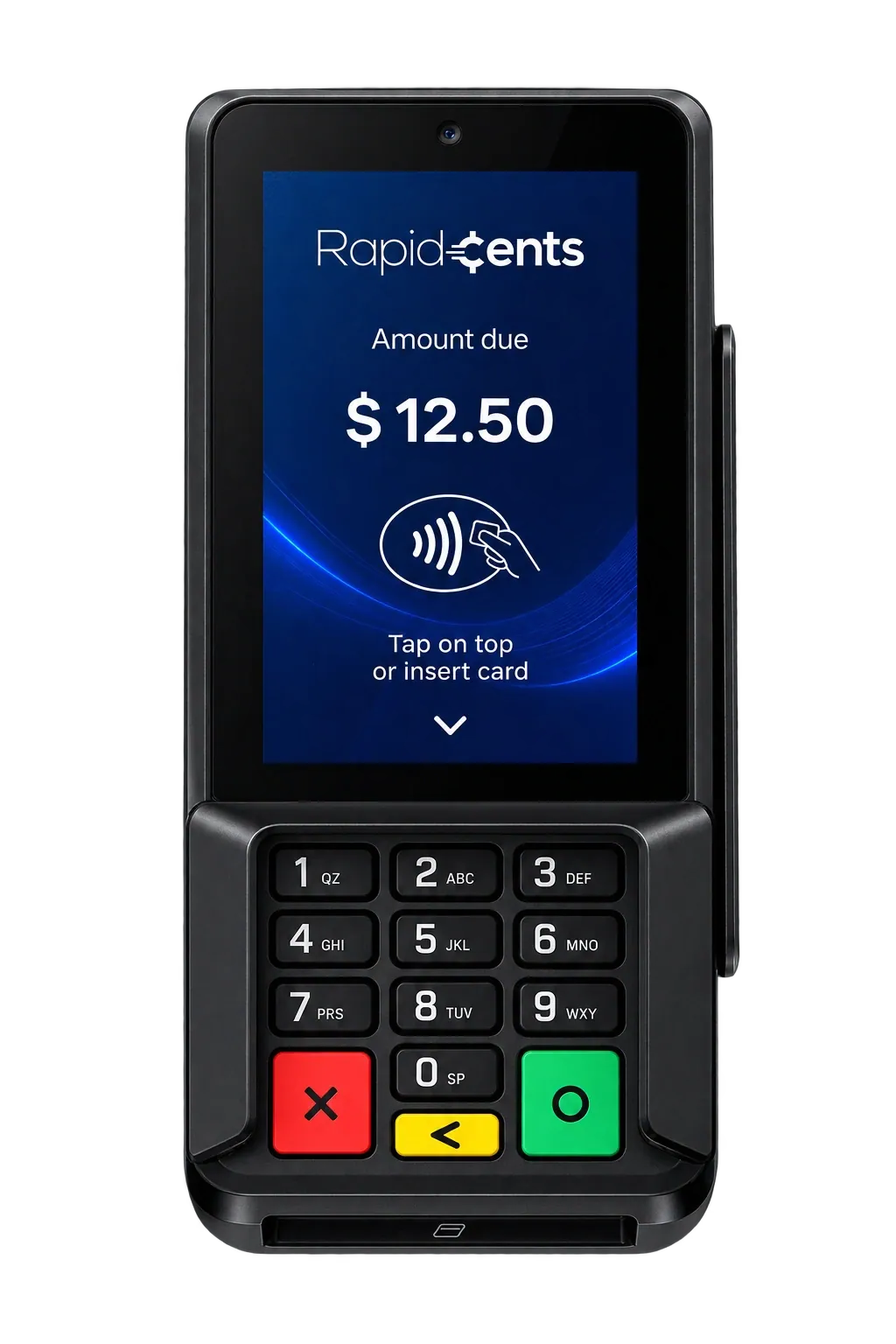
The RapidCents Rivo Touch is a slim smart terminal whose glass front runs edge to edge with no physical keypad, for counter and tableside card payments.
The RapidCents Rivo Touch is a slim terminal whose glass front runs edge to edge with no keypad, for counter and tableside card payments.
The design
Glass to the edges, nothing in the way
No keypad, no seams, no buttons to wear out. The whole face is the screen, which means the interface can be as large and as plain as the moment needs — a single amount when that is all that matters, a full menu when it is not.
The RapidCents Rivo Touch is a slim terminal whose glass front runs edge to edge with no keypad, for counter and tableside card payments.
The counter
Slim enough to disappear into the fit-out
A thin body that does not fight the design of the space it sits in. For rooms where the checkout is meant to be felt rather than seen, it takes up the least room of the three.
The RapidCents Rivo Touch is a slim terminal whose glass front runs edge to edge with no keypad, for counter and tableside card payments.
The flexibility
Key it in, or send a link, from the same screen
When the card is not in the room, the sale does not have to move to another device. Manual entry and payment links are on the terminal itself, so a phone order is handled where the counter sale would have been.
The other RapidCents terminals
Same platform, same pricing, same dashboard. The choice is about the hardware.
All major card brands: Visa, Mastercard, Amex, Discover, PIN debit
Who it's for
Counters with a design to protect
A slim profile that disappears into the fit-out instead of dominating it.
Floor, patio and curbside
Wi-Fi and 4G follow the sale away from the till.
Mixed card-present and card-not-present
Keyed entry and payment links live on the same device as the tap zone.
Core capabilities
Edge-to-edge touchscreen
A seamless glass front running the RapidCents guided checkout flow, which customers understand without being trained on it.
Tap, chip and swipe
Every card and every wallet, with the contactless zone sitting exactly where hands expect it.
Apple Pay and Google Pay
Contactless cards and phone wallets read from the same tap zone, with a glowing prompt guiding the guest.
Manual entry and payment links
Key a card in or send a payment link straight from the home screen when the card is not present.
Wi-Fi and 4G
Wi-Fi, with the sale moving onto an active SIM on its own when Wi-Fi is not the path.
Tipping, receipts and signature
On-screen tipping, digital receipts and signature capture on the terminal itself.
Remote updates and device management
Updates and device management run from the RapidCents dashboard.
PCI PTS certified
PCI PTS certification and EMV Level 1, 2 and 3, with point-to-point encryption.
On-terminal health check
The terminal reviews its own path: whether Wi-Fi is carrying traffic, whether an active SIM should take the authorization, whether the connection responds, and whether a restart will keep the terminal responsive. In most situations it completes that adjustment itself, confirms the path and returns to the sale.
Refund controls on the device
Refund fraud is a refund that was never a genuine sale. Every RapidCents terminal applies controls that stand between that refund and the merchant account, so a refund has to be genuine before it leaves the device.
Location lock
When the merchant turns it on, the terminal authorizes only inside a set radius of the business. Outside that radius it locks, including when the terminal is taken from the premises, so it stops taking payments.
Multi-carrier SIM
The SIM is not a card locked to AT&T, and it is not a card locked to T-Mobile. It is a universal SIM that attaches to the strongest signal available, whichever carrier that is. Several terminals in one business can each sit on a different network at the same time.
How it works
The Rivo Touch arrives pre-provisioned to your RapidCents merchant account.
Unbox it, charge it and connect it to Wi-Fi or 4G.
Run a test sale so staff see the guided checkout flow once before a customer does.
Take the first live sale on screen, whether the customer taps, inserts, swipes, is keyed in or pays by link, and send the digital receipt.
Close the batch; the sale settles and appears in the merchant dashboard.
Dashboard and reporting
Transactions, deposits and exceptions visible in the RapidCents merchant dashboard.
Watch how it works…Try it, edit values and click buttons
Merchant dashboard
Today
$4,218
Deposits
$12,482
Disputes
2 open
In-person
$842
Online
$1,104
Virtual terminal
$392
Demonstration data only
Integrations
Merchant dashboard
Every transaction, deposit and exception lands in one dashboard.
APIs and webhooks
Connect the product to your own software with REST APIs and signed webhooks.
Partner connectors
Certified connectors for common POS, ERP and commerce platforms.
Security
PCI DSS Level 1
Processing runs on PCI DSS Level 1 audited infrastructure.
Tokenization
Card data is replaced with tokens, keeping raw credentials out of your systems.
Role-based access
Permissions and audit trails control who can see and do what.
Implementation
Discovery
A payment specialist reviews how your business gets paid today.
Configuration
Accounts, users and settings are prepared before you go live.
Testing
Run test transactions and confirm reporting before cutover.
Launch and support
Go live with training materials and post-launch support.
Pricing
Transparent pricing
Pricing depends on volume, card mix and configuration. Fee Check compares your current statement before you commit to anything.
For businesses in the USA
A direct answer for a business in the USA: the workflow, the limit, and what to confirm next.
The payment workflow
A practical view covers US merchant taking a counter payment on the touchscreen, then show a separately approved remote-payment or link workflow if enabled. In practice, the customer prompts and receipt. Compare physical layout with Rivo Link and printer needs with Rivo Go without implying all entry methods have identical terms. Confirm eligibility, presentment currency, settlement currency and the enabled payment methods on the USA merchant account before quoting them. An illustrative amount is an example, not a fee or a funding promise. Rivo Touch does not, by itself, prove delivery or win a dispute.
The problem and the limit
Verify screen/device specifications, payment-app permissions and supported remote management. Distinguish card-present capture from manual entry and links, including consent and risk controls. Avoid every-card/every-wallet wording or a claim that a touchscreen guarantees accessibility or error-free checkout. Confirm eligibility, presentment currency, settlement currency and the enabled payment methods on the USA merchant account before quoting them. An illustrative amount is an example, not a fee or a funding promise. Rivo Touch does not, by itself, prove delivery or win a dispute.
What to confirm
Before you rely on this, confirm US SKU, methods, device-enabled keyed/link functions, connectivity, pricing and warranty. State any extra permissions or underwriting for remote payments. Keep currency/settlement details and channel fees accurate to the account instead of claiming all transactions on one device receive terminal pricing. Confirm eligibility, presentment currency, settlement currency and the enabled payment methods on the USA merchant account before quoting them. An illustrative amount is an example, not a fee or a funding promise. Rivo Touch does not, by itself, prove delivery or win a dispute.
Questions about Rivo Touch
What does the Rivo Touch accept?+
Tap, chip and swipe, including contactless cards, Apple Pay and Google Pay at the tap zone. When the card is not in the room, staff key it in or send a payment link from the home screen.
What happens when Wi-Fi is not the path?+
With an active SIM, the terminal moves the sale onto cellular by itself. Staff do not switch networks. The health check confirms that path and can restart the terminal when that is what keeps it responsive. If there is no Wi-Fi and no cellular path at all, store-and-forward still depends on the device and its configuration, and your advisor confirms what applies to your account.
It is all glass. What happens if it gets dropped?+
The Rivo Touch is a slim glass-front terminal and does not carry the drop-resistant silicone armour the Rivo Go does. If your terminals take a beating, ask about the Rivo Go instead. A damaged Rivo Touch is replaced through your advisor.
How is a terminal replaced?+
Your RapidCents advisor arranges it, and the turnaround, the shipping and the treatment of a damaged unit are worth confirming in writing before you need them. The replacement ships pre-provisioned to your merchant account and needs only a short activation and a test transaction before it takes a sale.
How does the terminal treat a refund?+
Refund controls sit on the device. A refund that was never a genuine sale has to clear those controls before it leaves the terminal and reaches the merchant account.
What happens if a terminal leaves the business?+
With location lock turned on, the terminal authorizes only inside the radius set around the business. Outside that radius it locks and stops taking payments.
Does the Rivo Touch print receipts?+
Receipts on the Rivo Touch are digital, sent from the terminal itself along with the tip prompt and signature. If a printed receipt has to come off the device at the counter, the Rivo Go has a thermal printer built in.
Can it take a payment when the customer is not there?+
Yes, and that is what sets it apart at the counter. Staff key the card in manually or send a payment link from the same home screen, so a phone order does not have to move to another device or another system.
Which workflows can Rivo Touch support for a USA merchant?+
For a business in the USA, list verified card-present, keyed or link functions with account/configuration conditions. This depends on the approved USA account setup and does not remove the merchant's own records or dispute duties.
Are keyed payments and payment links priced like card-present sales?+
For a business in the USA, in practice, the approved channel classification and fee terms; device location does not by itself determine pricing. This depends on the approved USA account setup and does not remove the merchant's own records or dispute duties.
How does Rivo Touch compare with the other Rivo models?+
For a business in the USA, use validated screen/keypad, printer, receipt, connectivity and form-factor differences. This depends on the approved USA account setup and does not remove the merchant's own records or dispute duties.
RapidCents Fee Check reads a processing statement and shows interchange separately from the markup. Upload a statement for an instant breakdown, or open a merchant account and start accepting payments on one account.