


One record per customer
See a customer’s payments, methods and history in one record
Customer Profiles is for businesses in the USA. Merchant organizing contact details, payment history and stored-method references; distinguish a payment record from a complete CRM. The sections below separate the workflow, the control and its limit, and the account facts to confirm before you rely on them.
- Full history per customer
- Stored methods attached
- Faster support answers

- PCI DSS Level 1
- SOC 2 Type II
- Specialist support
- Interchange-plus available
- All major card brands: Visa, Mastercard, Amex, Discover, PIN debit
Who it's for
Support teams
Answer billing questions from one screen.
Service businesses
Track a client relationship, not just transactions.
Finance
Trace a customer's activity for reconciliation.
Core capabilities
Unified history
Every payment, refund and dispute for that customer in one timeline.
Stored methods
See and manage the payment methods on file for the customer.
Subscriptions
Review recurring schedules attached to the customer.
Notes and references
Attach the identifiers your team uses to find the record.
Permissioned access
Control which roles can view or act on a profile.
How it works
A profile is created the first time a customer pays or is invoiced.
Payments, refunds and disputes attach to that profile.
Stored payment methods are held against the record.
Staff search by name, email or your own reference.
Permissions decide who can view or charge the profile.
Dashboard and reporting
Transactions, deposits and exceptions visible in the RapidCents merchant dashboard.
Try it, edit values and click buttons
Merchant dashboard
- Today
- $4,218
- Deposits
- $12,482
- Disputes
- 2 open
- In-person
- $842
- Online
- $1,104
- Virtual terminal
- $392
Demonstration data only
Integrations
Merchant dashboard
Every transaction, deposit and exception lands in one dashboard.
APIs and webhooks
Connect the product to your own software with REST APIs and signed webhooks.
Partner connectors
Certified connectors for common POS, ERP and commerce platforms.
Works with Customer Profiles
Capabilities on the same account, so the parts below connect without a second integration or a second contract.
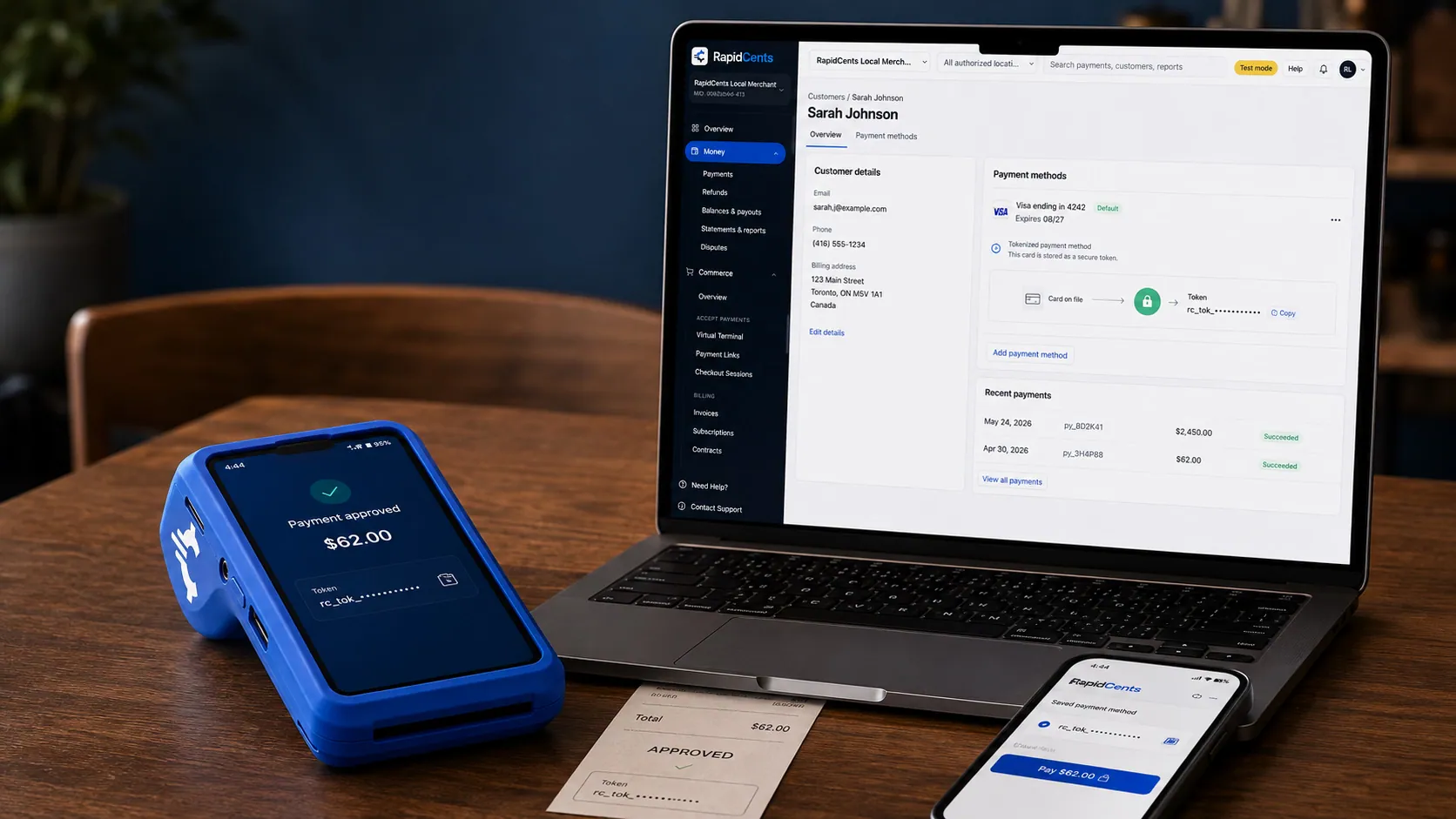
A stored RapidCents token stands in for the card number, with the terminal that captured the original credential beside it. Tokenization
Card numbers are replaced by a token, so nothing reusable is stored in your systems.
Explore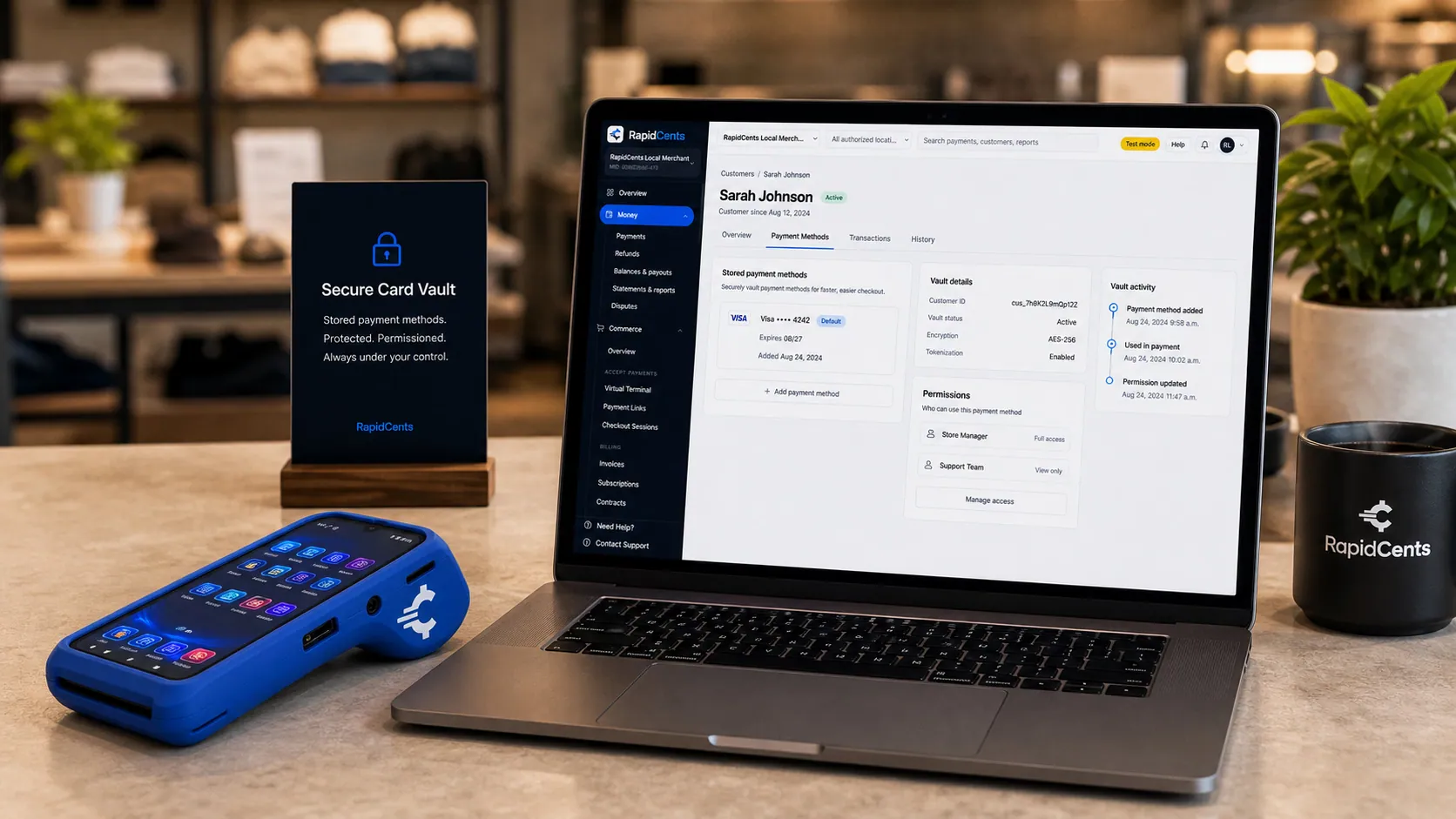
Card credentials sit in the RapidCents vault rather than in merchant software, with a terminal on the desk for new captures. Secure card vault
The PCI-scoped store the tokens point at, so card-on-file stays out of your scope.
Explore
The RapidCents recurring payments screen showing active subscriptions, monthly recurring revenue, failed payments and upcoming renewals, above a list of subscriptions with their plan, amount, frequency and next billing date. Recurring payments
Schedules, subscriptions and instalments billed from a stored credential.
Explore
The RapidCents invoices screen: outstanding, overdue, paid and draft totals across the top, the invoice list below them, and a preview of one invoice on the right with its line items and a View & Record Payment button. Invoicing
Send an invoice that carries its own payment page and reconciles itself.
Explore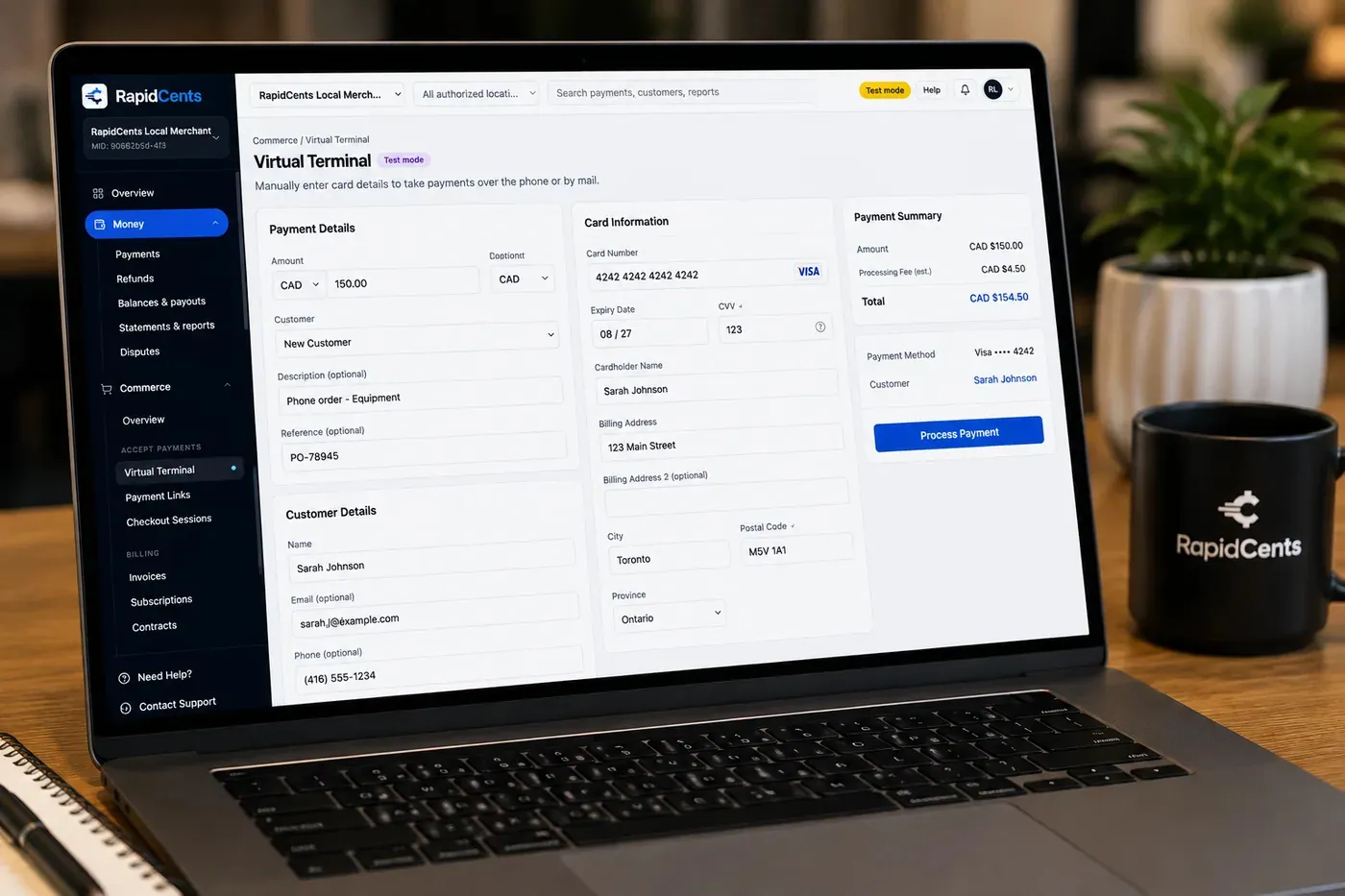
The RapidCents virtual terminal: payment details, card number, expiry and CVV keyed by hand on the left, with a payment summary on the right showing the amount, the estimated processing fee and a Process Payment button. Virtual Terminal
Key a card into a browser for phone, mail and back-office orders.
Explore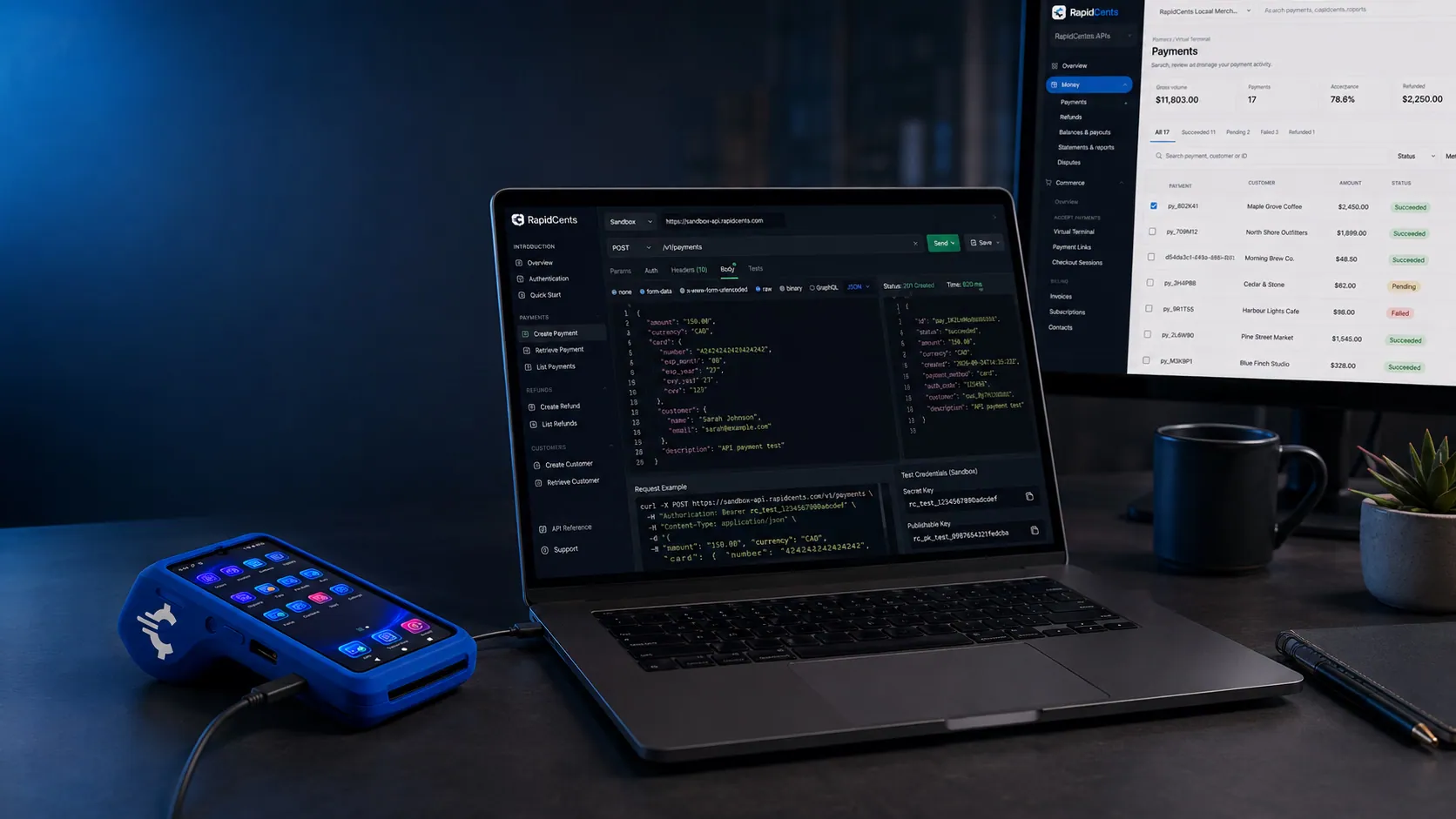
A RapidCents API request and its response on a developer workstation, with the merchant dashboard and a test terminal. RapidCents APIs
REST endpoints for payments, customers, refunds and reporting.
Explore


Security
PCI DSS Level 1
Processing runs on PCI DSS Level 1 audited infrastructure.
Tokenization
Card data is replaced with tokens, keeping raw credentials out of your systems.
Role-based access
Permissions and audit trails control who can see and do what.
Implementation
Discovery
A payment specialist reviews how your business gets paid today.
Configuration
Accounts, users and settings are prepared before you go live.
Testing
Run test transactions and confirm reporting before cutover.
Launch and support
Go live with training materials and post-launch support.
Pricing
Transparent pricing
Pricing depends on volume, card mix and configuration. Fee Check compares your current statement before you commit to anything.
For businesses in the USA
A direct answer for a business in the USA: the workflow, the limit, and what to confirm next.
The payment workflow
Use a US service team locating a returning customer, an open invoice and prior transactions before collecting a balance. Name the verified fields and linked records. In practice, the boundaries with CRM and accounting software so merchants understand which system owns each record. Confirm eligibility, presentment currency, settlement currency and the enabled payment methods on the USA merchant account before quoting them. An illustrative amount is an example, not a fee or a funding promise. Customer Profiles does not, by itself, prove delivery or win a dispute.
The problem and the limit
The practical view covers permissions, duplicate-record handling, audit history and token references. In practice, consent checks before reusing a saved method and correction of inaccurate details. A customer record or previous payment is not itself authorization to charge any stored credential. Confirm eligibility, presentment currency, settlement currency and the enabled payment methods on the USA merchant account before quoting them. An illustrative amount is an example, not a fee or a funding promise. Customer Profiles does not, by itself, prove delivery or win a dispute.
What to confirm
Before you rely on this, confirm US phone/address formats, time zones, imports/exports and integration limits. Show actual location/currency separation if supported. Have privacy owners approve retention, deletion and customer-request procedures rather than making universal compliance or unrestricted migration claims. Confirm eligibility, presentment currency, settlement currency and the enabled payment methods on the USA merchant account before quoting them. An illustrative amount is an example, not a fee or a funding promise. Customer Profiles does not, by itself, prove delivery or win a dispute.
Questions about Customer Profiles
Is a profile created automatically?
Yes, on the customer's first payment or invoice, and it can be edited afterwards.
Can I use my own customer IDs?
Yes. Add your reference so the profile matches your CRM or booking system.
Who can see stored payment methods?
Only roles you permit, and the underlying card data is never exposed.
Does it show disputes?
Yes, disputes appear in the same timeline as payments and refunds.
Can staff charge a customer directly from their profile?
Only where two things are true: the role has permission to charge, and a payment method is on file with the customer's recorded authorization. Otherwise the profile is a record to read, not a way to take money.
Where do I see a customer's subscriptions?
On the profile. Recurring schedules attached to that customer sit in the same record as their payments, refunds and disputes, so a question about a renewal does not mean opening the billing system separately.
What payment information can a USA merchant keep in a customer profile?
For a business in the USA, list actual contact, invoice, transaction and token-reference fields and CRM boundaries. This depends on the approved USA account setup and does not remove the merchant's own records or dispute duties.
Can staff charge a saved card from a profile?
For a business in the USA, state supported channels, permission and consent checks, customer identification and amount confirmation. This depends on the approved USA account setup and does not remove the merchant's own records or dispute duties.
Can I import or export existing customer records?
For a business in the USA, the practical view covers approved formats/APIs, identifiers and duplicate rules; treat card-credential portability as a separate reviewed process. This depends on the approved USA account setup and does not remove the merchant's own records or dispute duties.
Related products

The RapidCents payments screen: gross volume, payment count, acceptance rate and refunds across the top, a filterable transaction list below, and a money timeline on the right tracing one payment from capture to planned payout. Merchant Dashboard
The RapidCents merchant dashboard gives owners, managers and finance staff a single signed-in view…
ExploreCard credentials sit in the RapidCents vault rather than in merchant software, with a terminal on the desk for new captures. Secure Card Vault
The vault stores tokenized payment methods against a customer record so staff can charge a…
ExploreThe RapidCents recurring payments screen showing active subscriptions, monthly recurring revenue, failed payments and upcoming renewals, above a list of subscriptions with their plan, amount, frequency and next billing date. Recurring Payments
RapidCents recurring payments manage subscription plans, membership renewals and installment…
Explore

Industries that run on Customer Profiles
Professional Associations
Professional bodies collect annual member dues, certification and exam fees…
Labour Unions
Unions collect dues by payroll deduction or card, plus initiation fees, benefit…
Summer Camps
Camps take a deposit at booking then instalments before the session starts, plus canteen…
Childcare & Daycare
Daycares bill tuition on a fixed monthly or biweekly cycle per child, handling subsidy…
Tutoring Centres
Tutoring businesses sell prepaid lesson packages and monthly plans then draw sessions…
Martial Arts & Dance Studios
Studios run monthly memberships per student with family discounts, plus grading fees…
Yoga & Pilates Studios
Studios sell class packs, unlimited monthly memberships and workshops, with drop-ins paid…
Massage Therapy
RMT clinics book by appointment, hold a card on file to protect the slot, and issue…
Take the next step
Talk to a RapidCents specialist
RapidCents Fee Check reads a processing statement and shows interchange separately from the markup. Upload a statement for an instant breakdown, or open a merchant account and start accepting payments on one account.
- No obligation
- Payment specialists, not a call centre
- Secure statement upload



