


B2B and wholesale payment processing for net-term invoices and large-ticket cards
B2B & Wholesale is for businesses in the USA. Compare payment options for purchase orders, net-term invoices and partial payments; understand timing, payer authorization, exceptions and reconciliation for B2B wholesalers. The sections below separate the workflow, the control and its limit, and the account facts to confirm before you rely on them.

- PCI DSS Level 1
- SOC 2 Type II
- All major card brands: Visa · Mastercard · Amex · Discover · PIN debit
- Interchange-plus available
- Specialist onboarding support
Operational workflows
Buyer's purchase order received against the account
Order shipped and invoiced on net terms
Invoice paid by link or ACH with the PO referenced
Payments applied to the account in the ERP
Payment challenges
Pallet-sized orders on a commercial card
A single order can exceed the buyer's card limit, so the largest invoices move to ACH or get split across payments.
A payment with no invoice attached
Buyers settle several invoices in one transfer, and applying it correctly depends on whatever reference they typed.
The credit is already extended
Goods leave the warehouse before payment, so an overdue account is inventory that is already gone.
Choose the right payment setup for B2B & Wholesale
Choose b2b wholesale payment processing
For B2B & Wholesale, map the deposit, staged payments, and final balance, online checkout and remote payment, and the sale and reconciliation with business systems before choosing a setup. Select channels that match those moments, then confirm that the chosen solution genuinely covers each channel.
Payment hardware for B2B & Wholesale
For B2B & Wholesale, physical hardware may be secondary to the checkout flow. Prioritize gateway or payment-page requirements first, then add a terminal only when an in-person payment point is genuinely needed.
Compare payment processing fees
For B2B & Wholesale, request a written fee breakdown covering deposits and final balances and online checkout and dispute handling. Compare the effective cost across the real card and channel mix; do not choose on a headline rate alone.
Set up or switch B2B & Wholesale payments
To set up B2B & Wholesale payments, document how payment data moves into business systems and the checkout, confirmation, and refund path, confirm compatibility before purchase, then test a real payment flow before going live.
Recommended products

The RapidCents payment links screen listing created links with their amount, status, click count and whether they have been paid, beside a phone showing the branded page a customer opens to pay $2,500.00. Payment Links
RapidCents payment links let staff generate branded pay-by-link URLs for invoices, deposits, balances and…
Explore
The RapidCents invoices screen: outstanding, overdue, paid and draft totals across the top, the invoice list below them, and a preview of one invoice on the right with its line items and a View & Record Payment button. Invoicing
RapidCents invoicing helps professional services, contractors and B2B suppliers create branded invoices…
Explore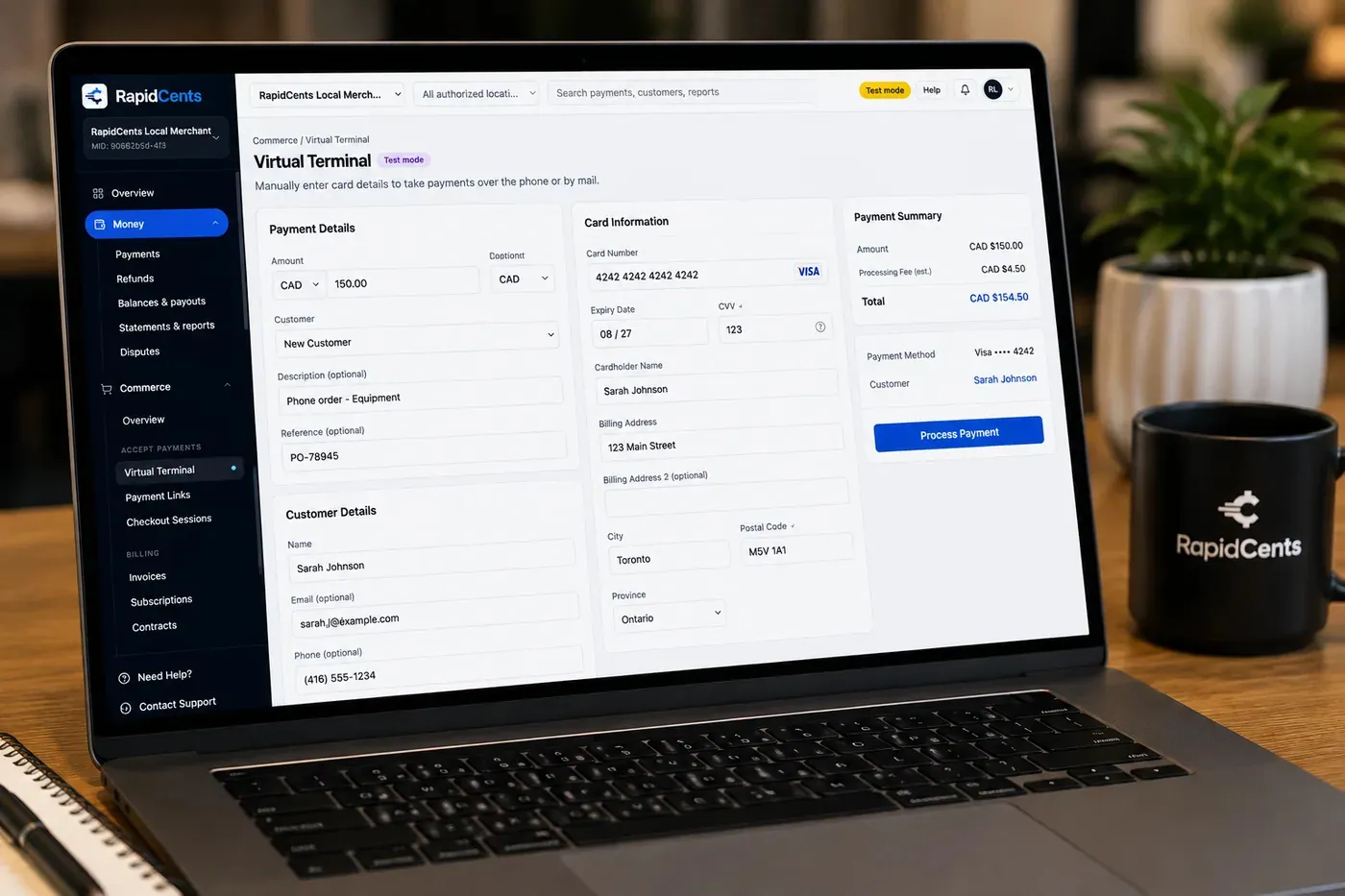
The RapidCents virtual terminal: payment details, card number, expiry and CVV keyed by hand on the left, with a payment summary on the right showing the amount, the estimated processing fee and a Process Payment button. Virtual Terminal
The RapidCents virtual terminal lets authorized staff enter mail-order and telephone-order payments through a…
Explore
A merchant reviews RapidCents reports for volume, mix and payouts, with the terminal that took the sales on the desk. Reporting
RapidCents reporting delivers customizable transaction, settlement and fee reports with CSV and PDF export…
Explore


How this gets set up
Order invoiced on net terms
The invoice goes out with the terms the buyer was approved for, not as a demand for payment on delivery.
PO number attached to the payment
The payment link captures the buyer's purchase order reference, without which accounts payable will release nothing.
Card instead of a mailed cheque
The buyer's AP settles a five-figure invoice by commercial card on the link, and the cheque run is skipped entirely.
Phone reorders keyed at the desk
A rep taking a reorder over the phone keys the card in the virtual terminal against the same order number.
Integrations
NetSuite exports
NetSuite exports carry settled invoice detail out as a file for the ERP's receivables — a reconciliation export rather than a live posting.
SAP B1
SAP Business One holds the order, the stock and the customer's terms, and payments reconcile against the invoice raised there.
Microsoft Dynamics
Microsoft Dynamics carries the customer account and its credit terms, and settled payments line up with the invoice and PO recorded on it.
Operations, security and going live
Receivables cleared invoice by invoice
Reporting has to match each settlement to the invoice and the PO it paid, or the AR ledger cannot be aged correctly.
Large tickets against a buyer's card limits
A single wholesale invoice can exceed what a buyer's card allows in one authorisation, so a part payment has to stay traceable to the same invoice.
Card data out of the sales desk
Keying in the virtual terminal keeps a buyer's card off the order form and out of a rep's notebook.
Live with AP on the other side
The invoice format and the PO field are agreed with the buyers who will pay them, because an unrecognised invoice is an unpaid one.
For businesses in the USA
A direct answer for a business in the USA: the workflow, the limit, and what to confirm next.
The payment workflow
Trace a purchase order through shipment, invoice issuance, due date and payment application; show how a buyer pays one invoice or a group of open items. Confirm eligibility, presentment currency, settlement currency and the enabled payment methods on the USA merchant account before quoting them. An illustrative amount is an example, not a fee or a funding promise. B2B & Wholesale does not, by itself, prove delivery or win a dispute.
The problem and the limit
Cover partial shipments, shortages, disputed freight charges and remittance information. Card acceptance or a pay-now link does not change agreed net terms automatically. Confirm eligibility, presentment currency, settlement currency and the enabled payment methods on the USA merchant account before quoting them. An illustrative amount is an example, not a fee or a funding promise. B2B & Wholesale does not, by itself, prove delivery or win a dispute.
What to confirm
Ask for a purchase order, delivery record and remittance example showing partial payment allocation and ERP matching; use US04 only as general small-business context. Confirm eligibility, presentment currency, settlement currency and the enabled payment methods on the USA merchant account before quoting them. An illustrative amount is an example, not a fee or a funding promise. B2B & Wholesale does not, by itself, prove delivery or win a dispute.
Payment questions from B2B & Wholesale
What should businesses compare when choosing b2b wholesale payment processing for B2B & Wholesale?
Compare b2b wholesale payment processing against the real payment journey: the deposit, staged payments, and final balance, online checkout and remote payment, and the sale and reconciliation with business systems. Start with the required channels and hardware, then confirm compatibility and support before committing.
What payment hardware is practical for B2B & Wholesale?
If B2B & Wholesale sells primarily online, do not choose physical hardware before validating checkout. Add hardware only for a clearly defined in-person payment need.
Which payment channels are relevant for B2B & Wholesale?
For B2B & Wholesale, start with the deposit, staged payments, and final balance, online checkout and remote payment, and the sale and reconciliation with business systems. Keep only the channels that match those moments, then verify the complete customer flow before offering them.
How should payment processing fees be evaluated for B2B & Wholesale?
For B2B & Wholesale, compare costs related to deposits and final balances and online checkout and dispute handling using actual transactions. Request a written breakdown of fees and terms rather than relying on an advertised rate alone.
What should be confirmed before setting up payments for B2B & Wholesale?
For B2B & Wholesale, document how payment data moves into business systems and the checkout, confirmation, and refund path, verify the needed compatibility, and test the flow before going live. This exposes manual steps and exceptions before customers encounter them.
How can buyers pay an invoice while keeping the purchase-order reference?
For a business in the USA, include the purchase-order and invoice references in the supported invoice or checkout fields and in the remittance record. Cover how the buyer receives the payment request and how the seller matches the confirmed receipt to the order; confirm the ERP or accounting export behavior. This depends on the approved USA account setup and does not remove the merchant's own records or dispute duties.
How should partial payments be applied across wholesale invoices?
For a business in the USA, use the buyer's remittance instructions or an agreed allocation rule to apply the amount invoice by invoice. Show paid, partly paid and unpaid balances separately, including deductions under review; confirm whether the platform allocates payments or staff must post them in the accounting system. This depends on the approved USA account setup and does not remove the merchant's own records or dispute duties.
How should an overpayment or existing credit affect the next wholesale invoice?
For a business in the USA, name the buyer account and approved credit balance before collecting more money. Apply it to the specified open invoice or arrange an authorized refund, record the allocation and communicate the revised amount due; confirm the accounting system's treatment of unapplied cash. This depends on the approved USA account setup and does not remove the merchant's own records or dispute duties.
Related industries
Law Firms
Law firms collect retainers, trust-account coordination and client invoices with secure…
Accounting Firms
Accounting and bookkeeping firms bill recurring engagements, project milestones and…
Professional Services
Consultancies and agencies use invoicing, retainers, recurring billing and virtual…
Insurance
Insurance agencies collect premiums via payment links, recurring billing and virtual…
Real Estate
Brokerages and property managers collect application fees, lease deposits and maintenance…
Property Management
Property managers run tenant rent portals, maintenance invoicing and HOA assessments with…
Freight & Logistics
Carriers and 3PLs invoice shippers, collect COD balances and manage fuel surcharge…
Marketing Agencies
Agencies bill monthly retainers plus project milestones and pass-through ad spend, so one…
Take the next step
Talk to a RapidCents specialist
RapidCents Fee Check reads a processing statement and shows interchange separately from the markup. Upload a statement for an instant breakdown, or open a merchant account and start accepting payments on one account.
- No obligation
- Payment specialists, not a call centre
- Secure statement upload



