


Match transactions, deposits and accounting records
Payment reconciliation fails on timing more often than on totals: sales are counted when they happen, deposits arrive later and fees are deducted in between. RapidCents starts from the deposit, ties each settlement to the transactions inside it, shows interchange, assessment and processor fees as separate columns and emails reports on a schedule. For businesses in Canada, confirm settlement currency.
- Canadian specialists
- Interchange-plus available
- Guided migration
- Post-launch support
Who this solution is for
Controllers and bookkeepers
Whoever ties the bank statement to the sales ledger and then has to explain the difference.
Multi-channel operators
Counter, online and keyed sales settling on different rhythms into the same account.
Businesses on accounting software
Where the export format decides whether the month takes an hour or a week.
Common challenges
Batch timing versus posting date
A sale on the last day of the month can settle in the next one. Without the batch detail, that looks like a missing deposit.
Net deposits
A deposit arriving net of fees does not equal the sales it represents, and the difference has to be attributable line by line rather than estimated.
Channel totals counted differently
Two systems that both report sales but treat refunds, tips or day boundaries differently will not agree, and neither of them is wrong.
The RapidCents approach
Start from the deposit rather than the sales total, because the bank is the fixed point.
Open the deposit detail to see which batch it came from and what was deducted.
Separate the channels, since in-person, online and keyed report differently and settle differently.
Export with the fee columns — interchange, assessment and processor fee — so the deduction is explained rather than assumed.
Schedule the export so the file arrives on the day the close starts, instead of someone logging in to produce it.
Recommended capabilities
Deposit-level detail
Each settlement tied to the transactions behind it, with the fees deducted shown against it.
Channel breakdown
In-person, online and keyed totals separated within the same report.
Fee detail export
Interchange, assessment and processor fee as separate columns, so cost is auditable at transaction level.
Accounting exports
CSV and PDF output for import into accounting systems, with saved filters kept as reusable report definitions.
Scheduled delivery
Reports emailed weekly or at month-end automatically, so the close does not start with a manual pull.
Related products

A merchant reviews RapidCents reports for volume, mix and payouts, with the terminal that took the sales on the desk. Reporting
RapidCents reporting delivers customizable transaction, settlement and fee reports with CSV and PDF export…
Explore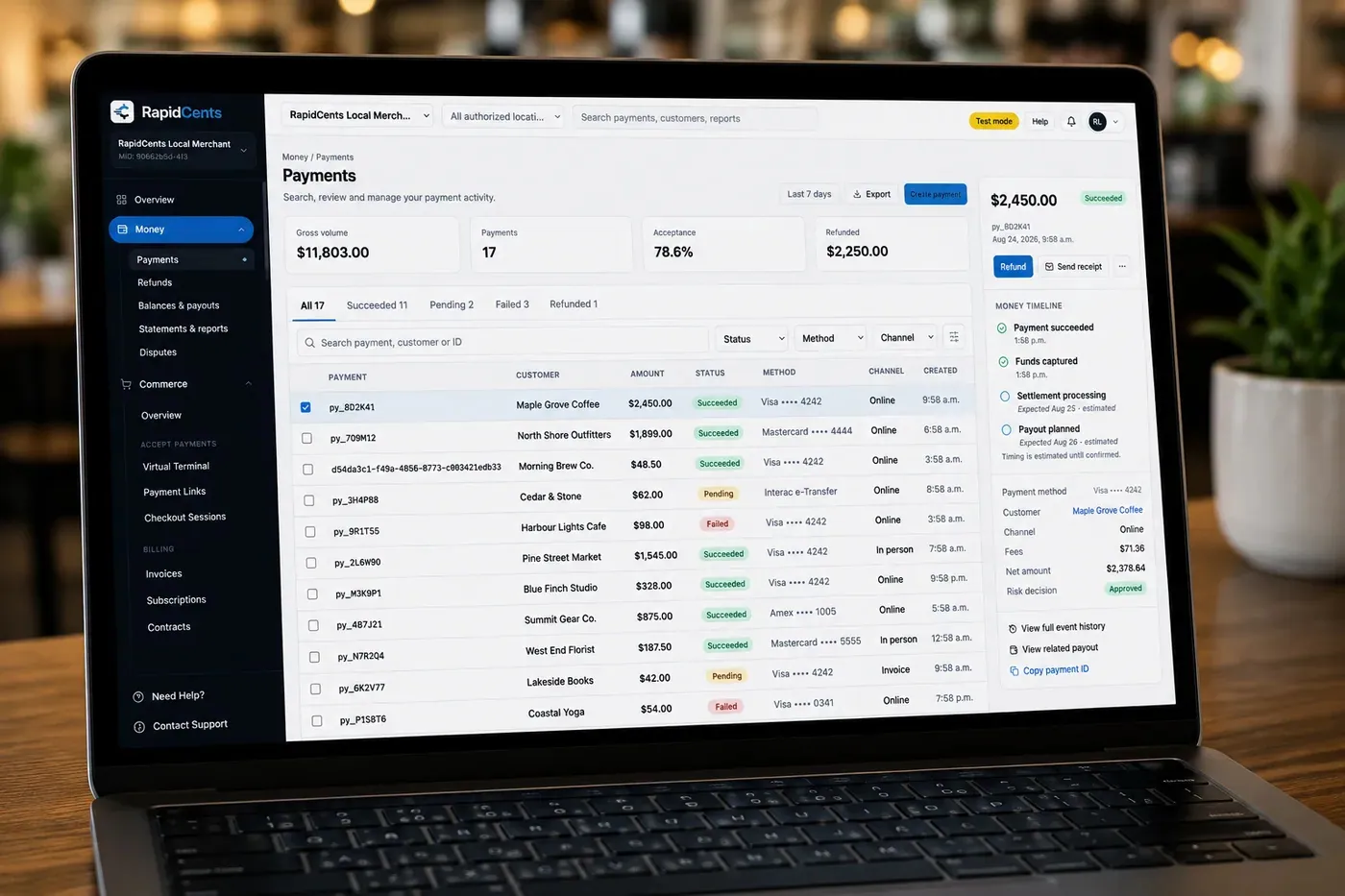
The RapidCents payments screen: gross volume, payment count, acceptance rate and refunds across the top, a filterable transaction list below, and a money timeline on the right tracing one payment from capture to planned payout. Merchant Dashboard
The RapidCents merchant dashboard gives owners, managers and finance staff a single signed-in view of live…
Explore


Implementation approach
Map the close
Establish which reports the month actually needs and who reads them, before configuring anything.
Configure exports
Date ranges, channel filters and fee columns saved as templates rather than rebuilt each period.
Test against a closed month
Run the new export against a period already reconciled, so any discrepancy is in the report rather than in the books.
Automate and review
Put the export on a schedule, then check the first automated cycle against a manual pull.
What does not change
Your accounting software
Exports import into the system you already run. Reconciliation improves the input, not the ledger.
Your close process
The sequence your finance team follows stays. What changes is how much of it is spent locating detail.
Settlement timing itself
Batches settle and eligible accounts fund next day. Reporting makes the timing visible; it does not change it.
Cards, currencies and settlement in Canada
What a RapidCents account in Canada accepts, the currencies it settles in, and when the money arrives.
Cards and methods accepted
Visa, Mastercard, American Express, Discover, UnionPay and Diners Club cards from any country, plus Interac Debit, Apple Pay, Google Pay and EFT/PAD bank payments, on one merchant account.
137+ currencies, settled in CAD or USD
Process in CAD, USD, EUR and 137+ currencies, and deposit payouts directly into your Canadian CAD bank account or your Canadian USD bank account, so USD sales are not converted twice.
Next-business-day funding and reconciliation
Batches close nightly and deposits arrive the next business day, based on cut-off times and eligibility, with deposit-level reporting in one RapidCents dashboard.
Frequently asked questions
Why does my deposit not match my sales?
Three ordinary reasons: fees deducted before the deposit, a batch that closed after the day boundary, and refunds netted against the same settlement. Deposit detail shows which of the three applies rather than leaving it to be inferred.
Can I get the fee breakdown per transaction?
Yes. The fee detail export carries interchange, assessment and processor fee as separate columns, which is what makes an effective rate calculation checkable rather than a summary you have to trust.
How do I handle a sale and its refund in different months?
The refund settles in the period it was processed, against its own batch. Deposit-level detail links it back to the original transaction, so the two are matched across the boundary rather than netted into one figure.
Do exports work with QuickBooks or Xero?
Reports export as CSV and PDF for import into accounting systems. The practical work is agreeing the mapping once and saving it as a report definition, so the format does not drift between periods.
Can the finance team have access without seeing everything?
Yes. Roles are separate — cashier, manager and admin — with audit trails, so a bookkeeper can hold reporting access without refund permissions.
What causes tips to reconcile badly?
Tips added on the device after the sale amount is captured, and tips mapped to the wrong general ledger account in an integrated setup. The first appears as a batch total differing from the POS total; the second only shows up in the ledger.
How should finance investigate an unmatched payment?
Start from the deposit rather than the sales total, since the bank is the fixed point, and work back to the batch and the transactions inside it. Because each settlement is tied to its transactions, the difference is attributed line by line instead of estimated.
Does better reporting change when deposits arrive?
No. Reporting makes settlement timing visible but does not change it: a batch closed after the day boundary still lands in a later deposit, and deposit detail shows which sales that deposit carried.
Why are in-person, online and keyed totals kept separate?
Because each channel reports and settles differently. Counter, online and keyed sales can reach the same account on different rhythms, so a single combined total hides which channel a difference came from, while separated totals in one report show it.
Take the next step
Talk to a RapidCents specialist
RapidCents Fee Check reads a processing statement and shows interchange separately from the markup. Upload a statement for an instant breakdown, or open a merchant account and start accepting payments on one account.
- No obligation
- Canadian payment specialists
- Secure statement upload



