


Healthcare payment processing: patient balances, terminals and plans
A medical office takes a copay at reception, then chases a balance that insurance did not cover weeks later. RapidCents handles the second half with payment links emailed to the patient instead of a phone call, a virtual terminal for keyed payments at the desk, and recurring payments for an agreed payment arrangement. The merchant dashboard gives each staff role only the access it needs. Health practitioners not otherwise classified use MCC 8099.

- PCI DSS Level 1
- SOC 2 Type II
- All major card brands: Visa · Mastercard · Amex · Interac debit
- Interchange-plus available
- Canadian support
Operational workflows
Front-desk copay collection
Payment links for balances
Recurring payment arrangements
Role-based staff permissions
Payment challenges
The real bill arrives weeks late
What the patient owes is only known once the claim is adjudicated, long after they have left the office.
Balances chased by phone tag
Recovering a small remainder through voicemails costs more front-desk time than the amount itself is worth.
Staff access to patient payments
Several people take payments across shifts, so each role needs only the access its job requires and every transaction needs a name on it.
Choose the right payment setup for Healthcare
Choose healthcare payment processing
For Healthcare, map booking, the appointment, and follow-up, sign-up, scheduled billing, and renewal, and the sale and reconciliation with business systems before choosing a setup. Select channels that match those moments, then confirm that the chosen solution genuinely covers each channel.
Payment hardware for Healthcare
For Healthcare, choose hardware after mapping where and when customers pay. Compare countertop, portable, and remote-payment options against the real workflow rather than a device's advertised price.
Compare payment processing fees
For Healthcare, request a written fee breakdown covering scheduled billing, declined cards, and cancellations. Compare the effective cost across the real card and channel mix; do not choose on a headline rate alone.
Set up or switch Healthcare payments
To set up Healthcare payments, document how payment data moves into business systems and deposit and post-appointment payment rules, confirm compatibility before purchase, then test a real payment flow before going live.
Recommended products
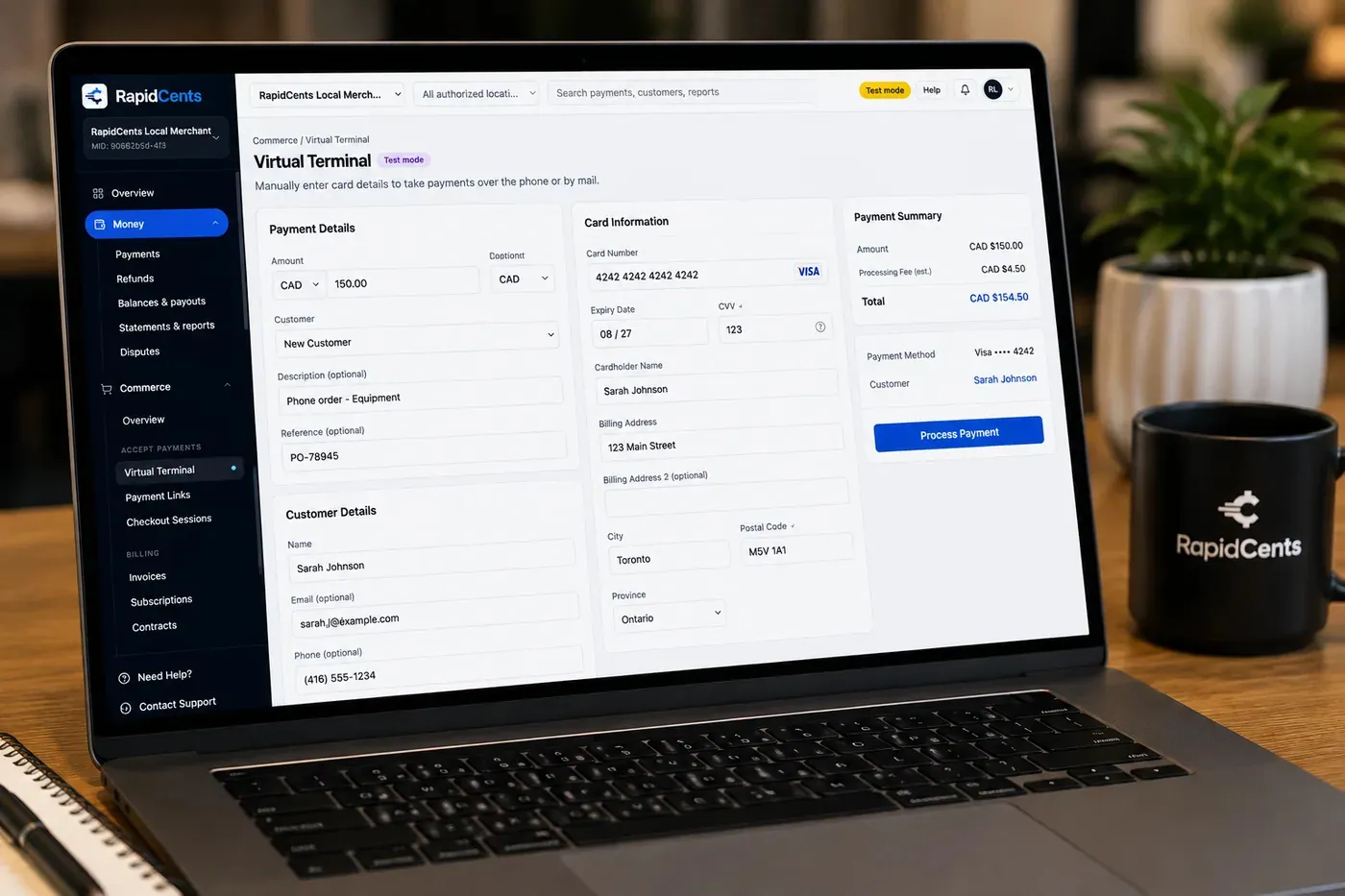
The RapidCents virtual terminal: payment details, card number, expiry and CVV keyed by hand on the left, with a payment summary on the right showing the amount, the estimated processing fee and a Process Payment button. Virtual Terminal
The RapidCents virtual terminal lets authorized staff enter mail-order and telephone-order payments through a…
Explore
The RapidCents payment links screen listing created links with their amount, status, click count and whether they have been paid, beside a phone showing the branded page a customer opens to pay $2,500.00. Payment Links
RapidCents payment links let staff generate branded pay-by-link URLs for invoices, deposits, balances and…
Explore
The RapidCents recurring payments screen showing active subscriptions, monthly recurring revenue, failed payments and upcoming renewals, above a list of subscriptions with their plan, amount, frequency and next billing date. Recurring Payments
RapidCents recurring payments manage subscription plans, membership renewals and installment schedules with…
Explore
The RapidCents payments screen: gross volume, payment count, acceptance rate and refunds across the top, a filterable transaction list below, and a money timeline on the right tracing one payment from capture to planned payout. Merchant Dashboard
The RapidCents merchant dashboard gives owners, managers and finance staff a single signed-in view of live…
Explore


How this gets set up
The copay at reception
The visit is paid at the desk, tapped or keyed into a virtual terminal, before the patient walks out and becomes a balance to chase.
The balance insurance did not cover
Weeks later, a payment link emailed to the patient replaces the phone call the front desk never has time to make.
An arrangement, written down
A patient who cannot settle at once goes onto recurring payments on an agreed schedule, so the plan is a billing record instead of a verbal promise.
Access by role, set before training
Reception can take a payment and only a manager can reverse one; the merchant dashboard is configured that way before staff learn it.
Integrations
Jane App
Jane App holds the appointment and the patient balance, so posting the payment there closes the visit off in the same place the booking lives.
Oscar Pro
Oscar Pro is the clinical record; keeping payments in RapidCents and matching by patient and date is what keeps card data out of the EMR entirely.
TELUS Health
TELUS Health handles the claim and the insurer's remittance, which is what tells the front desk the patient portion still left to collect.
Operations, security and going live
Two reports from the same records
The front desk balances a day sheet; the practice manager needs outstanding balances by patient and by provider. Both are read from the same transactions.
Payment history beside the chart, not inside it
The card is held as a token in the vault, so a billing question is answered from payment records without anyone opening a clinical file.
A name against every reversal
Role-based access means a voided or refunded payment carries the staff identity that made it, which is what a reconciliation disagreement comes down to.
Go-live around a full clinic day
Links and terminals are introduced at reception without pausing bookings, with keyed and phone payments covering the transition.
Payment questions from Healthcare
What should a healthcare practice compare in payment processing?
Compare healthcare payment processing against the real payment journey: booking, the appointment, and follow-up, sign-up, scheduled billing, and renewal, and the sale and reconciliation with business systems. Start with the required channels and hardware, then confirm compatibility and support before committing.
What payment hardware is practical for Healthcare?
For Healthcare, start with the workstation where customers pay and the space available. A test of the real flow reveals the right form factor better than a feature comparison alone.
Which payment channels are relevant for Healthcare?
For Healthcare, start with booking, the appointment, and follow-up, sign-up, scheduled billing, and renewal, and the sale and reconciliation with business systems. Keep only the channels that match those moments, then verify the complete customer flow before offering them.
How should payment processing fees be evaluated for Healthcare?
For Healthcare, compare costs related to scheduled billing, declined cards, and cancellations using actual transactions. Request a written breakdown of fees and terms rather than relying on an advertised rate alone.
What should be confirmed before setting up payments for Healthcare?
For Healthcare, document how payment data moves into business systems and deposit and post-appointment payment rules, verify the needed compatibility, and test the flow before going live. This exposes manual steps and exceptions before customers encounter them.
What should be confirmed before using recurring payments for Healthcare?
Define consent, billing cadence, change and cancellation rules, and how a declined card is handled. Ask to see the complete customer journey before offering it to customers.
What MCC category applies to Healthcare?
MCC 8099 is commonly associated with Healthcare. Our onboarding team confirms the correct category for your business.
Related industries
Dental Clinics
Dental practices accept front-desk, remote and scheduled payments with card-on-file…
Physio & Chiropractic
Physiotherapy and chiropractic clinics collect copays, package payments and recurring…
Veterinary Clinics
Vet clinics take exam-room payments, estimate deposits and recurring wellness plan…
Pharmacies
Independent and specialty pharmacies accept countertop, contactless and phone payments…
Medical Spas
Med spas combine high-ticket treatment packages, memberships and retail add-ons with…
Optometry
Optometry practices collect exam fees, eyewear deposits and insurance balance payments at…
Gym & Fitness Studios
Gyms and boutique fitness studios run memberships, class packs, retail and front-desk…
Salons & Spas
Salons and spas use mobile Tap to Pay, countertop terminals and appointment deposits with…
Take the next step
Talk to a RapidCents specialist
RapidCents Fee Check reads a processing statement and shows interchange separately from the markup. Upload a statement for an instant breakdown, or open a merchant account and start accepting payments on one account.
- No obligation
- Canadian payment specialists
- Secure statement upload



