


Payment processing for liquor stores: till, pickup and trade accounts
Payment processing for liquor stores covers the card terminal at the till, deposits on special orders, payment links for pickup or delivery orders, and invoices for restaurant and bar accounts. RapidCents supplies countertop terminals, Tap to Pay and reporting that ties every sale to a store and a shift, and your representative helps connect your point of sale.

- PCI DSS Level 1
- SOC 2 Type II
- All major cards: Visa, Mastercard, Amex, Discover, UnionPay, Diners Club & Interac Debit
- Interchange-plus available
- Canadian support
How liquor stores get paid
Liquor stores get paid at the till, through deposits on special orders, through pickup and delivery orders paid online, and through invoices to restaurants and bars. Each job has a different payer, trigger and record, so each needs its own collection method.
Counter sales at the till
A shopper brings bottles and cases to the counter. The clerk checks ID, rings the sale and takes a tap, chip or swipe on a countertop terminal. Refunds and voids happen at the till too. Finance gets a sale record tied to a store and shift.
Deposits on special orders and allocated bottles
A collector or host asks you to hold a rare bottle or order a case you do not stock. You send a payment link by text or email for a deposit, then take the balance at pickup. If an order is cancelled or never collected, the deposit follows the terms you agreed.
Pickup and delivery orders paid online
A shopper reserves bottles through your site or by phone. You collect with a payment link or virtual terminal, and staff check ID again at handover. If an order is refused for age or cannot be handed over, you refund. The record links the order to the payment.
Invoices for restaurant and bar accounts
A restaurant orders cases for its next event. You send an invoice with a payment link, and the buyer pays by card or bank payment. If an invoice is short-paid or disputed, its status shows it. Finance gets invoice status and a settled record for the ledger.
How do liquor stores collect payment at the till?
Liquor stores collect at the till by checking ID first, then ringing the sale and taking a card on a countertop terminal. The payment is recorded against the register, the clerk and the shift, so a closing count and a bank deposit can be matched later without guessing.
ID first, then the payment
Your clerk checks ID before ringing the sale, so the card is never taken for a sale you cannot complete. RapidCents does not verify age. That control stays in your store routine and your point of sale. The terminal handles the payment and prints or sends the receipt.
Set up shifts, clerks and registers first
Before launch, decide how each register is named, which staff may refund, and who closes the day. RapidCents reporting and the merchant dashboard then separate sales by location and register, so an overage or shortage on one shift is visible, not buried in a daily total.
When a sale goes wrong at the counter
A declined card, a split tender between two cards or a bottle returned after purchase each needs a rule. Void the same-day sale where you can, refund to the original card otherwise, and record the reason. Staff should never refund to a different card from the one used.
A Friday evening queue at one register
Say a clerk rings a mixed case and two single bottles, checks ID, and the shopper taps a phone. The sale posts to that register's shift. At close, the manager compares the shift's card total with the terminal batch and notes one refunded bottle.
Which liquor store contactless card terminals suit a busy counter?
Liquor store contactless card terminals should be fast on a queue, readable by the shopper and easy for staff to refund. RapidCents offers countertop terminals for the main till and Tap to Pay on supported phones for tastings, events, delivery handover and a spare checkout lane.
Countertop terminals for the main till
A countertop terminal accepts tap, chip and PIN, and sits where the shopper can reach it. Choose connectivity for your building, since a basement cooler or a thick-walled store may need a wired connection instead of Wi-Fi. Your RapidCents representative will help you pick the model and receipt options.
Tap to Pay for events, tastings and handover
Tap to Pay turns a supported iPhone or Android phone into a contactless terminal. Staff can take payment at a tasting table, a store event or a delivery handover. Your RapidCents representative will tell you which phone models and system versions are supported, and ID checks stay part of the handover.
Tips, refunds and dropped connections
Decide whether staff may accept a tip on delivery, who can refund, and what to do when the connection drops. A clerk should not retry a card repeatedly, since that can create duplicate charges. Check the terminal result, then look up the payment in the dashboard before trying again.
A Thursday tasting evening
Say a wine shop hosts a Thursday tasting. One employee uses Tap to Pay at the tasting table while the main till stays open. Each sale posts with the shop's location, and the next morning the manager exports the evening's sales for the owner.
RapidCents products for liquor stores
Liquor stores usually start with countertop terminals for the till and Tap to Pay for events and handover, then add the merchant dashboard and reporting to follow each store, register and shift.

A fixed RapidCents countertop terminal taking card payments at the till, with settlement visible on the dashboard. Countertop Terminals
RapidCents countertop terminals sit at retail counters, restaurant hosts and reception desks where speed and…
Explore
A café worker holds a phone running RapidCents Tap to Pay, showing an $18.75 sale and the contactless symbol, while a customer holds a Visa card to the screen. No separate card reader is present. Tap to Pay
RapidCents Tap to Pay turns supported iPhones and Android devices into contactless payment terminals without…
Explore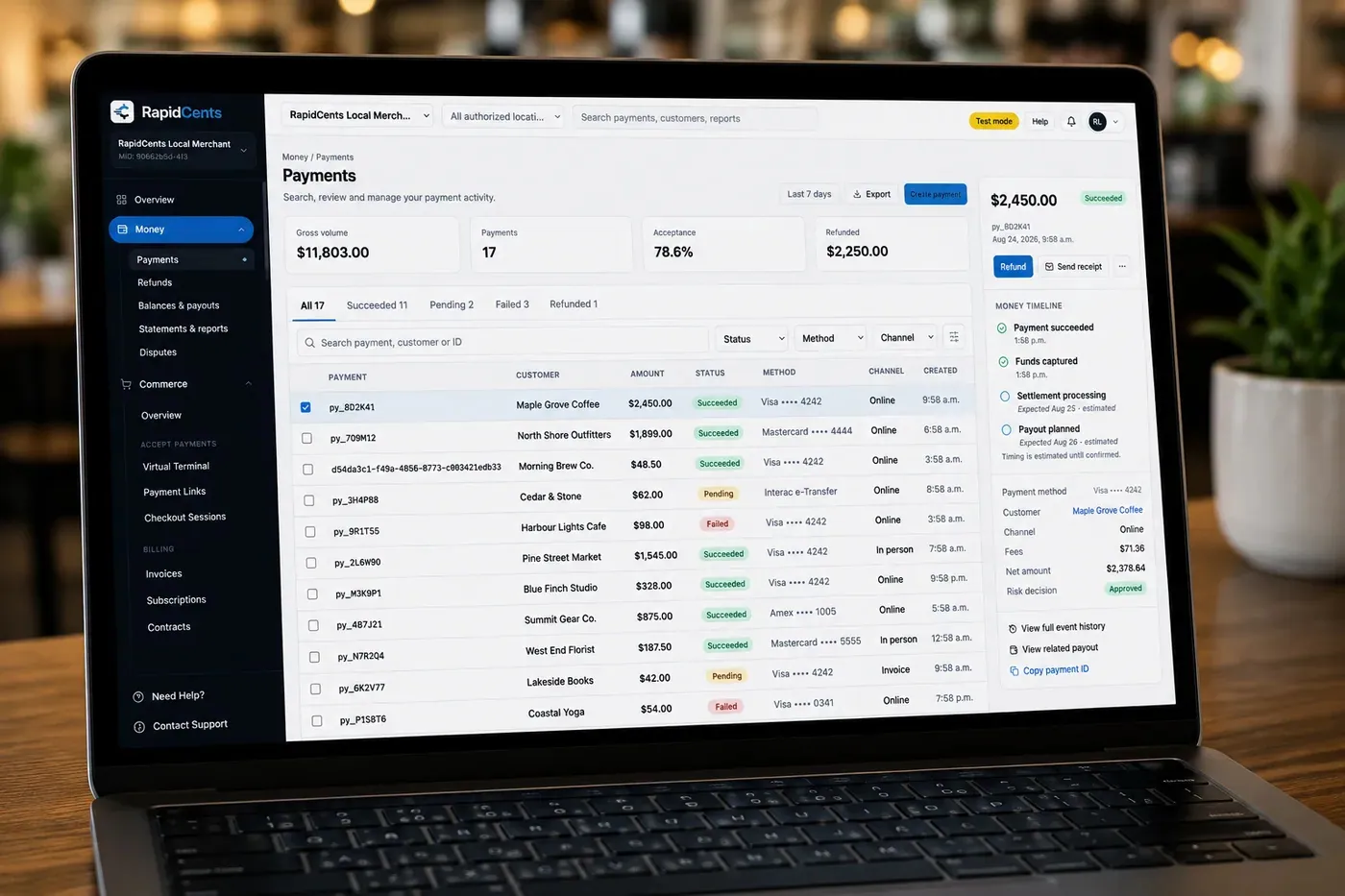
The RapidCents payments screen: gross volume, payment count, acceptance rate and refunds across the top, a filterable transaction list below, and a money timeline on the right tracing one payment from capture to planned payout. Merchant Dashboard
The RapidCents merchant dashboard gives owners, managers and finance staff a single signed-in view of live…
Explore
A merchant reviews RapidCents reports for volume, mix and payouts, with the terminal that took the sales on the desk. Reporting
RapidCents reporting delivers customizable transaction, settlement and fee reports with CSV and PDF export…
Explore


What does wine shop POS payment integration involve?
Wine shop POS payment integration means your point of sale sends the sale amount to the terminal and receives the result, so staff do not retype totals. RapidCents integrates with many major platforms through APPIE and RapidBridge, so most shops keep the point of sale they run today.
What integrated payments do for the till
APPIE lets the point-of-sale software you already run drive RapidCents terminals, passing the sale amount, refunds and settlement data between the register and the terminal. The right option depends on your vendor and version; your RapidCents representative will walk you through it.
Online orders through a payment gateway
A liquor store ecommerce payment gateway takes payment for orders placed on your site, then your staff check ID at pickup or delivery. RapidCents offers Online Payments, Hosted Checkout and a Payment Gateway, and your representative shows you how your storefront links each order to its payment.
Matching inventory to payment records
Liquor store inventory payment reconciliation means each sale, refund and settled deposit can be traced to what left the shelf. Use a shared reference such as an order or receipt number, and agree who fixes a mismatch between the stock count and the card record.
A case ordered online, ID checked at pickup
Say a shopper reserves a case of wine on your site and pays online. Staff see the order, pull the case and check ID at pickup. If the buyer cannot show valid ID, you refund the payment and return the case to stock, with both records noted.
What drives liquor store card processing costs?
Liquor store card processing costs depend on your card mix, ticket size, how cards are taken and how often you refund or face disputes. RapidCents prices on interchange-plus, month to month with no fixed term, so you can see interchange separately from your markup.
Interchange-plus pricing explained
Interchange is set by the card networks and passes through at cost. It varies with card type, such as debit, credit, premium or commercial, and with whether the card was tapped or inserted or keyed. Your RapidCents markup is set out in your Fee Schedule, plus fees for equipment or services, if applicable.
What to bring to compare
Bring recent processing statements, your split of in-store and online sales, average ticket, the share of trade invoices, and refund and dispute volume. A store with large mixed-case tickets and one with many single-bottle sales have different cost profiles, so compare using your own mix.
Run a Fee Check before you decide
Fee Check reads an uploaded processing statement and shows interchange separately from markup. It does not promise a result. Use it with written quotes from other providers, and ask each one to set out equipment, gateway and dispute fees in the same format.
Software compatibility for liquor store point of sale systems
RapidCents integrates with many major platforms through APPIE and RapidBridge, and connects settled transactions, fees and refunds to QuickBooks Online and Xero. The right option depends on your point-of-sale vendor and version, and your RapidCents representative will walk you through it.
Lightspeed Retail
Lightspeed Retail is a retail point of sale that many liquor and wine shops use for inventory and sales. Tell your RapidCents representative your plan and edition, and they will show you how card payments, terminals and settlement reports fit with it.
Bottle POS and KORONA POS
Bottle POS is built for liquor retail, and KORONA POS serves retail and multi-store operators. Tell your RapidCents representative which version you run, and they will show you whether payments connect through APPIE or whether a standalone terminal with matched reports is the better fit.
POS Nation C-Store POS
POS Nation C-Store POS suits stores that sell liquor with groceries and convenience goods. Your RapidCents representative will walk you through terminal hardware, reporting for mixed baskets and the connection that fits your setup, so the whole basket pays in one tap.
Shopify and accounting software
RapidBridge works with Shopify, so a card payment posts against the order you already have open, whether the sale started in store or online. RapidCents connects settled transactions, fees and refunds to QuickBooks Online and Xero, and SAP and NetSuite import settlement files.
Payment options for liquor stores in Canada
Liquor stores in Canada commonly accept Interac debit, credit cards and bank payments, settled in CAD. Alcohol sales rules differ by province, and some provinces route retail through provincial outlets. Your RapidCents representative will walk you through what fits your account.
Interac debit and credit at the counter
Shoppers pay with Interac debit by chip and PIN or contactless, and with Visa, Mastercard and American Express. Debit is a large share of everyday basket sales in many stores, so set up Interac on your terminals from day one.
EFT and pre-authorized debit for trade accounts
For restaurant and bar accounts you can invoice and collect by EFT or pre-authorized debit (PAD), once the account is set up for it. Your customer must authorize each recurring debit, and GST/HST may appear on your invoices and receipts.
How do you switch a liquor store to a new payment provider?
Once your account is approved, switch a liquor store in stages: list what you have, test a sale and a refund on the new setup, then move registers over and reconcile the first deposits. Plan the change for a quiet week, not the lead-up to a holiday weekend.
Inventory what you have now
List your registers, terminals, online order forms, open special-order deposits, open invoices, recurring charges such as a wine club, and any stored cards. Stored cards need customer authorization to be used again. Moving them between providers needs both providers to agree, so do not assume portability.
Test before moving live traffic
Run a sale, a refund and a deposit on the new terminal and payment link first. Keep the old setup running in parallel for a short period, then move one register or store before the rest. Check that receipts show your store name and contact details.
Reconcile the first settlements
Match each settled deposit to the sales, refunds and fees behind it, using reports and a shared reference. Map the results to your books, whether you use QuickBooks Online, Xero or import templates. Resolve differences before the old account is closed.
Payment questions from liquor stores
What should liquor stores compare before choosing a payment processor?
Compare the whole workflow, not one price. Look at how the processor handles the till, special-order deposits, online pickup orders and trade invoices, plus software restrictions, total fees, settlement, refunds and support. There is no universal best provider, so request written quotes and ask each one to demonstrate a sale, a refund and a deposit on your setup.
How much does payment processing cost for liquor stores?
It depends on your card mix, ticket size, how cards are taken and your refund and dispute volume. RapidCents prices on interchange-plus: interchange at cost, your RapidCents markup set out in your Fee Schedule, and fees for equipment or services, if applicable. It is month to month with no fixed term. Upload a statement to Fee Check to see interchange separately.
Does RapidCents work with Lightspeed Retail, Bottle POS and KORONA POS?
RapidCents integrates with many major platforms through APPIE and RapidBridge, so most liquor stores keep the point of sale they run today. The exact option depends on your vendor and version. Tell your RapidCents representative which system you use, and they will show you how payments connect, or how a standalone terminal with matched reports and an accounting export fits.
How can my business handle liquor store contactless card terminals?
Place a countertop terminal at each register, with Tap to Pay on supported phones for events and handover. The clerk checks ID, rings the sale and the shopper taps. Set rules for refunds, tips and dropped connections first, and make sure each sale posts to the right store and shift so closing totals match.
Which payment options can a liquor store in Canada offer?
A liquor store in Canada can usually offer Interac debit, credit cards, contactless payments and, for trade accounts, EFT or pre-authorized debit, with settlement in CAD. Provincial rules on who may sell alcohol and how vary, so your RapidCents representative will walk you through the methods that fit your province and your account.
How should we manage a liquor store ecommerce payment gateway?
Decide who may change or refund a payment, how each order links to its transaction and what staff do when payment fails. Hosted Checkout or the Payment Gateway can carry the order. Staff should still check ID at pickup or delivery, and the refund route for a refused handover should be written down before launch.
Can one platform handle inventory payment reconciliation and multi location reporting?
Mostly. RapidCents reporting and the merchant dashboard cover transactions, settlement and fees across locations, while inventory counts live in your point of sale. Match reports to stock with a shared order or receipt number, and ask your RapidCents representative how your software can import the settlement data.
How do we reconcile card payments and bank deposits for liquor stores?
Separate gross sales, refunds, disputes, fees and settlement, then match each bank deposit to the transactions behind it using a transaction reference and location. RapidCents connects settled transactions, fees and refunds to QuickBooks Online and Xero, and SAP and NetSuite import settlement files, so your books follow the deposits.
How do we switch payment providers without losing saved cards?
Do not assume saved cards will move. Both providers must agree to any transfer of stored card data, and customers must have authorized the stored cards. Inventory stored cards and recurring charges, test a sale, refund and deposit on the new setup, run old and new in parallel for a short time, then move registers in stages.
Can liquor stores take deposits on special orders by payment link?
Yes, a payment link can collect a deposit on a special order or allocated bottle. Send it by text, email or QR code, agree the cancellation terms in writing, and take the balance at pickup. Keep the order reference on the payment. Any later charge to a stored card needs the customer's authorization.
What MCC is used for liquor stores?
MCC 5921 is commonly associated with package liquor, beer and wine stores. Your RapidCents representative sets the right merchant category during onboarding, based on what your business actually sells. A shop that also runs a restaurant or sells other goods may be classified differently, and your representative explains what that means for you.
Related industries
Retail, convenience stores and grocery share the counter, shift reporting and multi-store questions of a liquor store, though each has its own basket, hours and software.
Retail
Take tap, chip and PIN payments at every register, sell on your website, refund returns…
Convenience Stores
RapidCents gives convenience stores countertop terminals for debit and credit taps, Tap…
Grocery
Credit, debit and contactless acceptance for supermarkets and independent grocers…
Jewellery Stores
Take high-ticket cards at the counter, collect repair and custom-order deposits, and…
Furniture Stores
Take order deposits at the desk, collect delivery balances by link or at the door, and…
Sporting Goods
Take cards at the till, the service desk and online, hold rental deposits, and reconcile…
Garden Centres & Nurseries
Take cards at the till, beside the shrubs and at the loading gate, and collect landscape…
Auto Parts Retailers
Take cards at the counter and on delivery, collect trade statements on the terms you set…
Take the next step
See what your liquor store pays to take cards
Upload a recent processing statement to Fee Check and see interchange separated from markup, so you can compare quotes for your till, special orders and trade accounts.
- No obligation
- Canadian payment specialists
- Secure statement upload



