


Oil and energy payments: B2B invoicing, fleet cards and net-term accounts
Oil & Energy is for businesses in the USA. Evaluate large-ticket supplier and field-service collections without assuming fleet-card or fuel-dispensing compatibility. The sections below separate the workflow, the control and its limit, and the account facts to confirm before you rely on them.

- PCI DSS Level 1
- SOC 2 Type II
- All major card brands: Visa · Mastercard · Amex · Discover · PIN debit
- Interchange-plus available
- Specialist onboarding support
Operational workflows
Delivery or field job invoiced on net terms
Pay-now link attached to the invoice
Fleet card keyed at the virtual terminal
Deposit matched back to the invoice number
Payment challenges
Invoices above an issuer's approval ceiling
A single fuel delivery or well-site job can be too large to authorize in one attempt on a commercial card.
Terms that stretch the collection
Energy accounts pay on terms, so the fuel is delivered and the crew has moved on long before the money arrives.
One payment against several tickets
A customer settles multiple delivery tickets with a single transfer, and each ticket still has to be closed out in reporting.
Choose the right payment setup for Oil & Energy
Choose oil and gas payment processing
For Oil & Energy, map the deposit, staged payments, and final balance, online checkout and remote payment, and the sale and reconciliation with business systems before choosing a setup. Select channels that match those moments, then confirm that the chosen solution genuinely covers each channel.
Payment hardware for Oil & Energy
For Oil & Energy, physical hardware may be secondary to the checkout flow. Prioritize gateway or payment-page requirements first, then add a terminal only when an in-person payment point is genuinely needed.
Compare payment processing fees
For Oil & Energy, request a written fee breakdown covering deposits and final balances and online checkout and dispute handling. Compare the effective cost across the real card and channel mix; do not choose on a headline rate alone.
Set up or switch Oil & Energy payments
To set up Oil & Energy payments, document how payment data moves into business systems and the checkout, confirmation, and refund path, confirm compatibility before purchase, then test a real payment flow before going live.
Recommended products

The RapidCents invoices screen: outstanding, overdue, paid and draft totals across the top, the invoice list below them, and a preview of one invoice on the right with its line items and a View & Record Payment button. Invoicing
RapidCents invoicing helps professional services, contractors and B2B suppliers create branded invoices…
Explore
The RapidCents payment links screen listing created links with their amount, status, click count and whether they have been paid, beside a phone showing the branded page a customer opens to pay $2,500.00. Payment Links
RapidCents payment links let staff generate branded pay-by-link URLs for invoices, deposits, balances and…
Explore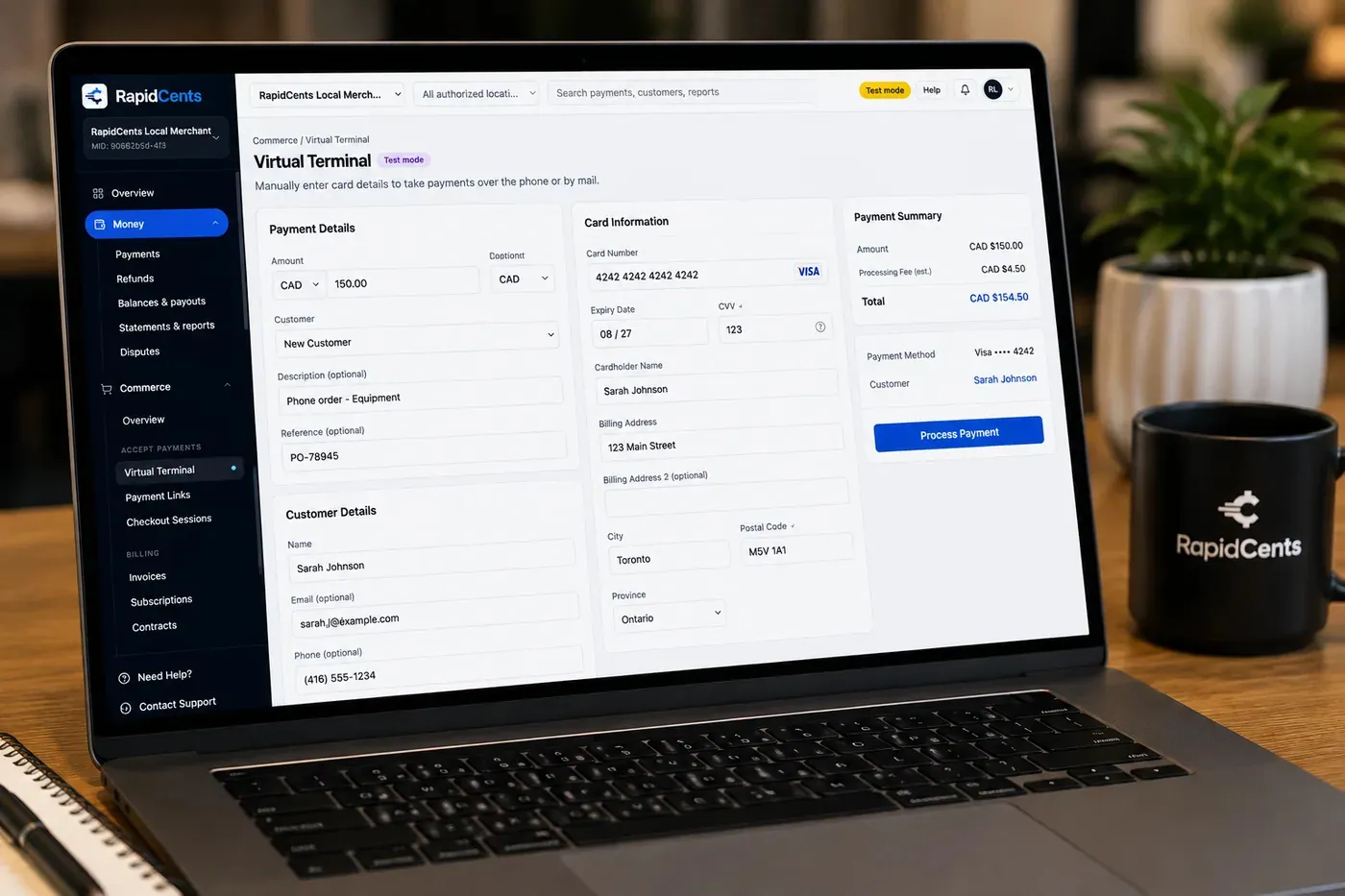
The RapidCents virtual terminal: payment details, card number, expiry and CVV keyed by hand on the left, with a payment summary on the right showing the amount, the estimated processing fee and a Process Payment button. Virtual Terminal
The RapidCents virtual terminal lets authorized staff enter mail-order and telephone-order payments through a…
Explore
A merchant reviews RapidCents reports for volume, mix and payouts, with the terminal that took the sales on the desk. Reporting
RapidCents reporting delivers customizable transaction, settlement and fee reports with CSV and PDF export…
Explore


How this gets set up
The account opened on terms
Nothing is paid at a counter here: a fuel or field service customer is set up on net terms first, and the payment method is agreed after that.
The invoice with a way to pay on it
Invoicing sends the bill with a pay-now link attached, which is what shortens the gap between a delivery ticket and a deposit.
The keyed card on a large ticket
One load or one service call can be big enough to reach an issuer's authorization ceiling, so a virtual terminal payment sometimes needs a call to the bank beside it.
Matching the payment back to the ticket
Field tickets, invoices and deposits are reconciled in reporting, because a customer clearing three invoices with one card charge is the normal case.
Integrations
NetSuite
NetSuite is the ledger of record for the receivable, so an energy invoice paid by card has to close out against the same customer account there.
SAP exports
SAP exports carry settlement and payment detail into the ERP as a file for posting, rather than a live two-way connection.
FieldCap
FieldCap holds the field ticket the invoice was built from, which is the document a customer disputing a charge asks to see.
Operations, security and going live
Reporting by account and by invoice, not by day
A daily total means little when what is being managed is a receivable; aging by account is the report the office actually opens.
Fleet and purchasing cards need detail on the invoice
A corporate buyer's own spending controls decide whether the payment clears, so the line detail on the invoice is not a formality.
Partial payments against a large invoice
A customer paying half now and half at month end must leave a traceable balance, or the receivable ledger and the bank deposits drift apart.
Rolling out per region, not company-wide
One district's accounts move onto invoicing and links first, with keyed payments as the fallback while the rest follow.
For businesses in the USA
A direct answer for a business in the USA: the workflow, the limit, and what to confirm next.
The payment workflow
Trace an energy-service job from purchase order and completion record to the final invoice. Keep separate industrial account billing from retail fuel or unattended dispensing transactions. Confirm eligibility, presentment currency, settlement currency and the enabled payment methods on the USA merchant account before quoting them. An illustrative amount is an example, not a fee or a funding promise. Oil & Energy does not, by itself, prove delivery or win a dispute.
The problem and the limit
In practice, authorized buyer contacts, high-value payment review and evidence of delivery or service. Distinguish supporting records from guaranteed dispute outcomes or automatic commercial-card qualification. Confirm eligibility, presentment currency, settlement currency and the enabled payment methods on the USA merchant account before quoting them. An illustrative amount is an example, not a fee or a funding promise. Oil & Energy does not, by itself, prove delivery or win a dispute.
What to confirm
Use a U.S. Supplier collecting a USD invoice to compare approved payment methods and reconciliation references. Verify fleet-card brands, ticket limits and ERP connections before including them. Confirm eligibility, presentment currency, settlement currency and the enabled payment methods on the USA merchant account before quoting them. An illustrative amount is an example, not a fee or a funding promise. Oil & Energy does not, by itself, prove delivery or win a dispute.
Payment questions from Oil & Energy
What should businesses compare when choosing oil and gas payment processing for Oil & Energy?
Compare oil and gas payment processing against the real payment journey: the deposit, staged payments, and final balance, online checkout and remote payment, and the sale and reconciliation with business systems. Start with the required channels and hardware, then confirm compatibility and support before committing.
What payment hardware is practical for Oil & Energy?
If Oil & Energy sells primarily online, do not choose physical hardware before validating checkout. Add hardware only for a clearly defined in-person payment need.
Which payment channels are relevant for Oil & Energy?
For Oil & Energy, start with the deposit, staged payments, and final balance, online checkout and remote payment, and the sale and reconciliation with business systems. Keep only the channels that match those moments, then verify the complete customer flow before offering them.
How should payment processing fees be evaluated for Oil & Energy?
For Oil & Energy, compare costs related to deposits and final balances and online checkout and dispute handling using actual transactions. Request a written breakdown of fees and terms rather than relying on an advertised rate alone.
What should be confirmed before setting up payments for Oil & Energy?
For Oil & Energy, document how payment data moves into business systems and the checkout, confirmation, and refund path, verify the needed compatibility, and test the flow before going live. This exposes manual steps and exceptions before customers encounter them.
Can a supplier attach a purchase order to a high-value payment?
For a business in the USA, the practical view covers supported transaction references and invoice matching; verify what appears in reports and receipts. This depends on the approved USA account setup and does not remove the merchant's own records or dispute duties.
Are fleet cards supported by the same setup as ordinary credit cards?
For a business in the USA, name only confirmed brands and acceptance configurations; do not infer fleet support from generic card acceptance. This depends on the approved USA account setup and does not remove the merchant's own records or dispute duties.
How should payment collection differ between field service and fuel dispensing?
For a business in the USA, in practice, separate workflows and hardware requirements, with explicit approval for any unattended or fuel-specific configuration. This depends on the approved USA account setup and does not remove the merchant's own records or dispute duties.
Take the next step
Talk to a RapidCents specialist
RapidCents Fee Check reads a processing statement and shows interchange separately from the markup. Upload a statement for an instant breakdown, or open a merchant account and start accepting payments on one account.
- No obligation
- Payment specialists, not a call centre
- Secure statement upload



