


Pharmacy payment processing for prescriptions, retail and delivery
Pharmacy payment processing means collecting the patient portion after a claim is adjudicated, taking front-store card payments and getting paid for deliveries. RapidCents covers the counter with countertop terminals, the door with Tap to Pay, and phone orders with a Virtual Terminal and Payment Links, and your RapidCents representative shows you how it fits your dispensing software.

- PCI DSS Level 1
- SOC 2 Type II
- All major cards: Visa, Mastercard, Amex, Discover, UnionPay, Diners Club & Interac Debit
- Interchange-plus available
- Canadian support
How pharmacies get paid
Pharmacies get paid by card in five ways: the patient portion at the prescription counter, front-store checkout, payments by phone, delivery orders, and patient account balances with cards on file. Each has its own payer, trigger and channel, so each gets its own line in your reconciliation.
Patient portion at the prescription counter
The patient pays what remains after the plan's share, once pickup is confirmed. Staff take the card on the pharmacy credit card terminal, and finance keeps the receipt and approval code. If a claim is adjusted after pickup, you refund or collect the difference.
Front-store checkout
A customer buys over-the-counter products or health and beauty items and pays by tap or insert on a countertop terminal. If an item comes back, it is refunded to the original card. Finance compares the till total with the terminal batch.
Payments by phone
A patient or caregiver calls to pay for a refill, balance or order. Staff key the card into the Virtual Terminal, or send a Payment Link so the payer types it. If an address or CVV check fails, staff ask for another card. Finance gets the record and an audit log entry.
Delivery orders
A patient pays for a delivered order, usually the patient portion plus any delivery charge, by Payment Link, mobile terminal or Tap to Pay. If a delivery is missed, there is nothing to reverse when payment was due at the door. Finance gets a receipt tied to the order.
Patient account balances and cards on file
A patient owes a balance or asks you to keep a card on file for refills. Balances go out as an invoice with a Payment Link, and a stored card is kept as a token with the patient's authorization. Finance gets invoice status and the token record.
How does prescription copay payment collection work after adjudication?
Prescription copay payment collection charges only the patient portion your dispensing system has confirmed after adjudication, by card at the counter, by phone or through a Payment Link. RapidCents processes that card payment only. It does not submit claims, adjudicate them or hold clinical records.
Run the confirmed balance and match the receipt
Once pickup is confirmed, staff enter the balance your dispensing system shows on the countertop terminal. The patient taps or inserts a card and the receipt prints with an approval code. Note that code against the prescription or account number, never the drug name.
Get authorization before any card is kept
If a patient wants a card kept on file for refills, agree the amount, the timing and how to cancel first. Capture the signature with Contracts & eSignatures, then store the card through Payment Tokenization and the Secure Card Vault, so your records hold a token, not the number.
Handle adjustments, declines and unclaimed prescriptions
Charge at pickup, not at fill, where you can, so a prescription that is never collected has no card payment to refund. If a plan adjusts the claim later, refund the difference to the original card or collect it by Payment Link. If a card declines, ask for another or send a link.
A $22.50 copay at the counter
Say a prescription is adjudicated and the plan covers part of the cost, leaving a $22.50 copay. The assistant enters $22.50 on the countertop terminal and the patient taps. The approval code goes on the account entry, and the day's card total later matches the terminal batch.
How do pharmacies reconcile retail and dispensary card tender?
Pharmacies reconcile retail and dispensary card tender by matching three records each day: the card total in the dispensing system, the card total at the front-store till and the RapidCents transaction and settlement reports. This daily pharmacy payment reconciliation traces each bank deposit back to its sales. Cash and plan-paid amounts never appear in card reports.
Decide which counter owns each card payment
The dispensing system and the front-store till each keep their own tender totals, and only card payments reach the processor. Decide which counter owns each card payment, close every counter at the same time each day, and compare each card total with the RapidCents transaction report for the same period.
Reconcile gross sales, refunds, fees and deposits
A deposit can differ from the day's gross card sales because of refunds, fees and timing. RapidCents settlement and fee reports export as CSV or PDF, or in formats for accounting import, so you can reconcile gross sales, refunds, fees and net deposit as separate lines instead of one number.
Find the usual mismatches
Mismatches usually come from a mis-keyed amount, a duplicate charge or a return refunded in the till but not on the card. Search the transaction report by amount and time, refund or void the extra charge, and note the fix against that day's close.
A $24.00 variance at close
Say a pharmacy closes with $1,486.40 of card tender in the dispensing system, $932.15 at the front-store till and $2,442.55 on the transaction report. The extra $24.00 is a front-store sale tapped twice. Staff find it by amount and time and refund the duplicate to the cardholder.
RapidCents products for pharmacies
Independent pharmacy merchant services from RapidCents pair countertop terminals for the prescription counter and front store with Tap to Pay for deliveries, a Virtual Terminal for phone orders and a Merchant Dashboard for deposits and reporting.

A fixed RapidCents countertop terminal taking card payments at the till, with settlement visible on the dashboard. Countertop Terminals
RapidCents countertop terminals sit at retail counters, restaurant hosts and reception desks where speed and…
Explore
A café worker holds a phone running RapidCents Tap to Pay, showing an $18.75 sale and the contactless symbol, while a customer holds a Visa card to the screen. No separate card reader is present. Tap to Pay
RapidCents Tap to Pay turns supported iPhones and Android devices into contactless payment terminals without…
Explore
The RapidCents virtual terminal: payment details, card number, expiry and CVV keyed by hand on the left, with a payment summary on the right showing the amount, the estimated processing fee and a Process Payment button. Virtual Terminal
The RapidCents virtual terminal lets authorized staff enter mail-order and telephone-order payments through a…
Explore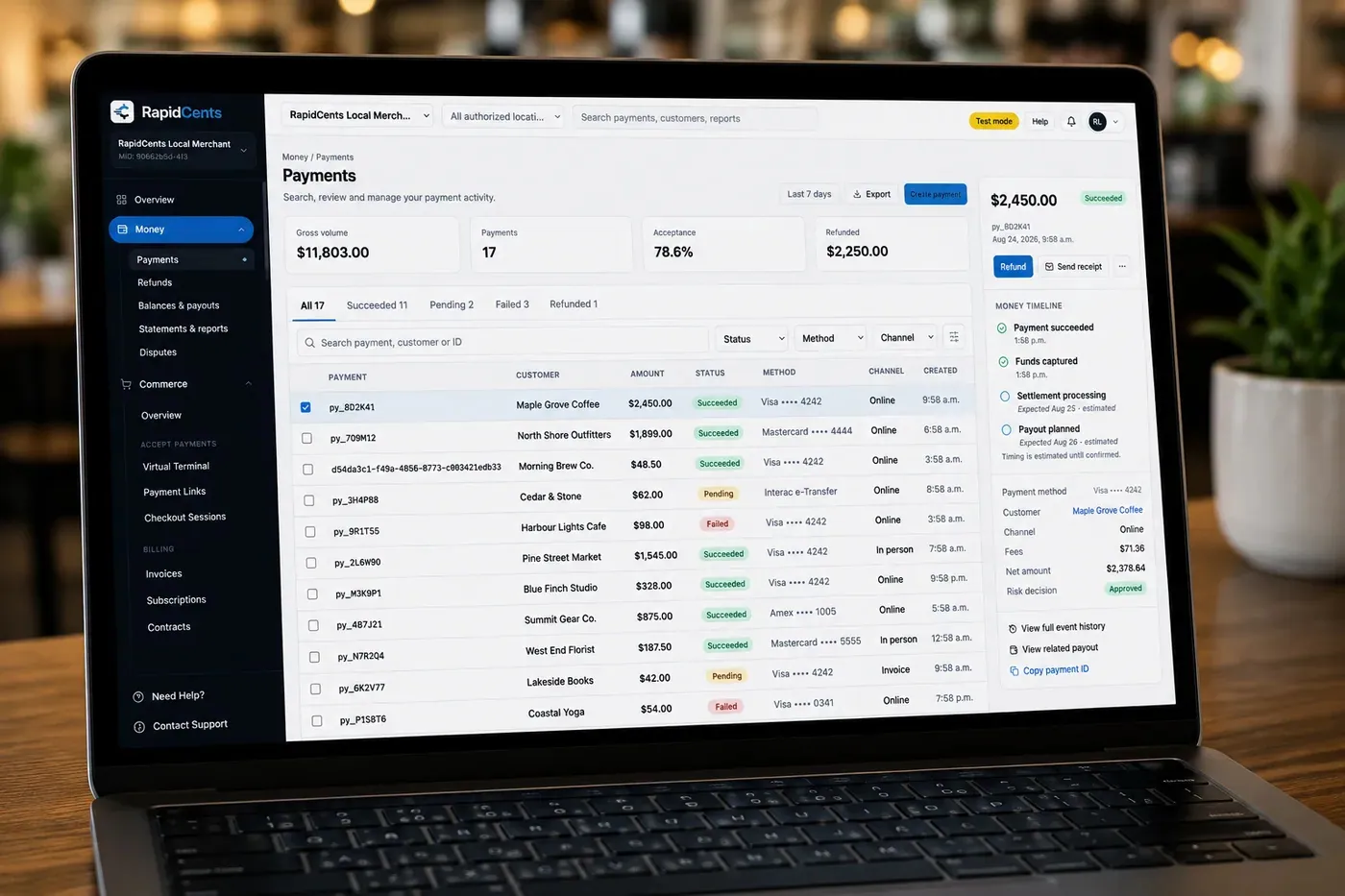
The RapidCents payments screen: gross volume, payment count, acceptance rate and refunds across the top, a filterable transaction list below, and a money timeline on the right tracing one payment from capture to planned payout. Merchant Dashboard
The RapidCents merchant dashboard gives owners, managers and finance staff a single signed-in view of live…
Explore


How do pharmacies collect payment for deliveries?
Pharmacy delivery card payments are collected in one of three ways: before dispatch by phone or Payment Link, at the door with a mobile terminal or Tap to Pay, or from a card the patient has authorized you to keep on file. Pick one method per order type so drivers never handle card numbers.
Before dispatch: key the card or send a link
For pharmacy phone payment processing, staff key the card into the Virtual Terminal while the patient is on the line, or send a Payment Link by SMS or email so the patient types it. The Virtual Terminal supports AVS and CVV checks and 3-D Secure where applicable.
At the door: mobile terminal or Tap to Pay
A driver can take payment at the door with a mobile terminal or a supported phone running Tap to Pay, and the payment shows in the Merchant Dashboard. If the patient is not home or refuses the order, there is no charge to reverse. If a card will not tap, send a Payment Link instead.
Keep card details off the order paperwork
Never write a card number on a bag label, delivery sheet or profile note, and keep medication names out of any payment note. Limit Virtual Terminal access to trained staff through role permissions, review the audit log, and send a Payment Link when a patient would rather not read a card number aloud.
A phoned-in refill for delivery tomorrow
Say a patient phones in a refill for delivery tomorrow. The assistant sends a Payment Link by SMS for the $41.75 patient portion plus the pharmacy's delivery charge, and the patient pays from home. The payment appears in the Merchant Dashboard, and the order goes to the driver with the receipt reference on the delivery sheet.
What should you compare in pharmacy processing fees and total cost?
Compare interchange, your RapidCents markup and any equipment or service fees. Interchange is set by the card networks and passes through at cost, and your markup is set out in your Fee Schedule. Pricing is interchange-plus and month to month, with no fixed term, so a written quote from any provider can be set beside it.
Card type and how the card is taken
Interchange depends on card type, which can be debit, credit, premium or commercial, and on how the card is taken, because tapped and inserted cards price differently from keyed and online ones. If most counter payments are small patient portions on debit cards, your mix differs from a front store with more credit and premium cards.
Your channel split and what to bring
Tapped counter and doorstep payments, phone orders keyed in the Virtual Terminal and Payment Links are taken in different ways, so list your volume by channel. Bring recent processing statements, average ticket sizes and your refund and chargeback volume, then upload a statement to Fee Check to see interchange separated from markup.
Total operating cost, not one line
Add terminals bought or rented, staff time spent reconciling by hand, and any software that limits you to a named terminal or acquirer. Ask how refunds and disputes are charged. A quote that shows one combined figure for counter, phone and delivery payments cannot be compared with interchange-plus until you see what sits inside it.
Will RapidCents work with TELUS Kroll and your other pharmacy software?
RapidCents integrates with many major platforms through APPIE and RapidBridge, and pharmacy POS payment integration depends on your software edition, your country and the exact data flow. Your RapidCents representative walks you through the options for TELUS Kroll, PharmaClik Rx, Fillware, WinRx or PioneerRx. Where a direct link is not the right fit, the terminal runs on its own: staff key the patient portion and you reconcile by report.
TELUS Kroll
TELUS Kroll is pharmacy software on the dispensing side, where the patient portion is set. How it links to a POS or terminal depends on your edition. Tell your RapidCents representative which edition you run, and they will walk you through the option that fits your country.
PharmaClik Rx
For PharmaClik Rx, the right option depends on which current PharmaClik product you run and which POS interface it supports. It could be a direct connector, an amount transfer, a payment link outside the software or a file export. Your RapidCents representative will walk you through each one.
Fillware
Fillware spans pharmacy and POS work, so the question is which payment terminals and which acquirer it supports. Tell your RapidCents representative how you use it today, and they will show you how RapidCents terminals, receipts and reports work alongside it for your edition and country.
WinRx
WinRx is dispensing software, and the POS middleware between it and a payment terminal is a separate piece to identify. Tell your RapidCents representative which middleware you use and what it passes back, such as sale amounts and refunds, and they will set up the payment flow around it.
PioneerRx
PioneerRx is an independent-pharmacy system, and what it offers can differ by country and edition. Tell your RapidCents representative your edition and where your merchant account is held, and they will walk you through how an external payment terminal fits and which data it exchanges.
Payment options for pharmacies in Canada
Pharmacies in Canada can offer Interac debit, credit cards and, where enabled for your account, EFT or pre-authorized debit (PAD) bank payments, with deposits in Canadian dollars. Methods are enabled per merchant account, and your RapidCents representative sets up the ones you want at the counter.
Interac debit and credit cards at the terminal
Patients pay at the terminal by chip and PIN or contactless with Interac debit, or with Visa, Mastercard or American Express credit cards. Your RapidCents representative sets up the card brands and debit options for your account.
EFT and PAD for invoiced balances
A balance invoiced to a patient account can be collected by EFT or pre-authorized debit (PAD) bank payment, where it is enabled for your account. The payer must authorize the debit first, including the amount, timing and how to cancel.
GST/HST on receipts and provincial rules
Front-store receipts can carry GST/HST, depending on the item, and that tax line comes from your till or dispensing software rather than from the card payment. Each province sets its own pharmacy and plan rules, and card processing does not change what your province or plan requires.
What is the checklist for switching a pharmacy to RapidCents?
Once your account is approved, switching a pharmacy to RapidCents takes four steps: list what depends on the old account, test the new one with a sale, a refund and a deposit, run both side by side until a full cycle reconciles, then retire the old terminals. Stored cards and software links need the most care.
Inventory what depends on the old account
List every terminal and the software that points to it, open patient balances and unpaid invoices, payment links already sent, refill cards on file, scheduled fees and refunds in flight. Each one either moves, is authorized again or is closed out on a date you choose.
Test, run in parallel, then reconcile
Run a test sale at the prescription counter and the front-store till, a refund and a phone-order payment on the new account, and check each in the transaction report. Keep the old terminals until the first RapidCents deposits match your ledger. RapidCents connects settled transactions, fees and refunds to QuickBooks Online and Xero, and SAP and NetSuite import settlement files.
Plan for stored cards
Saved payment credentials may need vendor-controlled migration, and both providers must agree to any transfer, so do not promise patients their cards will carry over. If tokens cannot move, ask patients to authorize again through a Payment Link, with the amount, timing and cancellation set out plainly.
Payment questions from pharmacies
How can our pharmacy collect the patient portion after a prescription claim is adjudicated?
Keep adjudication in your dispensing system, then collect only the confirmed patient portion by card. Enter that amount at the countertop terminal, or send a Payment Link if the patient is not at the counter. Note the receipt's approval code against the prescription or account number, and keep medication names out of the payment. RapidCents processes the card payment; it does not submit or adjudicate claims.
How should we reconcile retail and dispensary tender when choosing a payment provider?
Choose a provider whose reports make a daily three-way match easy: dispensary card tender, front-store card tender and the processor's transaction and settlement reports. Ask whether reports export as CSV or PDF, whether refunds show as separate lines, and how a counter's card total traces to a user. Close every counter at the same time each day.
How should we handle delivery payment collection?
Collect payment before dispatch or at the door, so drivers never write down a card number. Before dispatch, use a Payment Link or the Virtual Terminal; at the door, use a mobile terminal or Tap to Pay. Agree what happens on a missed delivery, because a charge taken in advance must be refunded to the original card.
How should we handle phone order security?
Limit who can take card numbers by phone, and record who did. The RapidCents Virtual Terminal supports AVS and CVV checks, 3-D Secure where applicable, role permissions and an audit log. Never write a card number on paper or a delivery sheet, and offer a Payment Link whenever the patient would rather type the card themselves.
Which payment options can a pharmacy in Canada offer?
A pharmacy in Canada can offer Interac debit and Visa, Mastercard or American Express credit cards at the counter, and, where enabled for the account, EFT or pre-authorized debit (PAD) bank payments for invoiced balances, with settlement in Canadian dollars. Phone orders, Payment Links and doorstep payments work on the same account. Your RapidCents representative will walk you through the methods for yours.
How should we handle multi-counter and multi-store reporting?
Use location-level merchant IDs and roll-up reporting, so each store's deposits stay separate while you still see the whole group. RapidCents Multi-Location provides location-level MIDs, permissions and roll-up reporting, and the Merchant Dashboard shows transactions, expected deposits, disputes and user activity. Within a store, give every counter its own terminal and every person their own login, so a variance traces to a counter and a person.
Which payment processor is best for pharmacies, and what should we compare?
The right processor is the one whose hardware, reporting and software limits fit your payment mix and whose written quote you can compare line by line. Ask each provider to quote independent pharmacy merchant services against your real counter, phone and delivery volume, then set terminal costs, settlement reporting, support, refund and dispute handling, and any named-terminal requirement in your dispensing software side by side.
What fees should pharmacies expect for in-person and online card payments?
Expect interchange, which the card networks set and RapidCents passes through at cost, plus your RapidCents markup set out in your Fee Schedule and any fees for equipment or services. Interchange varies with card type and with whether a card is tapped, inserted, keyed or paid online. Pricing is month to month with no fixed term. Fee Check shows interchange separated from markup on an uploaded statement.
Can we use RapidCents with TELUS Kroll or PharmaClik Rx?
RapidCents integrates with many major platforms through APPIE and RapidBridge, so most pharmacies keep the software they run today. The exact option depends on your vendor and version. Tell your RapidCents representative the edition, the country and the data flow you want, whether a direct connector, an amount transfer, a payment link, a file export or manual reconciliation, and they will walk you through it.
How can pharmacies reduce payment disputes and protect stored card details?
Get clear authorization, issue a receipt every time and control who can see cards. Tell the patient the amount before charging, keep the approval code with the account entry, and store a card only after the patient agrees to the amount, timing and cancellation. Payment Tokenization and the Secure Card Vault keep a token, not the number, in your records, and Disputes and Chargeback Protection adds alerts, evidence and deadlines. The card issuer decides each dispute.
How can pharmacies switch payment providers without losing billing records?
List what depends on the old account, test the new one, and run both until the first deposits reconcile. Inventory open patient balances, refill cards on file, scheduled fees, payment links and the terminals tied to your software. Run a test sale, a refund and a deposit before moving live traffic. Saved cards may need vendor-controlled migration, so both providers must agree, or patients authorize again.
What MCC is used for pharmacies?
MCC 5912, Drug Stores and Pharmacies, is commonly associated with this type of business. RapidCents sets the correct merchant category during onboarding, based on what your business actually sells. Tell your RapidCents representative what you sell, including any front-store lines and delivery, so the category on your account reflects the real business.
Related healthcare payment workflows
Other healthcare businesses share parts of this setup: a patient portion collected after a plan pays, payments taken by phone, and cards kept on file with permission. Compare how dental clinics, optometry practices and home healthcare teams run the same jobs.
Healthcare
Take visit payments at reception, send payment links for what insurance leaves unpaid and…
Dental Clinics
Take treatment plan deposits at the front desk or by text, run in-house installment plans…
Physio & Chiropractic
Collect visit fees and patient portions at the front desk or in the treatment room, sell…
Veterinary Clinics
Take deposits when owners sign surgery estimates, charge wellness plans monthly with…
Medical Spas
Collect treatment package deposits, bill monthly memberships and ring up retail at…
Optometry
Take exam fees and copays at checkout, deposits when frames and lenses go to the lab…
Gym & Fitness Studios
Bill monthly dues on stored cards, recover failed payments, sell class packs at the front…
Salons & Spas
Take booking deposits, charge no-show fees to cards clients agreed to store, collect tips…
Take the next step
See what your pharmacy pays for card processing
Upload a recent processing statement to Fee Check and see interchange separated from markup. Then compare the result with your counter, phone and delivery mix before you ask any provider for a written quote.
- No obligation
- Canadian payment specialists
- Secure statement upload



