


Payment processing for medical labs and imaging clinics
A private lab or imaging clinic charges the patient directly for tests insurance does not cover. RapidCents sends a payment link before the appointment so the balance is settled before the patient arrives, takes card at the intake desk on a payment terminal, and keys phone payments through the virtual terminal. Receipts carry the detail a patient needs for insurer submission, and reporting ties each collection back to its requisition. Diagnostic labs classify under MCC 8071.

- PCI DSS Level 1
- SOC 2 Type II
- All major card brands: Visa · Mastercard · Amex · Interac debit
- Interchange-plus available
- Canadian support
Operational workflows
Requisition priced against the uninsured test list
Payment link sent before the appointment slot
Card taken at the intake desk on arrival
Itemized receipt issued for insurer submission
Payment challenges
Balance unsettled at the draw
A patient arrives for a blood draw or a scan without knowing the test is uninsured, and the technician ends up negotiating price at the intake window.
Requisition and payment out of sync
Payment arrives under a patient name while the lab files the work under a requisition number, so reporting has to tie the two back together.
Receipts the insurer sends back
An imaging test paid out of pocket needs the test detail on the receipt or the patient's reimbursement claim is rejected.
Choose the right payment setup for Medical Labs & Imaging
Choose medical lab payment processing
For Medical Labs & Imaging, map booking, the appointment, and follow-up, the counter or service point, and the sale and reconciliation with business systems before choosing a setup. Select channels that match those moments, then confirm that the chosen solution genuinely covers each channel.
Payment hardware for Medical Labs & Imaging
For Medical Labs & Imaging, start with the place customers pay in person: a countertop terminal, smart terminal, or portable device depending on the workflow. Verify that the hardware fits the real volume and workspace.
Compare payment processing fees
For Medical Labs & Imaging, request a written fee breakdown covering in-person and remote transactions. Compare the effective cost across the real card and channel mix; do not choose on a headline rate alone.
Set up or switch Medical Labs & Imaging payments
To set up Medical Labs & Imaging payments, document how payment data moves into business systems and deposit and post-appointment payment rules, confirm compatibility before purchase, then test a real payment flow before going live.
Recommended products

The RapidCents payment links screen listing created links with their amount, status, click count and whether they have been paid, beside a phone showing the branded page a customer opens to pay $2,500.00. Payment Links
RapidCents payment links let staff generate branded pay-by-link URLs for invoices, deposits, balances and…
Explore
The RapidCents Rivo Go standing upright in its blue silicone case, showing the full-touch sale screen a customer reads across the counter. Payment Terminals
RapidCents payment terminals cover countertop, mobile and smart form factors so you can accept chip…
Explore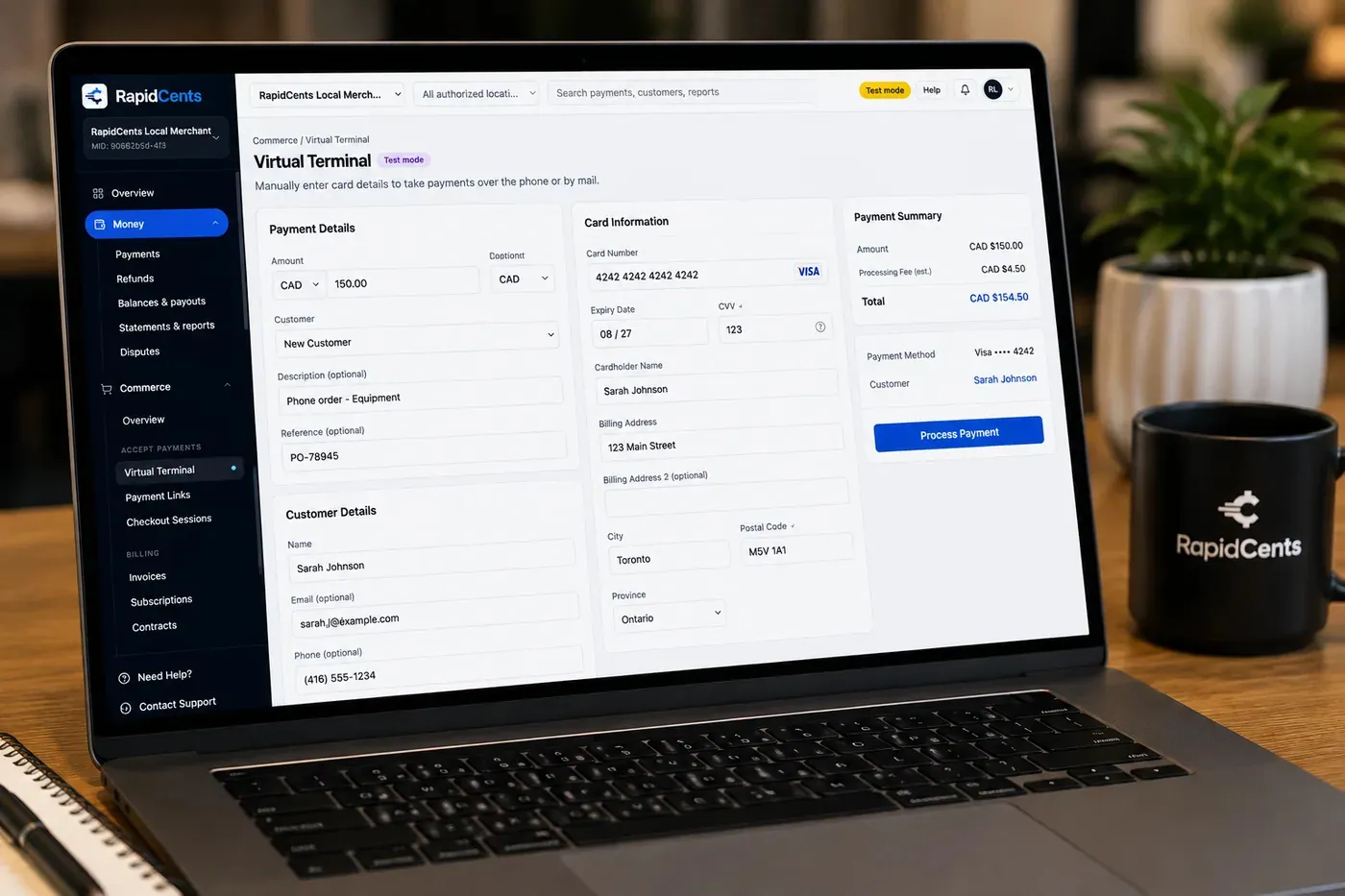
The RapidCents virtual terminal: payment details, card number, expiry and CVV keyed by hand on the left, with a payment summary on the right showing the amount, the estimated processing fee and a Process Payment button. Virtual Terminal
The RapidCents virtual terminal lets authorized staff enter mail-order and telephone-order payments through a…
Explore
A merchant reviews RapidCents reports for volume, mix and payouts, with the terminal that took the sales on the desk. Reporting
RapidCents reporting delivers customizable transaction, settlement and fee reports with CSV and PDF export…
Explore


How this gets set up
Priced against the requisition
The uninsured tests on a requisition are priced before the patient is booked, so the amount owed is known at scheduling rather than discovered at the counter.
Paid before the appointment
A payment link goes out with the booking confirmation so the balance is settled before the patient arrives for the draw or the scan.
Intake desk and phone line
Walk-ins pay by card at the intake terminal, and a patient who calls to add a panel is keyed through the virtual terminal.
A receipt the insurer will accept
The receipt carries the test detail the patient needs to claim reimbursement, and reporting ties the collection back to the requisition number.
Integrations
Ocean by CognisantMD
Ocean by CognisantMD carries the eReferral and requisition that tell the front desk which tests are uninsured before the patient is priced.
LIS exports
LIS exports move accession numbers and test detail out of the lab system as a file so collections can be matched to requisitions, not as a live two-way feed.
QuickBooks
QuickBooks receives the day's patient collections as revenue with deposits reconciled against the bank, kept separate from insurer remittances.
Operations, security and going live
Collections read back to requisitions
Reporting groups payments by requisition and by referring practitioner, so an unpaid test surfaces before the sample is processed rather than at month end.
Card details never enter the patient record
Payment card data stays out of the clinical chart entirely, and tokenization keeps any stored card off your own systems, which holds PCI scope to the intake desk and the phone line.
Refunds when coverage arrives late
A test billed to the patient sometimes turns out to be covered, so partial refunds against the original transaction are routine and stay attached to the requisition.
Go-live outside clinic hours
Intake terminals and the virtual terminal are brought up in a quiet block, with front-desk staff running test payments before the first patient day.
Payment questions from Medical Labs & Imaging
What should businesses compare when choosing medical lab payment processing for Medical Labs & Imaging?
Compare medical lab payment processing against the real payment journey: booking, the appointment, and follow-up, the counter or service point, and the sale and reconciliation with business systems. Start with the required channels and hardware, then confirm compatibility and support before committing.
What payment hardware is practical for Medical Labs & Imaging?
For Medical Labs & Imaging, start with the workstation where customers pay and the space available. A test of the real flow reveals the right form factor better than a feature comparison alone.
Which payment channels are relevant for Medical Labs & Imaging?
For Medical Labs & Imaging, start with booking, the appointment, and follow-up, the counter or service point, and the sale and reconciliation with business systems. Keep only the channels that match those moments, then verify the complete customer flow before offering them.
How should payment processing fees be evaluated for Medical Labs & Imaging?
For Medical Labs & Imaging, compare costs related to in-person and remote transactions using actual transactions. Request a written breakdown of fees and terms rather than relying on an advertised rate alone.
What should be confirmed before setting up payments for Medical Labs & Imaging?
For Medical Labs & Imaging, document how payment data moves into business systems and deposit and post-appointment payment rules, verify the needed compatibility, and test the flow before going live. This exposes manual steps and exceptions before customers encounter them.
How should payment be connected to appointments for Medical Labs & Imaging?
Decide when to request a deposit, full payment, or remaining balance, then make sure staff apply the same rule to every booking and follow-up.
What MCC category applies to Medical Labs & Imaging?
MCC 8071 is commonly associated with Medical Labs & Imaging. Our onboarding team confirms the correct category for your business.
Related industries
Healthcare
Healthcare providers collect patient payments at reception, via payment links and…
Dental Clinics
Dental practices accept front-desk, remote and scheduled payments with card-on-file…
Physio & Chiropractic
Physiotherapy and chiropractic clinics collect copays, package payments and recurring…
Veterinary Clinics
Vet clinics take exam-room payments, estimate deposits and recurring wellness plan…
Pharmacies
Independent and specialty pharmacies accept countertop, contactless and phone payments…
Medical Spas
Med spas combine high-ticket treatment packages, memberships and retail add-ons with…
Optometry
Optometry practices collect exam fees, eyewear deposits and insurance balance payments at…
Gym & Fitness Studios
Gyms and boutique fitness studios run memberships, class packs, retail and front-desk…
Take the next step
Talk to a RapidCents specialist
RapidCents Fee Check reads a processing statement and shows interchange separately from the markup. Upload a statement for an instant breakdown, or open a merchant account and start accepting payments on one account.
- No obligation
- Canadian payment specialists
- Secure statement upload



