


Therapy practice payment processing for counselling clinics
Therapy practice payment processing for a counselling clinic covers in-person terminals, payment links after virtual sessions and telephone payments keyed by staff. The defining jobs are charging each client's sliding scale amount, running recurring weekly session charges from a card the client authorized, and collecting no-show fees only with prior consent. RapidCents fits the software you already use.

- PCI DSS Level 1
- SOC 2 Type II
- All major cards: Visa, Mastercard, Amex, Discover, UnionPay, Diners Club & Interac Debit
- Interchange-plus available
- Canadian support
How counselling practices get paid
Counselling practices get paid per session, usually weekly or biweekly, and the amount can differ from one client to the next. Four payment jobs cover most of the work: sliding scale fees, recurring session charges, teletherapy payments and consented no-show fees.
Sliding scale session fees
The client pays the rate agreed at intake, which may differ from the full fee. Staff charge that amount at the terminal or by payment link after the session. Finance sees the agreed amount on the receipt and in the client profile.
Recurring weekly session charges
A client who attends on a set rhythm authorizes a card on file. The practice charges each session on its date, at that client's amount. Declines are retried or flagged, and the receipt shows the session date for reconciliation.
Teletherapy payments
After a video or phone session, the client pays through a payment link sent by text or email. Staff can also key a card into the virtual terminal when the client reads it over the phone. Each payment is tied to the client account.
No-show and late-cancel fees
The client agrees to a cancellation policy and a card on file before the first session. When a visit is missed, staff charge only the agreed fee, send a receipt and keep the signed policy ready if the client disputes the charge.
How do counselling practices handle sliding scale session fees?
Charge each client the amount agreed at intake, record that amount in the client profile, and collect it at the terminal or by payment link. Sliding scale therapy billing works when the agreed fee is written down once and every charge and receipt matches it.
How the charge runs
A client agrees a reduced fee at intake. Staff save the amount and the card, with the client's authorization, in a customer profile. After each session the front desk charges that amount, and the client receives a receipt showing the same figure.
What to set up first
Write the agreed fee, the review date and the authorization to keep a card on file into the intake paperwork. Limit who can edit a client's amount, so a change to the sliding scale is always a deliberate step with a record.
When circumstances change
Fees change when a client's circumstances change, and a client may pay part of a session by card and the rest another way. Refund an overcharge to the original card. Third-party insurer reimbursement stays outside the card payment record.
A $70 session for a $140 full fee
Say a three-therapist clinic agrees a $70 session fee with a client whose full fee is $140. The client pays $70 by payment link after each session. The monthly report lists those $70 charges, so the bookkeeper matches each one to the client account.
How do recurring weekly session charges work for a therapist?
Recurring weekly session charges run from a card the client authorized, on a schedule the client agreed, for that client's own amount. The practice sets amount, timing and cancellation terms in writing first, and each charge produces a receipt tied to a session date.
How the charge runs
RapidCents Recurring Payments charges a stored card on a weekly or biweekly schedule at the client's amount. Staff pause the schedule for holidays or a break in care, and the client receives a receipt for each charge.
What to set up first
A therapy card on file needs the client's authorization covering amount, timing and how to cancel. Capture it in writing or an electronic signature before the first charge, and give the client a clear way to stop the schedule.
When a charge fails or changes
A declined card is retried or flagged for staff to contact the client. An account updater service refreshes replaced cards where the card network supports it. If sessions are skipped, adjust the schedule rather than charging and refunding after the fact.
Tuesdays at $120, paused for travel
Say a counsellor sees a client every Tuesday at $120. The client signs a recurring authorization, and the card is charged each Tuesday. When the client travels for two weeks, staff pause the schedule, so no session is charged that was not delivered.
RapidCents products for counselling practices
Recurring Payments handles weekly sessions, Payment Links handles teletherapy, Virtual Terminal handles phone payments, and Customer Profiles keeps each client's card and agreed amount together, so the front desk repeats the same few jobs with the same few tools.

The RapidCents recurring payments screen showing active subscriptions, monthly recurring revenue, failed payments and upcoming renewals, above a list of subscriptions with their plan, amount, frequency and next billing date. Recurring Payments
RapidCents recurring payments manage subscription plans, membership renewals and installment schedules with…
Explore
The RapidCents payment links screen listing created links with their amount, status, click count and whether they have been paid, beside a phone showing the branded page a customer opens to pay $2,500.00. Payment Links
RapidCents payment links let staff generate branded pay-by-link URLs for invoices, deposits, balances and…
Explore
The RapidCents virtual terminal: payment details, card number, expiry and CVV keyed by hand on the left, with a payment summary on the right showing the amount, the estimated processing fee and a Process Payment button. Virtual Terminal
The RapidCents virtual terminal lets authorized staff enter mail-order and telephone-order payments through a…
Explore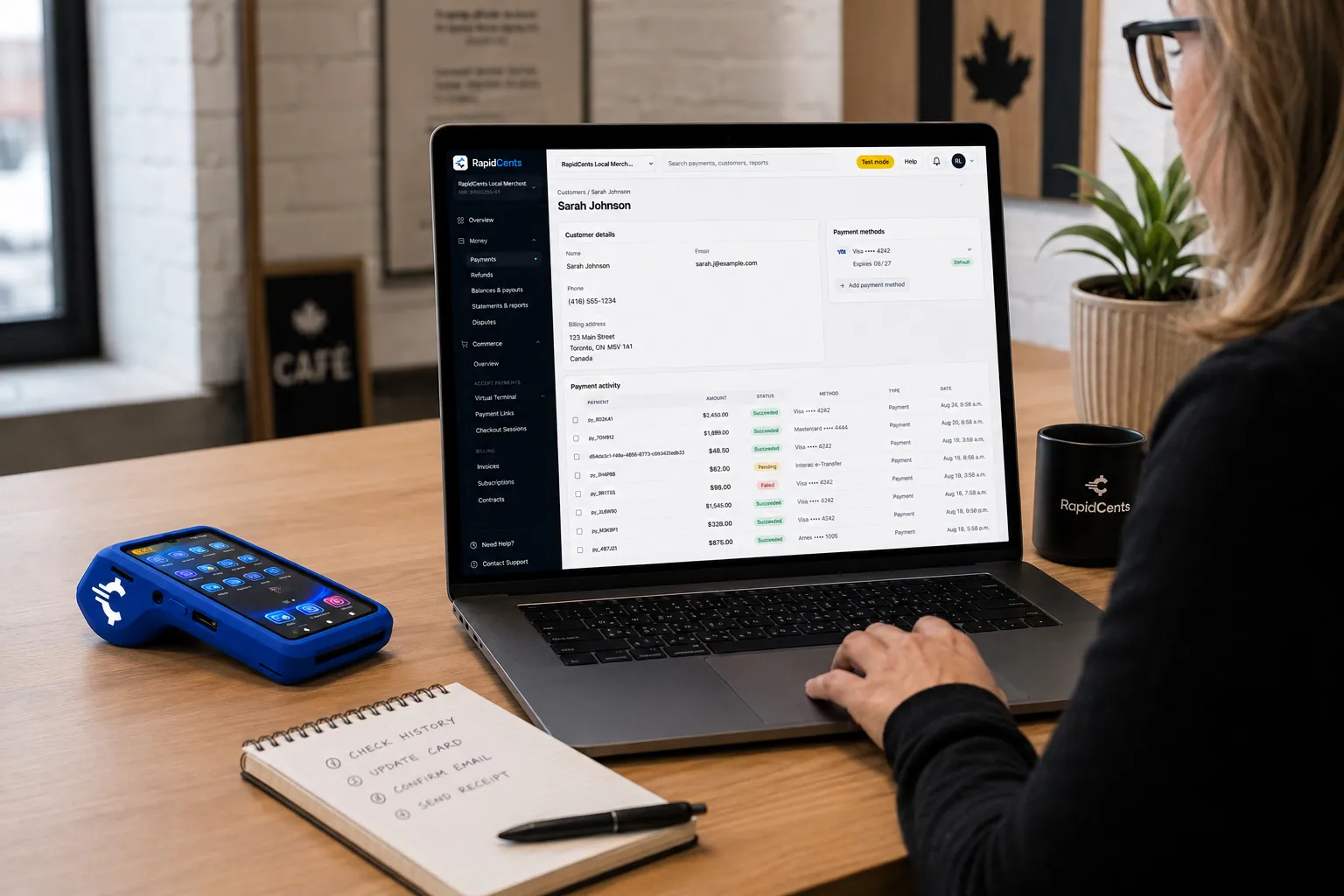
A RapidCents customer profile holds saved cards and invoices, so a return visit can be charged without re-keying the card. Customer Profiles
A customer profile ties together transactions, stored payment methods, subscriptions and disputes so staff…
Explore


How do you set up teletherapy checkout?
Teletherapy payment collection works best when the payment request goes out as soon as the session ends. A payment link by text or email lets the client pay on their own device, and staff can key a card into the virtual terminal when a client prefers to call.
How the payment flows
The therapist ends the video session and the front desk sends a payment link for the agreed amount. The client opens it on a phone, pays by card and receives a receipt. The payment appears in the dashboard under that client's profile.
Phone and mail payments
Some clients prefer to read a card number aloud. Authorized staff can enter it in the virtual terminal, which supports address and security code checks. Use role permissions so only trained staff see the screen, and never record card numbers in session notes.
Privacy on the payment record
Keep the payment description neutral, such as a session date and an invoice number, with no clinical detail. A client who pays for another person, such as a parent or an employer, should be recorded as the payer on the receipt.
A $95 payment after a 4 p.m. video session
Say a client attends a video session at 4 p.m. and the link arrives at 4:55. They pay $95 from their phone and receive a receipt. The next morning, the administrator matches that payment to the day's sessions in the transaction report.
How do you compare processing fees and total operating cost?
Compare therapist credit card processing on your real payment mix, not on a headline. RapidCents prices every account on interchange-plus: interchange passes through at cost, your RapidCents markup is set out in your Fee Schedule, and equipment or service fees apply if relevant. It is month to month, with no fixed term.
What drives cost in a counselling practice
Interchange varies with card type, such as debit, credit, premium or commercial, and with how the card is taken. A tapped or inserted card at the front desk is priced differently from a keyed or online payment sent as a link.
What to bring to a comparison
Bring recent processing statements, your average session fee, the split between in-person, link and keyed payments, and how often you refund or face disputes. A practice with mostly weekly recurring charges has a different mix from a walk-in clinic.
Costs outside the percentage
Look at terminal purchase or rental, monthly or service fees, and charges for refunds and disputes. Put every item in writing beside the interchange and markup lines, so two quotes can be compared on the same basis.
Run a Fee Check
Fee Check reads an uploaded processing statement and shows interchange separately from markup. Run it before you sign anything, then talk to your RapidCents representative about a Fee Schedule built on your own mix of card-present and remote payments.
Which practice software works with RapidCents, including Jane?
RapidCents integrates with many major business platforms through APPIE and RapidBridge, so a counselling practice keeps the software it already runs. RapidBridge works with Jane App, SimplePractice and TherapyNotes, and settled transactions, fees and refunds connect to QuickBooks Online and Xero.
Jane
RapidBridge works with Jane App, so a RapidCents card payment can post against the client record you already have open, without changing Jane. Jane Payments is its own separate processing service. Tell your representative how you take payments today and they will set it up.
Owl Practice
RapidCents integrates with many major platforms through APPIE and RapidBridge. The right option for Owl Practice depends on your software vendor and version, and your RapidCents representative will walk you through it, including how receipts reach the client chart.
SimplePractice
RapidBridge works with SimplePractice, so a card payment taken through RapidCents is recorded against the client's account. Receipts, amounts and ledger entries follow the same path for every session, whether the client pays at the desk or by link.
TherapyNotes
RapidBridge works with TherapyNotes, so payments land on the client account you already use. For accounting, SAP and NetSuite import settlement files, while QuickBooks Online and Xero connect to settled transactions, fees and refunds.
Sessions Health
RapidCents integrates with many major platforms through APPIE and RapidBridge. The right option for Sessions Health depends on your vendor and version. Your RapidCents representative will walk you through how a payment link or terminal marks a paid session against the client account.
Payment options for counselling practices in Canada
A counselling practice in Canada can accept the cards its clients carry, plus Interac debit at the terminal, and bank payments where enabled. Deposits are in Canadian dollars, and your RapidCents representative sets up the methods that suit your clients.
Cards and Interac debit
Clients can pay by Visa, Mastercard or American Express, or by Interac debit with chip and PIN or contactless at the terminal. Interac debit is a card-present method, so it suits front desk payments rather than payment links.
EFT and pre-authorized debit
Where enabled on your account, EFT and pre-authorized debit (PAD) can collect weekly sessions from a bank account with the client's written authorization. Your RapidCents representative will walk you through terms and cancellation rules.
CAD deposits and tax on receipts
Settlement is in CAD. Whether GST/HST applies to a session fee depends on the service and the province, so check with your accountant. Rules for therapist regulation and billing also vary by province.
What is the setup, switching and reconciliation checklist?
Switching a counselling practice to a new processor takes an inventory, a test and a reconciliation. Once your account is approved, list every client arrangement, test one sale, one refund and one deposit, then run both setups side by side until your ledger agrees with the first deposits.
Inventory before you move
List clients with a card on file, recurring weekly schedules, unpaid balances, open refunds, terminals and any software that records payments. Saved cards may not transfer automatically, so both providers must agree to any migration, and clients may need to re-authorize.
Test the flow first
Before moving live traffic, run a test sale, a refund and a payment link to one staff card. Check the receipt wording, the client profile entry and the report line, then see that a deposit lands where your bookkeeper expects it.
Reconcile and close the loop
Map each payment reference to the client account and session date. Export settlement and fee reports for your bookkeeper, and your representative will line them up with QuickBooks Online or Xero. Keep the old account open until final statements and disputes settle.
Payment questions from counselling practices
How should counselling practices handle sliding scale session fees when choosing a payment provider?
Choose a provider that lets you save each client's agreed amount and charge exactly that figure. Record the fee and the client's authorization at intake, restrict who can edit amounts, and make sure receipts match. Insurer reimbursement is separate from the card payment record, so keep track of both in your software.
How should counselling practices handle recurring weekly session charges when choosing a payment provider?
Look for recurring billing that charges a stored card on the schedule and amount the client agreed. Get written authorization covering amount, timing and cancellation, and allow pausing for breaks. Ask how declined cards are retried and how replaced cards are refreshed, since those are the points where weekly schedules break.
How should counselling practices handle teletherapy checkout when choosing a payment provider?
Pick a provider that can send a payment link by text or email straight after the session. The link should show the agreed amount, and every payment should attach to the client account. Add a virtual terminal for phone payments, and keep payment descriptions free of clinical detail.
How should counselling practices handle no show fees with consent when choosing a payment provider?
Charge a no-show fee only when the client agreed to the policy and to a card on file beforehand. Keep the signed policy, the missed appointment date and the receipt together. A signed record is your evidence if the client disputes the charge, and it does not promise a dispute outcome.
Which payment options can a counselling practice in Canada offer?
A counselling practice in Canada can usually offer credit cards, Interac debit at the terminal, payment links and keyed payments, with CAD settlement. EFT or pre-authorized debit (PAD) can collect recurring sessions where enabled on your account. Your RapidCents representative will walk you through each option and how it fits your practice software.
How should counselling practices handle payer and client privacy when choosing a payment provider?
Keep clinical detail out of the payment record and give staff only the access their role needs. Use neutral descriptions, such as a session date and invoice number, and record who actually paid when it is a parent or employer. Ask the provider about role permissions, audit logs and tokenized card storage.
Which payment processor suits counselling practices, and what should we compare?
The right processor is the one that fits your session payment mix, so compare written quotes rather than names. Check total fees on interchange-plus terms, hardware, payment links, recurring billing, reporting, support and software fit. RapidCents offers a Fee Check so you can see your current interchange separated from markup.
What fees should counselling practices expect for in-person and online card payments?
Expect interchange, a markup and, where relevant, equipment or service fees, and expect card-present and online payments to be priced differently. Interchange passes through at cost, and your RapidCents markup is set out in your Fee Schedule. Ask for a written quote based on your own volume and channel mix.
Can we use RapidCents with Jane or Owl Practice?
Yes. RapidBridge works with Jane App, so a RapidCents card payment posts against the client record you already have open, without changing Jane. For Owl Practice, RapidCents integrates with many major platforms through APPIE and RapidBridge. The right option depends on your vendor and version, and your RapidCents representative will walk you through it.
How can counselling practices reduce payment disputes and protect stored card details?
Get clear authorization, send receipts and keep a published cancellation policy. Limit staff access with role permissions, and use tokenized storage where supported so card numbers are not kept in notes. Evidence and alerts help you respond to a dispute, but no provider can promise that you will win one.
How can counselling practices switch payment providers without losing billing records?
List open balances, cards on file, recurring schedules, terminals and software dependencies first. Test a sale, a refund and a deposit, then run both setups together until your ledger matches. Saved cards may need a migration both providers agree to, so some clients may have to re-authorize.
What MCC is used for counselling practices?
MCC 8011 is commonly associated with this type of business. RapidCents sets the merchant category during onboarding, based on what your practice actually sells, so give a clear description of your services. The category can affect how a business is reviewed and reported, so tell your representative if you offer several services.
Related industries
Dental clinics, physio and chiropractic, massage therapy and other health and wellness businesses also take repeat appointment payments, stored cards and deposits, so many of these workflows carry across.
Healthcare
Take visit payments at reception, send payment links for what insurance leaves unpaid and…
Dental Clinics
Take treatment plan deposits at the front desk or by text, run in-house installment plans…
Physio & Chiropractic
Collect visit fees and patient portions at the front desk or in the treatment room, sell…
Veterinary Clinics
Take deposits when owners sign surgery estimates, charge wellness plans monthly with…
Pharmacies
Collect the patient portion once your dispensing system has adjudicated the claim, ring…
Medical Spas
Collect treatment package deposits, bill monthly memberships and ring up retail at…
Optometry
Take exam fees and copays at checkout, deposits when frames and lenses go to the lab…
Gym & Fitness Studios
Bill monthly dues on stored cards, recover failed payments, sell class packs at the front…
Take the next step
Check what your counselling practice pays to process cards
Upload a recent processing statement to Fee Check and see interchange separated from markup, based on your sessions, links and keyed payments.
- No obligation
- Canadian payment specialists
- Secure statement upload



