


Payment processing for IT distributors and computer wholesalers
Payment processing for IT distributors means collecting reseller invoices, hardware deposits and phone orders by card or payment link, with references that tie each payment to a purchase order and shipment. RapidCents gives you Invoicing, Payment Links, Virtual Terminal and Fraud Prevention for keyed orders, and your RapidCents representative shows you how it connects to your ERP.

- PCI DSS Level 1
- SOC 2 Type II
- All major cards: Visa, Mastercard, Amex, Discover, UnionPay, Diners Club & PIN Debit
- Interchange-plus available
- Specialist onboarding support
How computer and IT distributors get paid
B2B technology supply payments reach a computer distributor as reseller account payments on approved invoices, hardware deposit payments on special-order hardware, phone and email orders, and balances on shipments released in stages. Each job starts from an approved order and ends with a payment record your accounts receivable team can match to the invoice.
Reseller invoice payments
A reseller's accounts payable clerk receives your invoice with a payment link and pays by card against the purchase order. Partial payments apply to the open balance, and the receipt carries the invoice number for your ledger.
Hardware deposits on special orders
A reseller orders servers, switches or a bulk laptop run that you must source. You send a deposit request after the quote is approved, collect it by link, and apply it to the final invoice when the shipment is released.
Phone and email orders
A buyer calls in a replacement order or a small accessory list. Authorized staff key the card in the Virtual Terminal, with address and security code checks, and email a receipt that repeats the order reference.
Repeat orders on stored cards
A reseller that reorders cables, memory or peripherals each month can authorize a stored card in writing. You charge each approved order against that authorization and can revoke it at the reseller's request.
How can a computer reseller pay an approved hardware invoice by card?
Computer reseller invoice payments work by card within the ticket limits set on your merchant account. You send the invoice with a payment link, the payer enters the card, and the receipt carries your invoice and purchase order references back to your ledger.
How the invoice payment runs
Your order desk confirms the reseller's purchase order, finance issues the invoice in Invoicing, and the reseller's payer opens the payment link. The payment, the receipt and the paid status all match the same invoice number.
What to set up first
Agree which accounts may pay by card, which person at the reseller is authorized to pay, and what ticket limit applies. Put the purchase order number in the reference field so it prints on the receipt and the report.
Forty laptops on one invoice, paid in two parts
Say a reseller buys forty business laptops on an approved account and receives one invoice. The payer settles half by card this week and the rest after a second shipment, and each payment applies to the open balance.
How do hardware deposits and serialized equipment orders get collected?
You collect a hardware deposit after the reseller approves the quote and before you commit to sourcing the equipment, then bill the balance when the serialized shipment is released. Both payments use the same order reference so finance can see the deposit applied.
How the deposit and balance run
Send the deposit as a payment link tied to the approved quote. When the serialized shipment leaves the warehouse, issue the final invoice that shows the deposit already paid and the balance still due.
When an order changes
If a supplier delays an allocation, the reseller cuts the quantity or a card is declined on the balance, refund or reduce the deposit as your written terms say, and send a fresh link for the corrected amount.
A $9,000 rack switch order, deposit first
Say a reseller approves a $9,000 order for rack switches and pays a deposit by link. Two units ship first and the rest follow later, so you bill each release against the order and apply the deposit to the first invoice.
RapidCents products for computer and IT distributors
For IT hardware distributor merchant services, Invoicing and Payment Links collect reseller balances against purchase orders, Virtual Terminal handles phone orders, and Fraud Prevention scores keyed and online attempts so your staff can review risky orders with evidence.

The RapidCents invoices screen: outstanding, overdue, paid and draft totals across the top, the invoice list below them, and a preview of one invoice on the right with its line items and a View & Record Payment button. Invoicing
RapidCents invoicing helps professional services, contractors and B2B suppliers create branded invoices…
Explore
The RapidCents payment links screen listing created links with their amount, status, click count and whether they have been paid, beside a phone showing the branded page a customer opens to pay $2,500.00. Payment Links
RapidCents payment links let staff generate branded pay-by-link URLs for invoices, deposits, balances and…
Explore
The RapidCents virtual terminal: payment details, card number, expiry and CVV keyed by hand on the left, with a payment summary on the right showing the amount, the estimated processing fee and a Process Payment button. Virtual Terminal
The RapidCents virtual terminal lets authorized staff enter mail-order and telephone-order payments through a…
Explore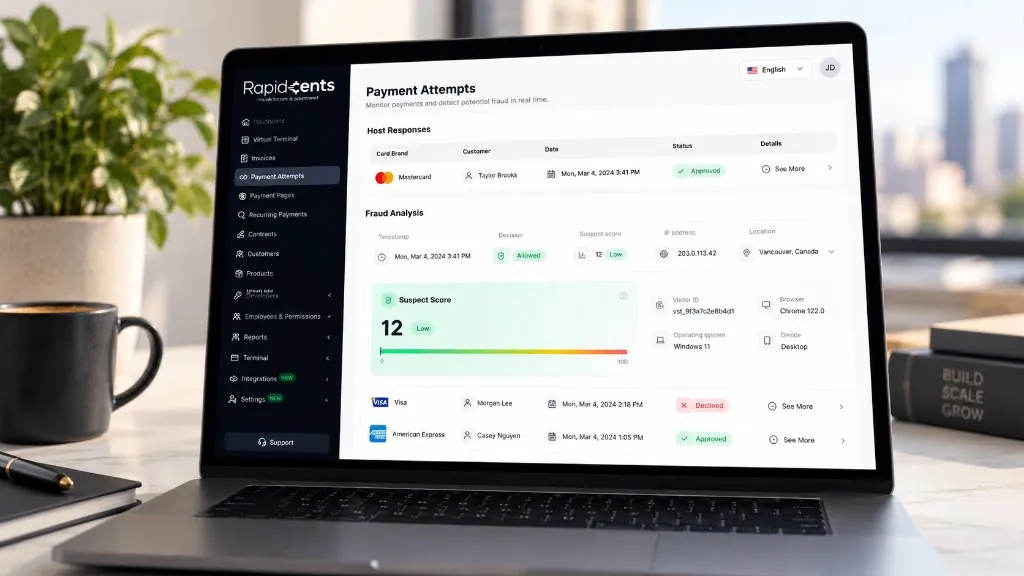
The Payment Attempts screen, shown with sample data: the host response for each attempt, then the fraud analysis behind it — decision, suspect score out of 100, IP address and location, visitor ID, browser, operating system and device. Fraud Prevention
RapidCents checks more than 180 signals on every payment attempt in under a second — the device, IP address…
Explore


How do serial-number returns and RMA credits reconcile to payment?
A serial-number return is tracked in your inventory or ERP, and the resulting credit is then matched to the original card payment. RapidCents holds the payment record, while the serial and RMA details stay in your inventory system, so the two sit side by side at reconciliation.
How the return runs
The reseller requests a return, your team issues an RMA number and logs the serial numbers on receipt, and finance approves the credit. Refund the original card for the approved amount and note the RMA number.
What to settle in advance
Agree the return window, restocking terms and who approves a credit before the first sale. A refund goes back to the card used, while a credit note may instead reduce a future invoice.
Three faulty docking stations under RMA 4471
Say a reseller returns three faulty docking stations from a larger order. You log the three serial numbers against RMA 4471, refund that portion to the card, and the other payments stay untouched.
How do you compare processing costs using your real payment mix?
Computer wholesaler credit card processing cost depends on card type, how the card is taken and your ticket size, so compare quotes using your real payment mix. RapidCents prices on interchange-plus, and Fee Check reads an uploaded processing statement and shows interchange separately from your markup.
What drives the cost
Interchange is set by the card networks and varies with debit, credit, premium and commercial cards, and with whether the card is tapped or inserted, keyed or paid online. It passes through at cost.
How RapidCents prices
You pay interchange at cost, plus your RapidCents markup shown in your Fee Schedule, plus fees for equipment or services if applicable. Terms are month to month with no fixed term. Enhanced commercial-card data applies where the card and your setup support it.
What to bring to compare
Bring recent processing statements, your split between invoice, phone and counter payments, average ticket, refund and chargeback volume, and the card types your resellers use. Upload a statement to Fee Check.
Which ERP and distribution software can work with your payments?
Most distributors run an ERP for orders, inventory and invoices, and that software decides how payment data returns. RapidCents connects settled transactions, fees and refunds to QuickBooks Online and Xero, and integrates with many major platforms through APPIE and RapidBridge. Your RapidCents representative walks you through the option that fits your edition.
NetSuite and SAP Business One
RapidBridge works with Oracle NetSuite and SAP Business One Web Client, so a card payment can post against the order or invoice you already have open. SAP and NetSuite also import settlement files with settled transactions, fees and refunds.
Dynamics 365 Business Central and Acumatica
RapidBridge works with Dynamics 365 Business Central and Acumatica, where your orders, customer accounts and open invoices already live. Payments are taken inside the software you run, and your representative shows you the setup for your edition.
Epicor Prophet 21
RapidCents integrates with many major platforms through APPIE and RapidBridge. The right option for a distribution system such as Epicor Prophet 21 depends on the vendor and version, and your RapidCents representative will walk you through it.
Payment options for IT distributors in the United States
In the United States, an IT distributor can accept credit and debit cards, including PIN debit where supported, and ACH bank payments, with settlement in US dollars (USD). RapidCents sets up the methods that suit your catalog and buyers.
Cards, PIN debit and ACH
Counter buyers may tap, insert or enter a PIN where supported. Resellers paying invoices can use a card link or an ACH bank payment, which follows bank rules rather than card rules.
State rules and tax
State rules can affect invoices, surcharges and tax. Your accountant decides the treatment, and the payment record only shows what was charged. Check the card surcharge rules for your state before you apply one.
How do you switch processors and keep your reconciliation clean?
Once your account is approved, switch in a planned sequence: list what you hold today, test the new flow with small real transactions, then move live traffic and reconcile deposits to your ledger. Stored cards move between processors only when both providers agree, so plan for fresh reseller authorizations.
Take inventory first
List stored cards and their written authorizations, open invoices with payment links, deposits waiting for shipment, pending refunds and any recurring orders. Decide which reseller accounts need new authorizations.
Test before you move
Run a sale, a deposit, a phone order and a refund through the new setup. Run old and new in parallel for a short period, and check that the references match your ERP.
Reconcile deposits
Match each deposit to its invoices, fees and refunds using the settlement report. Keep purchase order, invoice and RMA numbers consistent so your accounts receivable team can trace every payment.
Payment questions from computer and IT distributors
What is the best payment processor for IT distributors?
The best processor is the one whose written quote, terms and invoice tools match how your resellers pay. Compare interchange-plus pricing, ticket limits, purchase order references, refund and credit handling, ERP reporting and contract length. Upload a statement to Fee Check and we will give you an itemized written quote to compare side by side. RapidCents is month to month with no fixed term, so you are never locked in while you test the fit.
How much does credit card processing cost for IT distributors?
Cost depends on card type, how the card is taken and your ticket size, so no single figure applies. With RapidCents you pay interchange at cost, plus your RapidCents markup shown in your Fee Schedule, plus fees for equipment or services if applicable. Upload a processing statement to Fee Check to see interchange separated from markup.
Can NetSuite or SAP Business One use a different payment processor?
Yes. RapidBridge works with Oracle NetSuite and SAP Business One Web Client, and both can also take settlement files, so settled transactions, fees and refunds arrive in your books. The method depends on your edition and setup, and your RapidCents representative will walk you through the right one for your ERP.
How can IT distributors switch processors without losing payment history?
Export your payment history and reports from the current provider before you leave, and keep them with your accounting records. List stored cards, open invoices, deposits awaiting shipment and refunds in progress. Stored cards move between processors only when both providers agree, so plan for fresh reseller authorizations.
Which payment options can an IT distributor in the United States offer?
An IT distributor in the United States can offer credit and debit cards, PIN debit where supported, and ACH for bank payments, settling in US dollars (USD). Tell your RapidCents representative which methods your resellers prefer, and each one is set up along with your ticket limits and commercial card handling.
Can a reseller pay an approved hardware invoice by card?
Yes, within the ticket limits set on your merchant account. Send the invoice with a payment link, put the purchase order number in the reference field, and the receipt returns to the invoice. For a very large invoice, your RapidCents representative can suggest another method that fits the amount.
How are serial-number returns linked to the original order?
Your inventory or ERP system keeps the serial numbers and RMA records, and RapidCents keeps the payment record. When a return is approved, refund the original card or issue a credit and note the RMA and invoice numbers. Finance then reconciles the resulting credit to the original payment.
Will payments automatically activate software licenses?
A card payment does not activate a software license on its own. Activation happens when your license or ERP system has a connection that reads the paid status. Set up and test that connection before you promise instant delivery, and your RapidCents representative will walk you through what your setup supports.
How can we collect a part payment on a hardware order?
Collect a documented deposit or stage payments against the approved order, and apply each payment to the open invoice. A payment schedule is a collection schedule for money your reseller already owes, not financing. Keep the agreed amounts in writing, and never split one charge to avoid a card limit.
Can we charge a reseller's stored card for repeat orders?
Yes, with the reseller's written authorization that says what you may charge, when and how it can be cancelled. Store the card in the Secure Card Vault, charge only approved orders, and send a receipt each time. Stop charging as soon as the reseller revokes that authorization.
What MCC is used for computer and IT distributors?
MCC 5045 is commonly associated with computers, peripherals and software sellers. Your RapidCents representative sets the correct merchant category during onboarding, based on what your business actually sells and how. A distributor that also sells managed IT services is reviewed on both parts of the business.
Related distributor pages
If you also run a wider supply business, our B2B and wholesale solution covers the general supplier workflow, and electronic component distributors and office and school suppliers share the same purchase order, deposit and credit-note jobs.
B2B & Wholesale
Collect net-terms invoices by payment link with the PO number attached, take commercial…
Electronic Component Distributors
Collect purchase order invoices, allocation deposits and partial-shipment balances from…
Office & School Suppliers
Collect payment from schools, districts and offices that buy stationery and supplies from…
Commercial Furniture Suppliers
RapidCents helps commercial furniture suppliers collect fit-out deposits, delivery…
Apparel, Textile & Uniform Wholesalers
Collect production deposits, partial seasonal shipments and size-exchange credits from…
Beauty & Salon Suppliers
Collect reorder invoices, equipment deposits and phone orders from salon trade accounts…
Pet Product Wholesalers
Collect from pet retailers on approved invoices, trade-account reorders and credits, with…
Dental Suppliers
From monthly consumables reorders to chair and imaging deposits, collect what clinics…
Take the next step
Review your reseller payment costs
Upload a recent processing statement to Fee Check to see interchange separated from markup, and bring your reseller invoice and deposit mix to compare against your current provider.
- No obligation
- Payment specialists, not a call centre
- Secure statement upload



