


Taxi payment processing for fleets and owner-drivers
Taxi payment processing means taking a card fare and tip in the back seat, matching each driver's takings to a shift and billing corporate accounts. RapidCents gives you mobile terminals with LTE and Wi-Fi, Tap to Pay on a supported phone, and Invoicing with Payment Links for account rides. APPIE and RapidBridge connect RapidCents to many major business platforms.

- PCI DSS Level 1
- SOC 2 Type II
- All major cards: Visa, Mastercard, Amex, Discover, UnionPay, Diners Club & Interac Debit
- Interchange-plus available
- Canadian support
How taxi fleets get paid
Taxi fleets get paid by card through six jobs: the fare closed in the vehicle, the tip added on screen, limo jobs on a phone, phone bookings, account rides billed to a company, and driver takings reconciled by shift. Each has a different payer, trigger and record, so the setup for one rarely fits the next.
Fare closed in the vehicle
The passenger pays when the trip ends, on a RapidCents mobile terminal in the vehicle. The metered fare is the sale, and the dispatch job number is your reference for matching it later. Cash fares stay outside the card record, so finance sees one Merchant Dashboard transaction for each card fare.
Tip added at the terminal
The passenger picks a gratuity on the terminal screen before tapping, so fare and tip are charged as one card payment. A cash tip never reaches the card record. How tips are shared with drivers is set in your own driver agreement and payroll, not by the payment.
Limo and private hire jobs on a phone
A limo and taxi payment terminal does not have to be hardware. A chauffeur, private hire driver or owner-driver can take a contactless payment on a supported iPhone or Android phone with Tap to Pay, which suits a pre-booked job with an agreed fare. The sale appears in the same Merchant Dashboard as the fleet's mobile terminals.
Phone bookings and pre-paid rides
A passenger who books by phone can give a card to the dispatcher, who keys it into the Virtual Terminal with address and security code checks, or can pay from a Payment Link sent by SMS or email before the car arrives. Keyed and remote payments are priced and disputed differently from taps, so track them separately.
Corporate and account rides
The payer is a company, hotel desk or event organizer rather than the passenger, and the trigger is the booked account trip. You collect afterward, by invoice or by a stored card the company authorized. If a trip is disputed, you settle it on its own, and finance tracks each account as paid or open.
Driver takings reconciled by shift
The fleet owner is the payee: card deposits go to the business, and each driver is then settled under a lease, commission or wage arrangement that sits outside the card payment. The trigger is the shift or pay period. Finance works from exported transaction and settlement reports, split by driver and vehicle.
How do you take a fare and tip by card in a taxi?
You take a taxi fare and tip by card with a mobile terminal that stays in the vehicle, or Tap to Pay on the driver's phone, and the passenger adds the gratuity on screen before tapping. That is the core of taxi tipping card payments: one card payment, one transaction record, and a setup that depends on connectivity and driver habits.
How the fare runs from meter to payment
The trip ends and the meter stops. The driver keys the fare into the mobile terminal, the passenger picks a tip, then taps, inserts or uses a PIN. The sale posts to Merchant Dashboard as one transaction, ready for the office to match against the dispatch job.
What to set up before the first shift
Decide whether each vehicle gets a mobile terminal or a driver's phone with Tap to Pay, since a taxi driver card reader of either kind needs a charge, a mount the passenger can reach and a signal. Choose the tip options and receipt settings on the model you pick, and train drivers to show the total before the card is read.
Declines, wrong totals and refunds
A declined card means a second card or cash, not repeated retries on the same card. A wrong total is corrected by refunding the sale and taking a new one, so drivers should read the amount aloud before the passenger taps. If a passenger disputes the fare later, the trip time, pickup and drop-off and receipt are your evidence.
A $46.00 airport fare with a $6.00 tip
Say a driver finishes a $46.00 airport fare, the passenger adds a $6.00 tip on screen and taps. The terminal charges $52.00 as one payment, and the sale shows in Merchant Dashboard as a live transaction. The office matches it to the dispatch log by time and amount. If the passenger meant a smaller tip, the driver refunds the sale and runs it again.
How do you reconcile card takings by driver and shift?
You reconcile card takings by driver and shift by matching each terminal's transactions to the shift window, then matching settled deposits to the same days. Merchant Dashboard and Reporting supply the transactions, expected deposits and exports; the dispatch log, cash and driver agreements stay in your own records. This is taxi fleet payment reconciliation in practice.
How a shift closes against the dashboard
At shift change the driver hands back the vehicle, and the dispatcher pulls that terminal's transactions for the shift window from Merchant Dashboard. The total is compared with the trips on the dispatch log. Reporting can export the same list as CSV or PDF for the bookkeeper, and settlement reports set out what each deposit contains.
Set up terminal labels and cut-off rules
Label every terminal by vehicle number and log which driver holds it each shift. Agree the shift cut-off time and who owns the daily review. Your RapidCents representative will show you how user permissions limit who issues refunds, since a refund after the driver has gone home changes a shift that is already closed.
Where the totals disagree
Card takings and the trip log differ for ordinary reasons: cash fares that never touched the terminal, a fare keyed at the wrong amount, a refund, or a sale that settles in a later deposit than the shift it belongs to. A dispute can also reverse a sale from a past shift. Work through these before assuming a driver error.
Closing a driver's shift with 14 trips
Say a driver's log shows 14 trips, 3 of them paid in cash. The dispatcher pulls the shift window and finds 12 card sales and one refund, because a fare keyed too high was refunded and run again. The 11 real card fares match the log, the cash is counted separately, and the office exports the shift as a CSV file for the bookkeeper.
RapidCents products for taxi fleets
Mobile Terminals and Tap to Pay take the fare and tip in the vehicle. Merchant Dashboard shows live transactions and expected deposits across channels, and Reporting exports transaction, settlement and fee data as CSV or PDF for your bookkeeper.

A staff member takes a card payment on a RapidCents handheld terminal, with the same sale appearing on the dashboard. Mobile Terminals
RapidCents mobile terminals are battery-powered wireless devices with LTE and Wi-Fi so staff accept payments…
Explore
A café worker holds a phone running RapidCents Tap to Pay, showing an $18.75 sale and the contactless symbol, while a customer holds a Visa card to the screen. No separate card reader is present. Tap to Pay
RapidCents Tap to Pay turns supported iPhones and Android devices into contactless payment terminals without…
Explore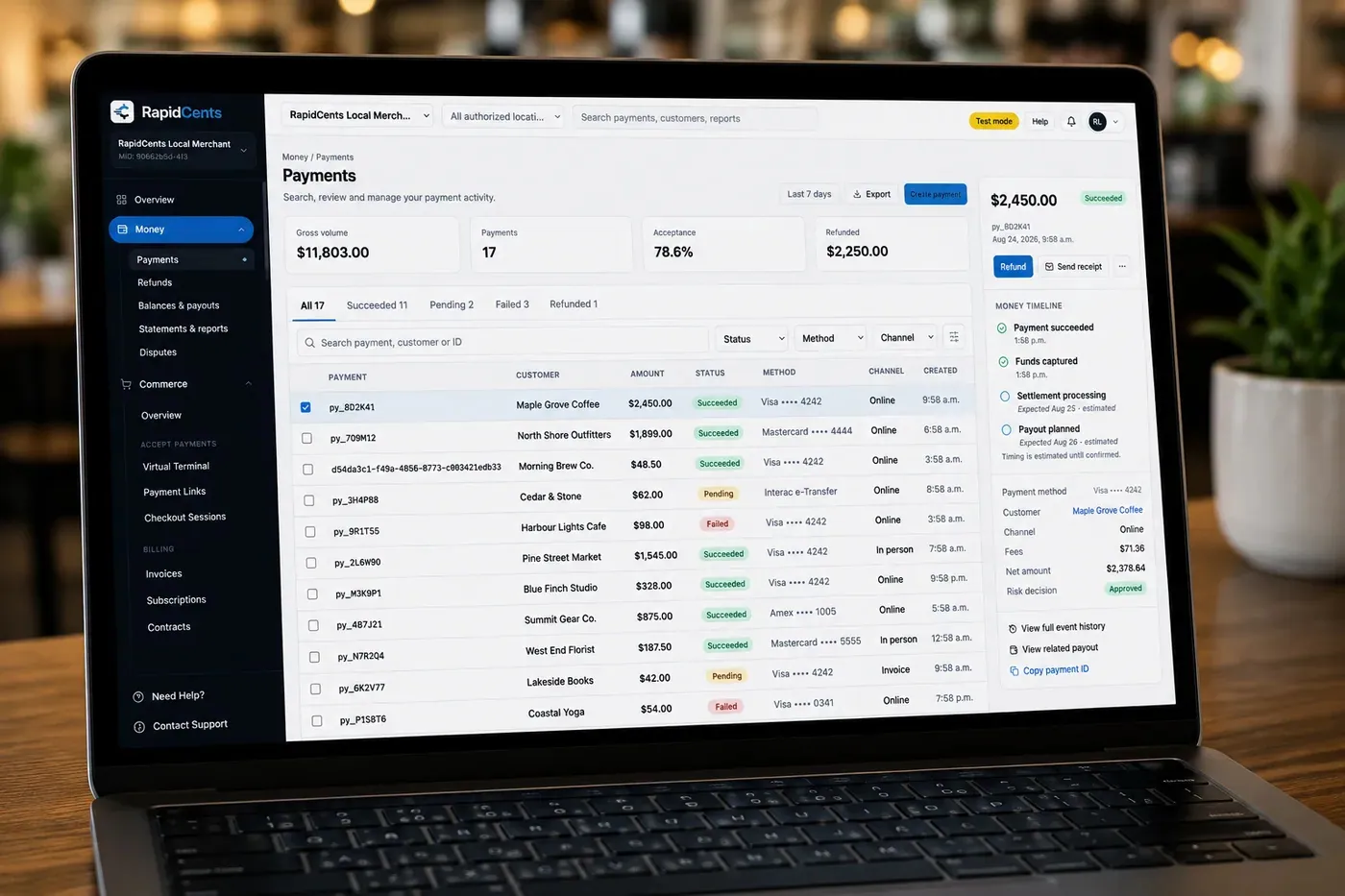
The RapidCents payments screen: gross volume, payment count, acceptance rate and refunds across the top, a filterable transaction list below, and a money timeline on the right tracing one payment from capture to planned payout. Merchant Dashboard
The RapidCents merchant dashboard gives owners, managers and finance staff a single signed-in view of live…
Explore
A merchant reviews RapidCents reports for volume, mix and payouts, with the terminal that took the sales on the desk. Reporting
RapidCents reporting delivers customizable transaction, settlement and fee reports with CSV and PDF export…
Explore


How do you bill corporate accounts for taxi rides?
You bill corporate accounts for taxi rides by sending a branded invoice with a Payment Link for each account period, or by charging a stored card the company has authorized. With taxi corporate account invoicing, the payer, the trips you list and the payment status sit on one record, and any credit terms stay your own arrangement with the company.
How an account ride becomes a paid invoice
A company books rides under an account number held in your dispatch records. At the end of the agreed period you send one branded invoice listing those trips, with a Payment Link by email or SMS. The company pays by card or bank payment, and invoice status shows your office what is paid and what is still open.
Set up account terms and card authorization
Put the account terms in writing: who may book, which reference, such as a PO or job number, must appear on each trip, when invoices go out and how a disputed trip is handled. If the company wants its card charged for each invoice, get its written authorization covering amount, timing and cancellation before the card goes into the Secure Card Vault.
Disputed trips, part payments and declined cards
If a company disputes one trip, ask it to pay the others and settle the disputed trip separately, refunding to the card once you agree. Your RapidCents representative will show you how a part payment appears on an invoice before you offer one. A declined stored card goes back to the company's accounts team for another card, not repeated retries.
A monthly corporate account of 22 rides
Say a company account takes 22 rides in a month, each logged against a PO number. You send one invoice listing the trips with a Payment Link, and the company pays it by card. Later it questions one $38.00 trip, you agree, and you refund that amount to the card. Reporting shows the payment and the refund as separate lines for your office to match to the invoice.
What do taxi card payments cost, and how do you compare quotes?
Taxi card payments cost interchange, set by the card networks, plus your RapidCents markup set out in your Fee Schedule and any fees for equipment or services, on a month-to-month agreement with no fixed term. Your own cost depends on how many fares are tapped or inserted in the vehicle, how many are keyed or paid remotely, and the mix of debit, credit and commercial cards.
What drives the cost of a taxi card mix
Interchange varies with the card type and with how the card is taken. A fare tapped or inserted on a mobile terminal or a phone is card-present. A booking keyed by the dispatcher or paid from a Payment Link is not, and its interchange can differ. Debit, credit, premium and commercial cards also differ, which matters for corporate-account rides.
How interchange-plus shows up on your statement
We price every account on interchange-plus. Interchange passes through at cost, and your markup is set out in your Fee Schedule, with fees for equipment or services where they apply. Interchange and markup sit on separate lines, so a rise in corporate-card use or keyed bookings is visible rather than buried. The agreement is month to month.
Equipment and the total cost of cab fleet mobile payments
Total cost includes hardware as well as processing. For cab fleet mobile payments, ask your RapidCents representative what each vehicle's mobile terminal costs to buy or rent, how its LTE connection is charged, and what replacing a lost or damaged unit costs. Tap to Pay on a supported phone needs no separate reader, so price it separately for limo and private hire drivers.
What to bring when you compare a quote
Bring recent processing statements, your average fare, how often a tip is added, the split between back-seat taps, keyed bookings and account payments, and your refund and chargeback counts. Upload a statement to Fee Check to see interchange separated from markup, then compare any written quote against the same inputs.
Which dispatch software can you use with RapidCents?
RapidCents integrates with many major platforms through APPIE and RapidBridge. The right option for iCabbi, Autocab, TaxiCaller, CabStartup or Onde depends on the vendor and version, and your RapidCents representative will walk you through it, including how payments and reports line up.
iCabbi
iCabbi holds the booking and the fare, so the question is how that fare reaches the card terminal. Tell your RapidCents representative which iCabbi edition and country you run, and they will walk you through the option that fits. Until then, drivers key the amount and the office matches payments to jobs from Reporting.
Autocab
Autocab is dispatch and booking software, and it records your account jobs and receipts. Your RapidCents representative will explain how it sits beside RapidCents payments in your country, and how account invoices can be paid through a Payment Link outside the software.
TaxiCaller
TaxiCaller is dispatch software, and a dispatch vendor may route app bookings through its own payment gateway. Those payments settle and reconcile apart from your in-vehicle sales. We will map out which payments RapidCents processes for you and which stay with the vendor.
CabStartup
CabStartup is dispatch software. A solid baseline needs no link at all: a mobile terminal per vehicle, a shift report from Reporting and a CSV match to your trip list. Your RapidCents representative will show you the integration options that can shorten that step for your CabStartup setup.
Onde
Onde is dispatch software whose payment options can differ by country and edition. Tell your RapidCents representative which edition you run, and they will explain how a RapidCents terminal works beside its in-app payments and which export carries payments, tips and refunds.
Payment options for taxi fleets in Canada
Taxi fleets in Canada can take Interac debit and credit cards in the vehicle, bill corporate accounts by EFT or pre-authorized debit where it is enabled on the account, and settle in Canadian dollars. Each method is switched on per merchant account, and your RapidCents representative will set out what is enabled on yours before you plan driver training.
Interac debit and credit in the vehicle
Passengers in Canada can pay by Interac debit, tapped or with chip and PIN, as well as with Visa and Mastercard credit. Your RapidCents representative will tell you which cards, including American Express, your account accepts before drivers are told what to offer.
Corporate accounts by EFT or pre-authorized debit
A company account can pay its invoice by card, or by EFT or pre-authorized debit where RapidCents has enabled bank payments for your account. A pre-authorized debit needs the company's agreement covering amount, timing and cancellation. Ask your RapidCents representative what your account supports before you offer it on invoices.
Canadian dollars and tax on receipts
Card sales settle in Canadian dollars. Where GST or HST applies to a fare, it can appear on the receipt or invoice. Card processing does not calculate or file tax, so keep tax treatment with your accountant and provincial taxi licensing rules with your licensing authority.
How do you switch taxi payment providers without losing records?
You switch taxi payment providers by listing what depends on the old one, testing a sale, a refund and a deposit on one vehicle, then moving vehicles in groups while the old terminals stay live. Saved cards need both providers' agreement to move. A parallel run lets you reconcile before the final cutover.
Inventory what depends on the old provider
List every terminal and who holds it, each account customer with a stored card, scheduled charges, open invoices, pending refunds and any dispatch-software payment link. Record the old provider's deposit schedule and report formats too, because your bookkeeper's process depends on them.
Test one vehicle before the fleet
Once your account is approved, put a RapidCents mobile terminal in one vehicle and run a sale with a tip, a refund and a keyed phone booking. Check each appears in Merchant Dashboard and Reporting with the amount you expect, then follow the sale to a deposit. Run old and new terminals together for a pay period before moving more cars.
Reconcile deposits to your ledger
Map each payment to the reference your office uses, such as the job number or vehicle and shift, then match deposits to the ledger. RapidCents connects settled transactions, fees and refunds to QuickBooks Online and Xero, and SAP and NetSuite import settlement files. The CSV export works for any other ledger.
Move saved cards and account customers carefully
Saved payment credentials move only when both providers agree to a vendor-controlled transfer, so do not promise it to account customers. Plan to ask for fresh authorization where a transfer is not possible, and keep the old terminals active until the last open refund and dispute are closed.
Payment questions from taxi fleets
How should a taxi fleet handle fares and tips by card in the vehicle?
Give each vehicle a RapidCents mobile terminal as its taxi credit card machine, or give a limo or private hire driver a phone with Tap to Pay, and have the passenger choose a tip on screen before tapping. The fare and tip go through as one payment. Show the total first, agree how a wrong amount is refunded, and keep receipts available as evidence if the fare is questioned later.
How do we reconcile card takings by driver and shift?
Match each terminal's transactions for the shift window to the trips on your dispatch log, then match settled deposits to the same days. Merchant Dashboard lists transactions and expected deposits, and Reporting exports them as CSV or PDF. Cash fares, refunds and disputes are the usual differences, and a record of which driver held which terminal makes the match possible.
How do we bill corporate accounts for taxi rides?
Send each company one branded invoice for the account period, with a Payment Link by email or SMS, or charge a stored card the company has authorized. Agree the references that must appear on each trip, such as a PO or job number. Credit terms are your own arrangement with the company; RapidCents collects the payment and does not extend credit to your account customers.
How does a booking move from dispatch to a card payment?
RapidCents integrates with many major platforms through APPIE and RapidBridge, and the right option depends on your dispatch vendor and version. Your RapidCents representative will walk you through it. Whichever route you use, agree where the job number is recorded, so you can match every payment to its job from Reporting.
Which payment options can a taxi fleet in Canada offer?
A taxi fleet in Canada can offer Interac debit and Visa, Mastercard and other credit cards in the vehicle, card payments by phone or Payment Link for bookings, and EFT or pre-authorized debit for corporate accounts where enabled. Settlement is in Canadian dollars. Your RapidCents representative sets out which methods are live on your merchant account during onboarding.
How should a taxi fleet plan for mobile connectivity and fallbacks?
Plan for signal gaps before they happen: RapidCents mobile terminals connect over LTE and Wi-Fi, so a vehicle in a dead zone may not complete a sale until it reconnects. Ask your RapidCents representative what each terminal model does without a signal, rather than assuming offline acceptance, and give drivers a fallback such as a second card, cash or a Payment Link sent afterward.
How do we choose a payment processor for a taxi fleet, and what should we compare?
Compare processors on what a fleet actually needs: hardware per vehicle and its connectivity, tip handling, shift and settlement reporting, how corporate invoices are collected, support hours, dispatch software fit and the total cost. Ask each for a written quote on your real card mix, with interchange and markup on separate lines, and test one vehicle before you commit.
What fees should a taxi fleet expect for in-person and online card payments?
Expect interchange, which the card networks set, plus your processor's markup and any equipment or service fees. RapidCents prices on interchange-plus, month to month, with your markup set out in your Fee Schedule. Keyed bookings, Payment Link payments and corporate cards can cost differently from a tapped fare, so build any quote on your own volume and channel mix, and upload a statement to Fee Check.
Can we use RapidCents with iCabbi or Autocab?
APPIE and RapidBridge connect RapidCents to many major platforms, and the exact option for iCabbi or Autocab depends on your vendor, edition and country. Tell your RapidCents representative which one you run, and they will walk you through how payments, receipts and account billing connect to it.
How can a taxi fleet reduce payment disputes and protect stored card details?
Reduce disputes by showing the total before the passenger taps, keeping receipts and trip records, and answering complaints quickly; protect stored cards by storing them only with the customer's authorization, in the Secure Card Vault as tokens, and by limiting which staff can key or refund payments. RapidCents offers Disputes and Chargeback Protection with alerts, evidence and deadlines, but no dispute outcome is promised.
How can a taxi fleet switch payment providers without losing billing records?
Switch in a fixed order so no record is orphaned: list what depends on the old provider (terminals and who holds them, account customers with stored cards, scheduled charges, open invoices, pending refunds), then test a sale, a refund and a deposit on one vehicle, run both providers in parallel for a pay period and reconcile before cutover. Saved cards move only if both providers agree, so plan to re-authorize where they cannot.
What MCC is used for taxi and limousine services?
MCC 4121, taxicabs and limousines, is commonly associated with this type of business. RapidCents sets the correct merchant category during onboarding, based on what your business actually sells, so a fleet that sells other services beside rides may be classified differently. Tell your representative about every service you take card payments for when you apply.
Related transportation industries
Parking, towing and roadside, courier and delivery, limousine and charter, and driving schools share these workflows: payments taken away from a counter, driver or operator reconciliation, and invoices for account customers.
Parking
Take cards at booths and event gates, let drivers pay by plate or QR code, and bill…
Towing & Roadside
Take release fees at the yard gate, card payments at the roadside and invoices for…
Automotive
Take the parts deposit, the phone-approved repair, the insurance deductible and the…
Car Wash
Single washes at the pay station, unlimited plans on monthly autopay and the renewals…
Car Dealerships
Take holding deposits by payment link, ring service and parts tickets on terminals, and…
Limousine & Charter
Take a booking deposit, adjust for wait time and gratuity, and capture the final fare…
Courier & Delivery
Bill business accounts on terms, take card payments from walk-in senders and collect from…
Driving Schools
RapidCents helps driving schools sell lesson packages online, collect installments and…
Take the next step
Review your fleet's processing costs
Upload a recent processing statement to Fee Check and see interchange separated from markup. Then compare it with your own fare, tip, account and refund volumes before you choose terminals or a dispatch link.
- No obligation
- Canadian payment specialists
- Secure statement upload



