


Start accepting payments with clarity from day one
A small business starts accepting cards by opening a merchant account in the business name, choosing where sales happen, and deciding how pricing is structured. RapidCents supplies a countertop, mobile or Tap to Pay setup, a payment link for remote sales, and a dashboard that ties each deposit to the sales inside it. Interchange and the provider markup are shown separately, so the quote can be checked against a real statement rather than trusted. Support is reachable by phone.
- Payment specialists
- Interchange-plus available
- Guided migration
- Post-launch support
Who this solution is for
Owner-operators
One person opens, serves, closes and reconciles. The payment setup has to work without a second person to escalate to.
First-time card acceptance
Businesses moving off cash, e-transfer or a personal card reader need an account in the business name, depositing to a business bank account.
Small teams with turnover
Staff change. Terminal flows and refund permissions have to be simple enough to teach in a single shift.
Common challenges
A quote you cannot verify
A single blended rate merges the interchange the card networks set with the provider markup on top. Nothing on the page tells you which half you are being quoted on.
Costs that appear later
Monthly minimums, statement fees, non-compliance charges and terminal rental arrive on the statement rather than in the quote, so the number you agreed to is not the number you pay.
Support that starts with a ticket
A question at a full counter needs an answer in minutes. A ticket queue turns it into the next day.
The RapidCents approach
Start from a real statement, or from expected volume and average sale if you have never processed cards.
Match the channel to the business: countertop terminal, mobile terminal, Tap to Pay on a compatible phone, or a payment link for the occasional remote sale.
Set the pricing model, with the interchange portion and the RapidCents markup shown separately.
Configure the account: deposit bank account, staff roles, refund permissions and receipt details.
Run a live sale, a refund and a batch close before the first customer pays.
Recommended capabilities
Countertop or mobile terminal
Chip, contactless and PIN debit, with tip prompts, printed or emailed receipts, and batch close either manually or on a schedule.
Tap to Pay on a compatible phone
Contactless acceptance without a second device, for market stalls, deliveries and pop-ups.
Fee Check on your statement
Upload a processing statement and interchange, markup and effective rate are separated line by line, with no obligation attached to the result.
Merchant dashboard
Find a transaction by last four digits, amount or reference, and see which deposit it settled into and what was deducted.
Specialist support
Support is reachable by phone, so a counter problem starts as a conversation rather than a ticket.
Related products
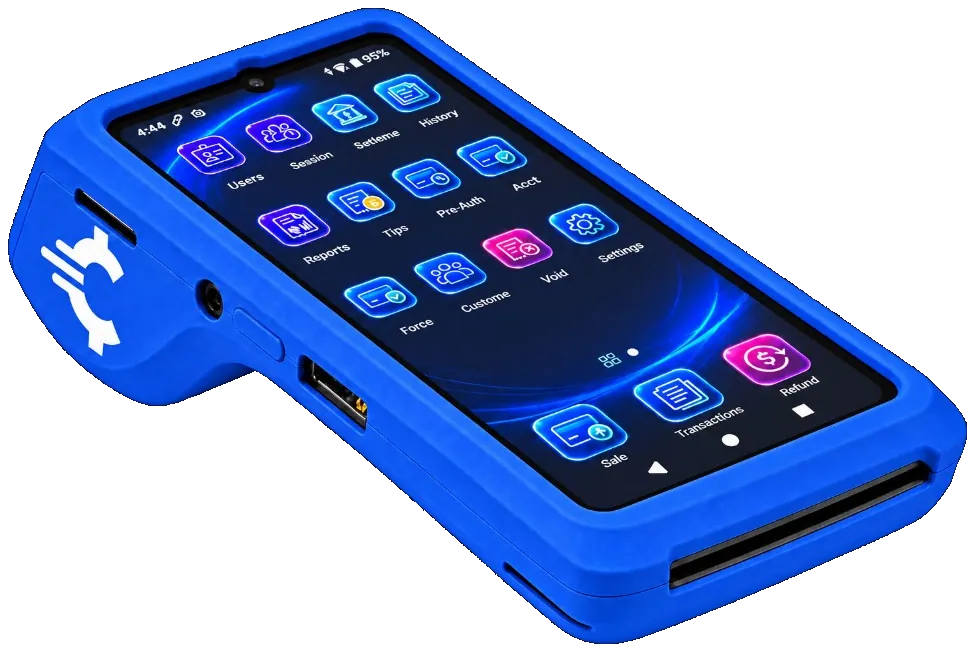
The RapidCents Rivo Go on a counter, the flagship of the Rivo line of countertop, mobile and compact card terminals. Payment Terminals
RapidCents payment terminals cover countertop, mobile and smart form factors so you can accept chip…
Explore
A café worker holds a phone running RapidCents Tap to Pay, showing an $18.75 sale and the contactless symbol, while a customer holds a Visa card to the screen. No separate card reader is present. Tap to Pay
RapidCents Tap to Pay turns supported iPhones and Android devices into contactless payment terminals without…
Explore
The RapidCents payments screen: gross volume, payment count, acceptance rate and refunds across the top, a filterable transaction list below, and a money timeline on the right tracing one payment from capture to planned payout. Merchant Dashboard
The RapidCents merchant dashboard gives owners, managers and finance staff a single signed-in view of live…
Explore


Implementation approach
Discovery
A specialist asks how you take money today, what an average sale looks like and where the deposit has to land. A conversation, not a form.
Configuration
Terminals ship pre-provisioned to your account. Staff roles, refund limits and receipt branding are set before the device arrives.
Testing
Run a sale, a refund and a batch close on the device, and confirm each appears in the dashboard for the amount you expect.
Go live and check the first deposit
Take live payments, then tie the first deposit back to the first batch. That single check catches most setup mistakes.
What does not change
Your bank
Deposits go to the business account you already use. Changing processor does not mean changing bank.
Your prices
Accepting cards does not require repricing. If you already build card cost into your prices, that stays your decision.
Your own PCI obligation
RapidCents is a PCI DSS Level 1 service provider, which covers the RapidCents environment. Your annual self-assessment is still yours to complete, on the questionnaire matching how you accept payments.
Frequently asked questions
What do I actually need before I can take a card?
A business bank account for deposits, business details for underwriting, and a decision about where you sell: counter, phone, online or on the road. Device, pricing model and receipt content are configuration after that.
Do I need a POS, or is a terminal enough?
A terminal takes payments. A point of sale also holds the catalogue or menu, adjusts stock, applies staff permissions and produces the day end. If you track inventory or run a menu, a terminal alone leaves that work manual.
When does the money reach my account?
Batches settle and eligible accounts fund next day. The dashboard deposit calendar shows what is pending, what has landed and what was deducted from each one.
What happens if the internet drops mid-shift?
Terminals connect over Ethernet, Wi-Fi or LTE depending on the model, so a wired lane can be specified with mobile data behind it. Raise connectivity when the device is recommended rather than after the first outage.
Can I take a payment when the customer is not in front of me?
Yes. A payment link sent by email or SMS, or the Virtual Terminal for a card read over the phone. Both settle into the same account and appear in the same reporting as counter sales.
How do I know I am not overpaying a year from now?
Run Fee Check against a current statement again. Interchange changes and card mix changes, so the effective rate you had at signup is not the effective rate you have today.
Can staff take payments without being able to issue refunds?
Yes. Staff roles and refund permissions are set on the account, so a cashier can complete sales while refunds stay with a manager. Those roles are configured before the terminal arrives, and the dashboard keeps an audit trail of who did what — which matters most in a small team where people cover each other's shifts.
Does accepting cards mean changing my bank or my prices?
Neither. Deposits go to the business account you already use, so changing processor does not mean changing bank. Pricing stays your decision: accepting cards does not require repricing, and if you already build card cost into your prices, that stays as it is.
Take the next step
Talk to a RapidCents specialist
RapidCents Fee Check reads a processing statement and shows interchange separately from the markup. Upload a statement for an instant breakdown, or open a merchant account and start accepting payments on one account.
- No obligation
- Payment specialists, not a call centre
- Secure statement upload



