


Payment processing for retail stores, at the register and online
Payment processing for retail stores covers tap and chip sales at the register, orders paid on your website, and returns refunded to the shopper's card. RapidCents handles all three with Countertop Terminals, the Payment Gateway and Hosted Checkout online, and one Merchant Dashboard, and connects to the POS you already run through APPIE and RapidBridge.

- PCI DSS Level 1
- SOC 2 Type II
- All major cards: Visa, Mastercard, Amex, Discover, UnionPay, Diners Club & PIN Debit
- Interchange-plus available
- Specialist onboarding support
How retail stores get paid
Retail stores get paid at the register, at online checkout, through phone and special-order payments, and through invoices to account customers, and they send money back through returns. Walk-in shoppers tap or insert a card at the counter, web customers pay before pickup or delivery, regulars put deposits on items you order in, and local businesses pay on account. All five jobs show up in the Merchant Dashboard, so one close covers every register, the web store and paid invoices.
Register sales
A walk-in shopper pays when the cashier rings up the basket in your POS. The shopper taps a card or phone on a countertop terminal, or inserts a chip card and enters a PIN. If a card is declined or the basket is split across two cards, the cashier simply runs the next tender. Finance gets every approval tagged with its register, cashier and batch.
Online orders and in-store pickup
A customer pays at your website checkout, through the Payment Gateway or a Hosted Checkout page, then receives the order or collects it from a store. If an item sells out after payment, you void or refund it; if an order is flagged for a mismatched billing address, you review it before shipping. Finance gets each online payment tagged with its order number.
Phone orders, special orders and holds
A regular calls to reserve an item, or asks you to bring in a size or style you do not stock. Staff take the card in the Virtual Terminal, or text a Payment Link for a deposit now and the balance at pickup. If the customer never collects, your written deposit terms decide what comes back. Finance sees each payment against its order reference.
Account customers who pay by invoice
Local businesses, schools and offices place bulk or corporate gift orders on account and pay later. Invoicing sends a branded invoice with a payment link, and the customer pays online by card, or by bank payment where your account supports it. If a customer short-pays or disputes a line, the rest of the invoice still settles. Finance can see which invoices are open, paid or overdue.
Returns and exchanges
A shopper brings an item back inside your return window with a receipt or an order number. The refund goes to the card used for the purchase, at the terminal or from the Merchant Dashboard. An even exchange needs no card transaction, while a price difference becomes a refund or a new sale. Finance gets each refund recorded against the sale it reverses.
Payment pages for specialized businesses
Some businesses in this sector take payments differently enough to need their own page. Each one covers its own payment jobs, software questions and buyer FAQs.
Florists
Take counter sales, phone orders, wedding deposits and online orders with receipts, order references and…
Clothing Boutiques
RapidCents gives clothing boutiques counter terminals, online checkout and pop-up acceptance under one setup…
Shoe Stores
Take special-order size deposits, online pickup payments and exchanges at the counter, by link or online…
Electronics Stores
Take high-value card purchases in store, online and by phone, keep delivery and return records tied to the…
Hardware & Home Improvement Stores
RapidCents helps hardware and home improvement stores take card payments at the counter, in the yard and by…
Computer & Phone Repair Shops
Take diagnostic fees, remote parts deposits and pickup balances at the counter or by payment link, and keep…
Appliance Stores
Take special-order deposits in store, collect delivery balances by mobile terminal or payment link, and…
How do retail stores take card payments at the register?
Retail stores take card payments at the register on a countertop terminal tied to the sale. The cashier rings up the basket, the total reaches the terminal, and the shopper taps a card or phone or inserts a chip card, entering a PIN when the card asks for one. The approval prints on the receipt, the sale joins that register's batch, and the batch closes at the end of the day.
From basket to receipt
The cashier scans the items in your POS. On an integrated register the total goes to the RapidCents terminal by itself; on a standalone setup the cashier keys the same total into the terminal. The shopper pays, the terminal shows approved or declined, and the receipt carries the approval code, card brand and last four digits. The same record appears in the Merchant Dashboard for lookups and refunds.
What to set up before opening day
Give each register its own terminal and each cashier their own login, so every sale traces back to a lane and a person. Check that receipts show your store name and address, and that the POS receipt carries your return policy. Decide which staff may issue refunds and voids, and set user permissions to match. Agree in advance what cashiers do if a terminal loses its connection: which spare to use and who to call.
Declines, split payments and duplicate charges
A decline appears on the terminal, sometimes with a short reason; ask for another card instead of retrying the same one over and over. A basket split across two cards runs as two transactions, so a later refund follows the same split. If a terminal times out mid-sale, look up the last transaction before charging again. Voiding a duplicate before the batch closes stops it from settling, although the shopper's bank may show a pending hold for a while.
Busy days, sidewalk sales and pop-ups
When the line backs up or the store sets up a table outside, a mobile terminal or Tap to Pay on a supported iPhone or Android phone lets staff take contactless payments away from the counter. Those sales land in the same Merchant Dashboard as the registers, so the day's close still covers every device.
A busy Saturday at a two-register shop
Say a home goods and gift shop runs two registers on a busy Saturday. One shopper taps a phone for a set of candles. Another splits the cost of a rug across two cards, which gives two approvals on one sale. A third returns a lamp bought last week, and the manager refunds it to the original card. At close, each register's batch matches the card tenders the POS recorded.
Retail POS payment integration: integrated or standalone terminals?
RapidCents integrates with many major platforms through APPIE and RapidBridge, so most stores keep the POS they know. With retail POS payment integration, your POS software sends each sale total to the terminal and records the result itself, so nobody keys an amount twice. A standalone RapidCents terminal takes card payments beside any POS, and cashiers record the card tender by hand.
What an integrated register does
With APPIE, the POS you already run drives the RapidCents terminal: it sends the amount, the shopper pays, and the approval or decline comes back into the sale with the card brand, last four digits and a transaction reference. Refunds and voids usually start from the original sale in the POS too. Because the amount is never typed twice, a mistyped total or a second charge for the same basket is less likely.
What a standalone terminal does
The cashier keys the total into the RapidCents terminal, then marks the sale as paid by card in the POS. It works beside any POS, and card data stays in the terminal rather than on your store computers. The trade-off is a daily match: someone compares each register's card tenders in the POS with that terminal's batch and chases any gap.
What decides which setup fits you
Your POS vendor and edition decide the route. Some retail POS platforms process cards through their own payments service; others work with outside processors through a supported connection. Tell your RapidCents representative which POS, edition and country you run, and they will walk you through the terminal models and the connection that fit. If your current payment agreement has an end date or an early exit fee, plan around it.
Connecting your own software
If you run your own POS or online store software, a developer can connect it to the RapidCents Payment Gateway, a REST API for authorize, capture, void, refund and tokenize calls, with webhooks that report each payment event back to your system. Run sales, refunds, voids and declines in the sandbox before a live card is charged. A store replacing its POS anyway can also look at RapidCents Retail POS.
A family shoe store keeps its POS
Say a family-run shoe store likes its POS and wants to keep it. It installs standalone Countertop Terminals at its three registers. Cashiers key each total and tender the sale as card in the POS. At close, the manager compares each register's card tenders with its terminal batch in the Merchant Dashboard and resolves any difference that evening, while the staff who rang the sales are still on shift.
RapidCents products for retail stores
Four RapidCents products cover the core of a retail store's payments. Countertop Terminals take the card at every lane, the Payment Gateway and Hosted Checkout handle website orders, and the Merchant Dashboard brings register sales, online sales, refunds and deposits together for the daily close.

A fixed RapidCents countertop terminal taking card payments at the till, with settlement visible on the dashboard. Countertop Terminals
RapidCents countertop terminals sit at retail counters, restaurant hosts and reception desks where speed and…
Explore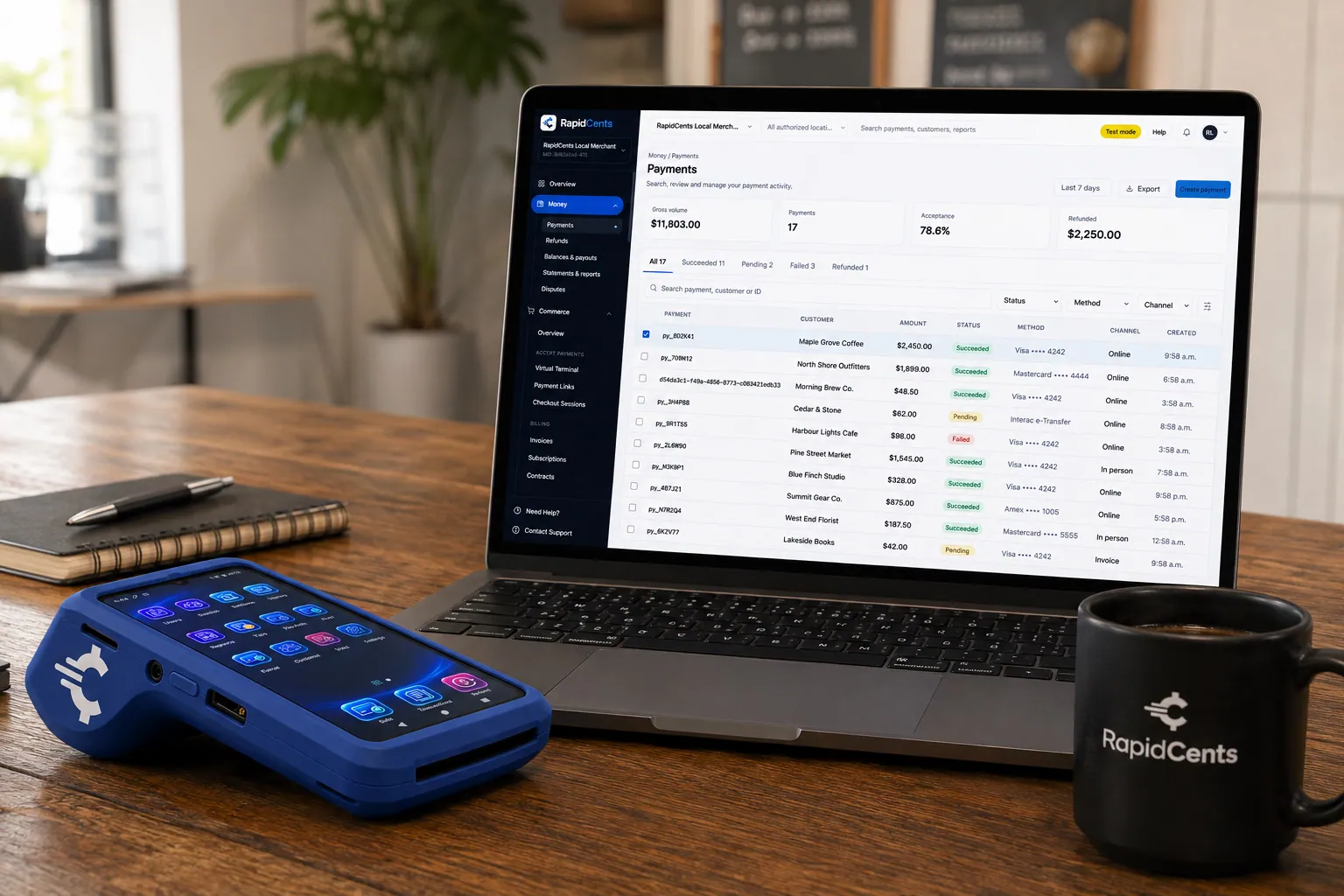
A payment-gateway integration desk: API response on screen, RapidCents terminal ready for a test sale. Payment Gateway
The RapidCents payment gateway exposes REST endpoints for authorize, capture, void, refund and tokenize…
Explore
A RapidCents hosted checkout page at checkout.rapidcents.com, with the order summary and totals on the left and the card fields on the right, footed by SSL and PCI DSS assurances. Hosted Checkout
RapidCents hosted checkout delivers PCI-scoped payment pages you redirect customers to or embed via iframe…
Explore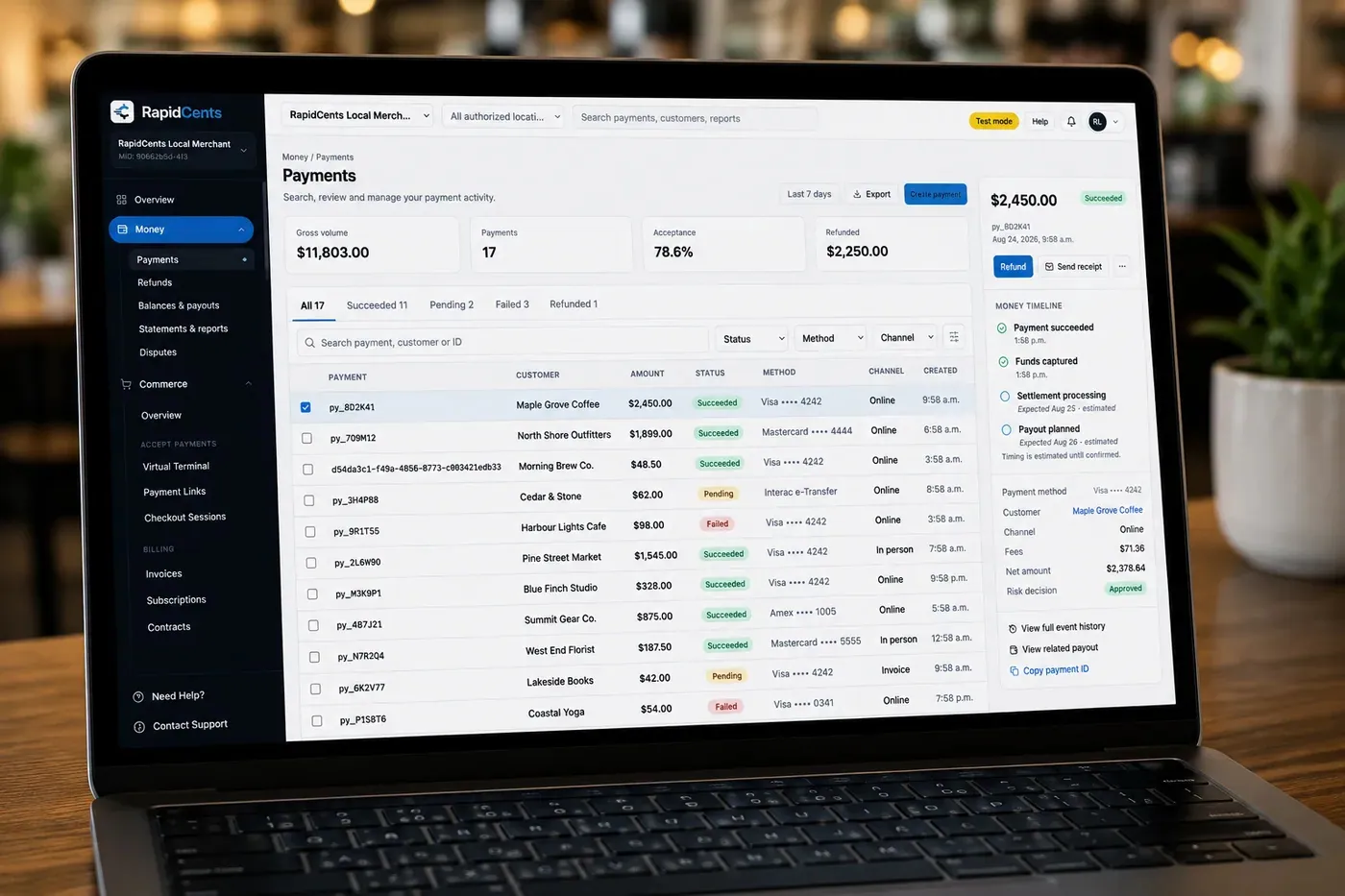
The RapidCents payments screen: gross volume, payment count, acceptance rate and refunds across the top, a filterable transaction list below, and a money timeline on the right tracing one payment from capture to planned payout. Merchant Dashboard
The RapidCents merchant dashboard gives owners, managers and finance staff a single signed-in view of live…
Explore


Online and in-store payment reconciliation, store by store
Online and in-store payment reconciliation works when every sale, refund and fee carries the store, register or web order it came from. RapidCents shows terminal batches and online payments side by side in the Merchant Dashboard, so you can match each day's card sales to the POS and the web store, then match each deposit to the bank. When totals disagree, check refunds, returns that cross channels and timing first.
What the reports show
The Merchant Dashboard lists every transaction with its date, amount, card brand, location and staff member, and shows the deposits you can expect. Register sales carry their terminal and batch; online payments carry the order reference your website sends with them. Export either view as CSV for your accounting software or a spreadsheet.
Matching sales to deposits
Start from gross card sales for the day, by store and by channel. Subtract refunds and chargebacks, then any fees taken from the deposit, and compare the result with the bank line. One deposit can hold more than one batch, so match it to the batches inside it rather than to a calendar day. Keep register batches and online payments in separate columns, so a gap points to one channel rather than to the whole day.
Returns that cross channels
A web order returned at the counter is a common reconciliation gap. Refund it against the original online payment from the Merchant Dashboard, rather than as a fresh refund on the store terminal, so the credit reaches the card that paid and the order and its refund sit in the same channel. Record the return in the POS as well, so stock and sales stay right.
Multi-store payment reporting
With Multi-Location, each store can run under its own location-level merchant ID, with permissions that let a store manager see that store only while head office sees the roll-up. A variance then belongs to one store and one register instead of to the whole business, and the owner can compare stores without collecting a spreadsheet from each manager.
Chargebacks on online orders
When a shopper disputes a web order with their bank, the disputed amount is usually debited from your funds while the case is reviewed. Keep the order, delivery or pickup confirmation with each online payment and answer before the deadline. The Merchant Dashboard lists open disputes, and Disputes and Chargeback Protection adds alerts, evidence collection and deadline tracking.
Three stores and a web shop on Monday's close
Say a retailer with three stores and a web shop reviews Monday's close. Store two's terminal batch is higher than its POS card tenders; the dashboard shows a card sale that the cashier rang as cash, so the manager corrects the tender in the POS. The web channel shows a refund for an order returned at store one, which explains the return in store one's POS with no terminal refund beside it.
What drives retail store credit card processing fees?
Retail store credit card processing fees depend on your card mix, how each card is taken and the services around the payment. RapidCents prices on interchange-plus: interchange, set by the card networks, passes through at cost; your RapidCents markup is set out in your Fee Schedule; and fees for equipment or services apply where you use them. The agreement is month to month, with no fixed term.
Interchange-plus, line by line
Every card sale carries interchange, which varies with the card type, how the card was taken and the category the networks assign to your business. RapidCents passes interchange through at cost and adds the markup set out in your Fee Schedule. When you compare providers, line up the markups and the equipment and service fees, since interchange is a network cost that applies whoever processes the card.
Your card mix
Debit generally costs less to accept than credit, and premium rewards and business cards carry higher interchange than standard consumer cards. A store where most shoppers tap a debit card has a different cost profile from one selling higher-priced goods on rewards cards, so ask for quotes on your own mix rather than on a sample.
Tapped or inserted versus keyed or online
A card tapped or inserted at the register usually qualifies for lower interchange than the same card keyed by hand, taken by phone or paid online, because a card present at the counter carries less fraud risk. If your web and phone share is growing, your cost per sale shifts with it, even when the markup stays the same.
Returns, refunds and what reaches the bank
A store with a generous return window sends more money back, so ask every provider how refunds are priced: whether a refund carries its own fee, and what happens to the markup on the original sale. Each deposit is your closed batches less refunds and chargebacks, and less fees where they come off the deposit, so also ask whether fees are taken daily or billed monthly.
Total cost of ownership
Add the costs outside the card fees: terminals bought or rented, POS software subscriptions, any online checkout or gateway fee, chargeback fees and the staff hours spent matching reports by hand. A low markup can still cost more over a year when it comes with an expensive terminal lease or a POS that only works with its own processor.
What to bring to a fee comparison
Bring two or three recent processing statements, your average ticket, your split between register, online and phone sales, and your monthly refund and chargeback counts. Upload a statement to Fee Check and it separates the interchange on your card mix from the markup you pay now, so every quote starts from the same base.
Software compatibility: Lightspeed Retail, Shopify POS and other retail systems
RapidCents integrates with many major platforms through APPIE and RapidBridge, so most stores keep the POS they run today. APPIE lets your POS drive RapidCents terminals, and RapidBridge takes payments inside web-based software such as Shopify, WooCommerce and BigCommerce. The right option depends on your POS vendor, edition and country, and your RapidCents representative walks you through it. Where a POS has no connection, terminals run standalone beside it.
Lightspeed Retail
Lightspeed Retail runs the register, inventory and customer records, and Lightspeed sells its own payments service alongside it. Which RapidCents option fits depends on your Lightspeed product line, such as X-Series or R-Series, your country and your Lightspeed agreement. Tell your RapidCents representative which edition you run, and they will walk you through it; standalone terminals beside the register are the fallback.
Shopify POS
Shopify POS shares products, stock and customers with a Shopify online store. RapidBridge works with Shopify, so an online card payment posts against the order you already have open, and your RapidCents representative will show you how in-store sales fit your plan and country. Shopify's own card readers are designed for Shopify Payments, so register setups need that conversation.
Square for Retail
Square for Retail combines POS software with Square's own card processing, so cards taken in the Square app on Square hardware are processed by Square. To use RapidCents for in-store cards, run RapidCents terminals standalone and record those sales as an external payment in Square where your plan allows it, or move to a POS that connects. Export your sales and refund history first; your RapidCents representative will walk you through the route for your country.
Clover
Clover is a POS and terminal platform from Fiserv, sold directly and through banks and resellers, and Clover devices are generally tied to the processing account they were sold with. Read your Clover agreement for its term, equipment lease and any early termination fee, then talk to your RapidCents representative about the options for your country. Clover's transaction exports move history out as a file, which helps a migration.
NCR Counterpoint
NCR Counterpoint is a retail POS and inventory system from NCR Voyix. Its card payments typically run through the payment services NCR Voyix supports for your version, so ask NCR Voyix which options exist for your version and country, and your RapidCents representative will explain how APPIE and RapidBridge fit. If none fits, standalone terminals plus a settlement export into your accounting system keep payments and books aligned.
QuickBooks Online and Xero
On the accounting side, RapidCents connects settled transactions, fees and refunds to QuickBooks Online and Xero, while larger ERPs such as NetSuite and SAP import settlement files instead of a live connector. Decide whether you post each sale or a daily summary per store, and your RapidCents representative will set up the mapping with you.
Retail payment options by country
RapidCents serves retail merchants in Canada and the United States. The workflows are the same in both countries, but the debit options, bank payment methods and settlement currency depend on the country where your merchant account is opened. Your RapidCents representative gives you the list of methods your stores can offer.
What works the same in both countries
Register sales on Countertop Terminals, online orders through the Payment Gateway and Hosted Checkout, refunds against the original sale and store-by-store reporting in the Merchant Dashboard follow the same steps in Canada and the United States.
What depends on your account's country
Which debit cards your terminals accept, which bank payment methods your business customers can use and the currency your deposits arrive in are set by the country of your merchant account. Ask your RapidCents representative for the enabled list before you print signage, train staff or change your website checkout.
Selling to shoppers abroad
If your web store ships to customers in other countries, talk to your RapidCents representative about International Payments, which card brands and currencies your account can accept online, and how refunds on those orders appear in your reports.
How to switch payment processors without disrupting checkout
Switch a retail store's payment processor by listing everything that takes cards today, testing every flow before shoppers reach it, and keeping the old account open through your return window. Plan the cutover away from your busiest season, run old and new side by side on one register or one store first, and reconcile the first deposits line by line before moving the rest.
Take stock of what charges cards today
List every terminal by store and register, each POS and website connection, saved customer cards, recurring charges, open invoices and deposits held on special orders. Note your current agreement's end date, cancellation terms and whether terminals are owned, leased or rented, because leased equipment usually has to go back or be paid off.
Saved cards stay with the old processor unless both agree
Cards saved with your current processor are stored as tokens in that processor's vault. Moving them takes the agreement of both providers and a secure transfer, and not every processor allows it. When a transfer is not possible, customers add their card again on their next purchase, with their authorization to store it.
Test every flow before live shoppers
On each new terminal, run a sale, a void, a refund against an earlier sale, a declined card and a split payment. Online, run an order, a 3-D Secure challenge, a refund and a Payment Link for a special-order deposit. Check that each test appears in the Merchant Dashboard with the right store, register and order reference, and that staff logins and refund permissions match your rules.
Keep the old account through your return window
A return on a purchase made before the switch should be refunded through the processor that took the original payment, against that sale. Keep access to the old account, through a terminal or its online portal, until your return window has passed and any chargebacks on old sales are closed, then close it in writing.
Reconcile closely, then move the next store
For the first few weeks, match every deposit to its batches by store and channel, and map payment references to your POS and accounting software so each refund and fee lands in the right ledger account. Set up store-level users and reports in the Merchant Dashboard as you go. When a full cycle reconciles cleanly, move the next store.
Payment questions from retail stores
How do we choose the best credit card processing for a retail store?
Choose the processor that fits your own store's setup and numbers, because no processor is best for every retail store. When you compare retail store merchant services, line up six things: whether the processor works with your POS and online store, the total cost on your real card mix, how returns and refunds run, how deposits and reports match your books, who helps when a terminal fails on a busy day, and the agreement's term, equipment and exit terms. Ask each provider for a written quote on the same recent statement and a live demonstration of a sale, a refund and a day's close.
How much does payment processing cost for a retail store?
What you pay for payment processing at a retail store depends on your card mix, how each card is taken and the services you use, so the useful answer is a quote built on your own statement. RapidCents bills interchange-plus: the card networks' interchange at cost, plus the markup in your Fee Schedule, plus fees for any equipment or services that apply to your account, on a month-to-month agreement with no fixed term. Tapped and inserted cards usually carry lower interchange than keyed or online payments. Add terminals, POS software and chargeback costs to compare the total, and use Fee Check to see your current interchange and markup separately.
Can I use Lightspeed Retail with a different payment processor?
Often, yes. RapidCents integrates with many major platforms through APPIE and RapidBridge, and the right option depends on your Lightspeed product line, your country and your Lightspeed agreement. Lightspeed sells its own payments service, so tell your RapidCents representative which edition you run and they will walk you through it. If no connection fits, RapidCents terminals run standalone beside the register, with cashiers recording card tenders in Lightspeed and a manager matching the two each day.
How does retail POS payment integration work?
Retail POS payment integration links your POS to the payment terminal: the cashier finishes the sale in the POS, the amount appears on the terminal, the shopper pays, and the result and a transaction reference return to the POS without anyone retyping the total. The receipt prints with the sale, and at close the POS card total should agree with the terminal batch. RapidCents connects to the POS you already run through APPIE and RapidBridge, and your representative tests sales, refunds, voids and declines with you on each register. Otherwise, standalone terminals take the card and staff record the tender by hand.
Which payment options can retail stores use in Canada and the United States?
Retail stores in Canada and the United States can take major credit and debit cards by tap or chip at the register, card payments online through Hosted Checkout or the Payment Gateway, and invoice payments by Payment Link. Debit options, bank payment methods and the settlement currency differ by the country of your merchant account, and your RapidCents representative gives you the list switched on for yours. Have that list in hand before you train staff or change your checkout.
What setup is needed for online and in-store payment reconciliation?
Online and in-store payment reconciliation needs three things: every payment tagged with its store, register or web order; one report that shows terminal batches and online payments together; and a routine that matches each deposit to the batches inside it. With RapidCents, set up each store as its own location, have your website send its order number with each online payment, and export the settlement report as CSV for your accounting software. Refund web orders returned in store against the original online payment.
How should we handle retail returns and refund processing?
Refund every return to the card the shopper paid with, against the original sale, and limit who can issue refunds. Write down who may refund, up to what amount without a manager, and what happens when the shopper has no receipt; your POS policy may offer store credit instead. If a refund fails at the terminal, retry it against the original sale from the Merchant Dashboard rather than handing back cash, so the credit and the record match.
Can one provider run our retail contactless debit terminals and multi-store payment reporting?
Yes, RapidCents runs both. Countertop Terminals take contactless debit and credit at each register, and the Merchant Dashboard reports every location's transactions and deposits in one roll-up, with location-level merchant IDs and permissions. Two things stay where they are: the stock and sales record lives in your POS, and any store whose POS only works with its own processor reports separately until it moves to RapidCents or to standalone terminals.
How do we reconcile card payments with bank deposits for a retail store?
Reconcile in two passes: card sales against the POS, then deposits against the bank. First, compare each register's terminal batch and the web store's online payments with the card tenders and orders in your POS, store by store. Then match each bank deposit to the batches it contains, less refunds, chargebacks and any fees taken from the deposit, and trace gaps by transaction ID and location. Settled transactions, fees and refunds flow to QuickBooks Online and Xero; other systems can import the settlement report as a CSV file.
How do we switch payment providers without losing saved cards or breaking our POS setup?
Once your account is approved, your RapidCents representative helps you plan what happens to saved cards and the POS connection before you move any live sales, then you switch one store at a time. Saved cards are tokens held by your current processor; moving them needs both providers' agreement and a secure transfer, which not every processor allows, so be ready for customers to add their cards again with their authorization. Test sales, refunds and voids on each register, and keep the old account until your return window closes.
What MCC is used for retail stores?
MCC 5311, the card networks' code for department stores, is commonly associated with retail stores that sell many kinds of goods across several departments. A store that sells mainly one kind of product, such as clothing, shoes, electronics or hardware, usually carries a more specific code. RapidCents sets the merchant category with you during onboarding based on what your business actually sells, and the code has to describe the business accurately, because card networks use it to classify your transactions.
Related retail and storefront businesses
Convenience, grocery and liquor stores share the fast register lane; furniture stores add large tickets and delivery deposits; nurseries, sporting goods and gift shops swing with the seasons; vending takes payment with no cashier at all. See how the register, online and refund jobs change for each of these businesses.
Convenience Stores
RapidCents gives convenience stores countertop terminals for debit and credit taps, Tap…
Grocery
Credit, debit and contactless acceptance for supermarkets and independent grocers…
Liquor Stores
RapidCents gives liquor and wine retailers card terminals for the till, payment links for…
Jewellery Stores
Take high-ticket cards at the counter, collect repair and custom-order deposits, and…
Furniture Stores
Take order deposits at the desk, collect delivery balances by link or at the door, and…
Sporting Goods
Take cards at the till, the service desk and online, hold rental deposits, and reconcile…
Garden Centres & Nurseries
Take cards at the till, beside the shrubs and at the loading gate, and collect landscape…
Auto Parts Retailers
Take cards at the counter and on delivery, collect trade statements on the terms you set…
Take the next step
See what your store pays to accept cards
Fee Check reads a recent statement from your current provider and shows how much of what you pay is interchange and how much is markup. Bring that breakdown to a RapidCents quote built on the same card mix and the same split of register, online and phone sales.
- No obligation
- Payment specialists, not a call centre
- Secure statement upload



