


Retainer billing for consultancies and agencies, plus project invoices and MOTO
Consultancies and agencies work on a monthly retainer with project scopes billed alongside it, and the person who approves the work is rarely the person who pays the invoice. RapidCents charges the retainer automatically each month with recurring payments, invoices project scopes as they close, sends branded payment links a client's accounts payable can pay directly, and keys card details given over the phone through the virtual terminal. Consulting practices are classified under MCC 8999.

- PCI DSS Level 1
- SOC 2 Type II
- All major card brands: Visa · Mastercard · Amex · Discover · PIN debit
- Interchange-plus available
- Specialist onboarding support
Operational workflows
Statement of work agreed and the monthly retainer set
Retainer charged on schedule each month
Project milestones and overages invoiced separately
Hours reviewed against what the retainer covers
Payment challenges
Scope grows faster than the retainer
Extra work gets delivered before it is contracted, so the invoice arrives as an argument instead of a formality.
The approver is not the payer
The client contact signs off but accounts payable settles, so invoices wait on a purchase order from people who attended no meeting.
Net terms on a monthly fee
A recurring retainer billed on terms lets a client run two months behind while the work keeps going out.
Choose the right payment setup for Professional Services
Choose professional services payment processing
For Professional Services, map the deposit, staged payments, and final balance, sign-up, scheduled billing, and renewal, and online checkout and remote payment before choosing a setup. Select channels that match those moments, then confirm that the chosen solution genuinely covers each channel.
Payment hardware for Professional Services
For Professional Services, physical hardware may be secondary to the checkout flow. Prioritize gateway or payment-page requirements first, then add a terminal only when an in-person payment point is genuinely needed.
Compare payment processing fees
For Professional Services, request a written fee breakdown covering deposits and final balances, scheduled billing, declined cards, and cancellations, and online checkout and dispute handling. Compare the effective cost across the real card and channel mix; do not choose on a headline rate alone.
Set up or switch Professional Services payments
To set up Professional Services payments, document the checkout, confirmation, and refund path, confirm compatibility before purchase, then test a real payment flow before going live.
Recommended products

The RapidCents invoices screen: outstanding, overdue, paid and draft totals across the top, the invoice list below them, and a preview of one invoice on the right with its line items and a View & Record Payment button. Invoicing
RapidCents invoicing helps professional services, contractors and B2B suppliers create branded invoices…
Explore
The RapidCents recurring payments screen showing active subscriptions, monthly recurring revenue, failed payments and upcoming renewals, above a list of subscriptions with their plan, amount, frequency and next billing date. Recurring Payments
RapidCents recurring payments manage subscription plans, membership renewals and installment schedules with…
Explore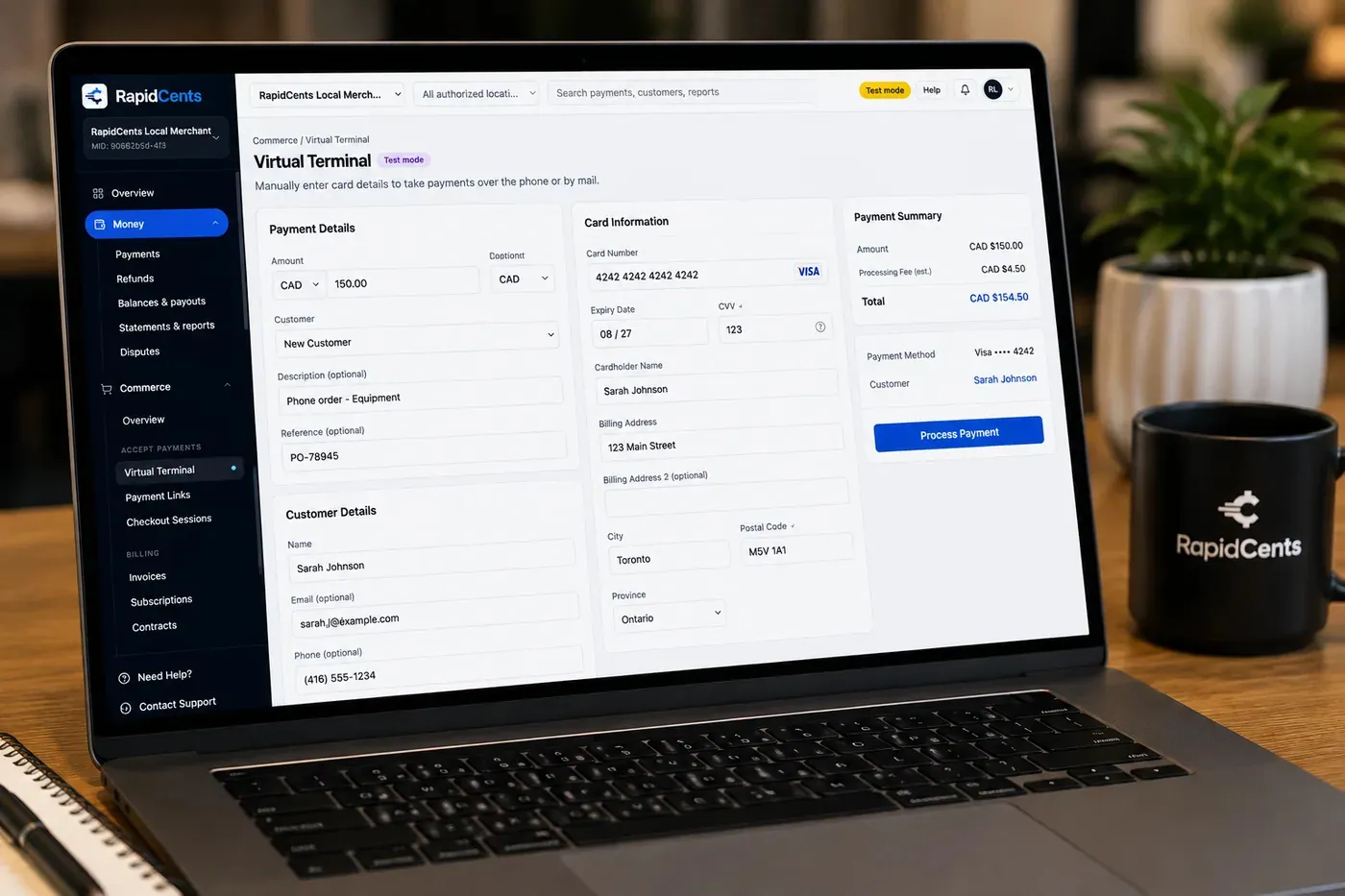
The RapidCents virtual terminal: payment details, card number, expiry and CVV keyed by hand on the left, with a payment summary on the right showing the amount, the estimated processing fee and a Process Payment button. Virtual Terminal
The RapidCents virtual terminal lets authorized staff enter mail-order and telephone-order payments through a…
Explore
The RapidCents payment links screen listing created links with their amount, status, click count and whether they have been paid, beside a phone showing the branded page a customer opens to pay $2,500.00. Payment Links
RapidCents payment links let staff generate branded pay-by-link URLs for invoices, deposits, balances and…
Explore


How this gets set up
Retainer agreed and scheduled
The monthly retainer is set up once on recurring payments, so it charges without a reminder email every month.
Project scopes invoiced alongside
Work outside the retainer is invoiced as its own scope, closing when the deliverable does.
A link the approver can forward
The invoice goes out as a branded payment link, because the client contact who approved the work is rarely the one who pays it.
Accounts payable pays by card
The client's AP settles the link directly, with no call to read out a number and no cheque in the mail.
Integrations
Clio
Clio is where a practice with legal-adjacent matters keeps the file and the bill, and payments post against the matter they were raised on.
QuickBooks
QuickBooks holds the firm's receivables, and a settled retainer or project invoice clears there without being re-entered by hand.
Xero
Xero carries the invoice the client actually received, and the card payment reconciles against it so the ledger and the payment record agree.
Operations, security and going live
Retainer and project revenue read separately
Reporting has to distinguish the recurring base from project billing, because that ratio is what the firm plans capacity against.
The approver and the payer are two people
The payment record has to name the client and the scope clearly enough for an AP clerk who attended none of the meetings.
A card given by phone does not sit in an inbox
The virtual terminal takes the number directly, so an account manager's email never holds one.
Live at the start of a billing cycle
Retainers move onto the schedule at a cycle boundary, so no month is billed twice or missed in the switch.
Payment questions from Professional Services
What should businesses compare when choosing professional services payment processing for Professional Services?
Compare professional services payment processing against the real payment journey: the deposit, staged payments, and final balance, sign-up, scheduled billing, and renewal, and online checkout and remote payment. Start with the required channels and hardware, then confirm compatibility and support before committing.
What payment hardware is practical for Professional Services?
If Professional Services sells primarily online, do not choose physical hardware before validating checkout. Add hardware only for a clearly defined in-person payment need.
Which payment channels are relevant for Professional Services?
For Professional Services, start with the deposit, staged payments, and final balance, sign-up, scheduled billing, and renewal, and online checkout and remote payment. Keep only the channels that match those moments, then verify the complete customer flow before offering them.
How should payment processing fees be evaluated for Professional Services?
For Professional Services, compare costs related to deposits and final balances, scheduled billing, declined cards, and cancellations, and online checkout and dispute handling using actual transactions. Request a written breakdown of fees and terms rather than relying on an advertised rate alone.
What should be confirmed before setting up payments for Professional Services?
For Professional Services, document the checkout, confirmation, and refund path, verify the needed compatibility, and test the flow before going live. This exposes manual steps and exceptions before customers encounter them.
What should be confirmed before using recurring payments for Professional Services?
Define consent, billing cadence, change and cancellation rules, and how a declined card is handled. Ask to see the complete customer journey before offering it to customers.
What MCC category applies to Professional Services?
MCC 8999 is commonly associated with Professional Services. Our onboarding team confirms the correct category for your business.
Related industries
Law Firms
Law firms collect retainers, trust-account coordination and client invoices with secure…
Accounting Firms
Accounting and bookkeeping firms bill recurring engagements, project milestones and…
B2B & Wholesale
Wholesale distributors accept large ticket B2B cards, invoicing and net-term payment…
Insurance
Insurance agencies collect premiums via payment links, recurring billing and virtual…
Real Estate
Brokerages and property managers collect application fees, lease deposits and maintenance…
Property Management
Property managers run tenant rent portals, maintenance invoicing and HOA assessments with…
Freight & Logistics
Carriers and 3PLs invoice shippers, collect COD balances and manage fuel surcharge…
Marketing Agencies
Agencies bill monthly retainers plus project milestones and pass-through ad spend, so one…
Take the next step
Talk to a RapidCents specialist
RapidCents Fee Check reads a processing statement and shows interchange separately from the markup. Upload a statement for an instant breakdown, or open a merchant account and start accepting payments on one account.
- No obligation
- Payment specialists, not a call centre
- Secure statement upload



