


Payment processing for print and sign shops, from quote to pickup
Payment processing for print and sign shops follows the way a job moves: quote, proof approval, production, then pickup or install. We send a payment link with the quote for the deposit, invoice your corporate accounts and take the balance at the counter or by link, all around the software you already run.

- PCI DSS Level 1
- SOC 2 Type II
- All major cards: Visa, Mastercard, Amex, Discover, UnionPay, Diners Club & PIN Debit
- Interchange-plus available
- Specialist onboarding support
How print and sign shops get paid
Print and sign shops get paid in four moves: a deposit that releases production, a balance when the work is collected or installed, invoices for corporate accounts on terms, and orders placed through a web storefront. Each move uses a different RapidCents tool, and all of them land on the same job ticket, so your bookkeeper can match money to work.
Job deposits before production
A customer approves a quote and you need money before ordering vinyl, substrate or stock. Staff send a payment link by text or email, or key the card in the Virtual Terminal. The deposit is recorded against the job ticket and appears on the receipt.
Balances at pickup or install
The customer collects the finished banners, or the installer completes the job. Staff take the remaining balance on a countertop or mobile terminal, or send a link to a customer who is not on site. The balance closes the same job ticket the deposit opened.
Corporate accounts invoiced on terms
A school, contractor or property manager places repeat orders and pays after delivery. You send a branded invoice with the purchase order number and a payment link, then watch it move from sent to paid. Larger runs can be paid by bank payment instead of card.
Web storefront and phone orders
Some customers order templates and business cards online, while others phone in a rush job. Online orders pass through a payment gateway, and phone orders are keyed into the Virtual Terminal with address and security code checks, so every order has a payment record.
How do print and sign shops collect payments from quote to pickup?
A print or sign shop collects payment in two steps tied to the job ticket: a deposit once the customer approves the quote and proof, and a balance when the work is picked up or installed. We cover both with payment links, the Virtual Terminal and countertop terminals, so staff never retype card numbers from an email.
Quote, proof and deposit run in order
The customer approves the artwork proof, staff attach a payment link to the job ticket, and production is released once the deposit clears. A print proof approval payment workflow works best when the approval and the payment reference sit on the same record.
Set the rules before the first job
Agree in writing what the deposit covers, whether artwork changes after approval are billed as change orders, and what happens to custom work if the customer cancels. Keep a card on file for later charges only with the customer's authorization.
Window graphics and vehicle lettering, $1,800
Say a customer approves $1,800 of window graphics and vehicle lettering. Staff text a payment link for the deposit, the shop orders cast vinyl, and the balance is taken on the countertop terminal at pickup. If the first card declines, staff resend the link for another card.
How do print job deposit payments release production?
Print job deposit payments work when the deposit is collected before any materials are ordered, and the link, receipt and job ticket share one reference. RapidCents Payment Links and the Virtual Terminal let staff collect that deposit by text, email, QR code or phone, without the customer visiting the shop.
Choose the channel by customer
A repeat office buyer pays from the emailed link, a walk-in taps or inserts a card on the terminal, and a customer ordering by phone gives card details to a staff member who keys them into the Virtual Terminal with address and security code checks.
Handle rush orders, partial payments and declines
Rush orders may need a larger deposit, and a partial payment link suits a customer paying in two parts. A declined card should not stop the job: send a fresh link and note the attempt. Refunds on custom printed goods follow the policy the customer accepted on the quote.
A $2,400 restaurant menu order
Say a restaurant orders 500 menus and a sandwich board for $2,400. The shop sends a link for the deposit, locks the proof and prints once the payment shows paid. When the owner adds a wine list, staff issue a second link for the added work instead of altering the first charge.
RapidCents products for print and sign shops
Payment Links and Invoicing collect deposits and balances away from the counter, Payment Terminals take payment at pickup, and bank payments suit larger invoices. Together they keep each job's money on one record.

The RapidCents invoices screen: outstanding, overdue, paid and draft totals across the top, the invoice list below them, and a preview of one invoice on the right with its line items and a View & Record Payment button. Invoicing
RapidCents invoicing helps professional services, contractors and B2B suppliers create branded invoices…
Explore
The RapidCents payment links screen listing created links with their amount, status, click count and whether they have been paid, beside a phone showing the branded page a customer opens to pay $2,500.00. Payment Links
RapidCents payment links let staff generate branded pay-by-link URLs for invoices, deposits, balances and…
Explore
The RapidCents Rivo Go standing upright in its blue silicone case, showing the full-touch sale screen a customer reads across the counter. Payment Terminals
RapidCents payment terminals cover countertop, mobile and smart form factors so you can accept chip…
Explore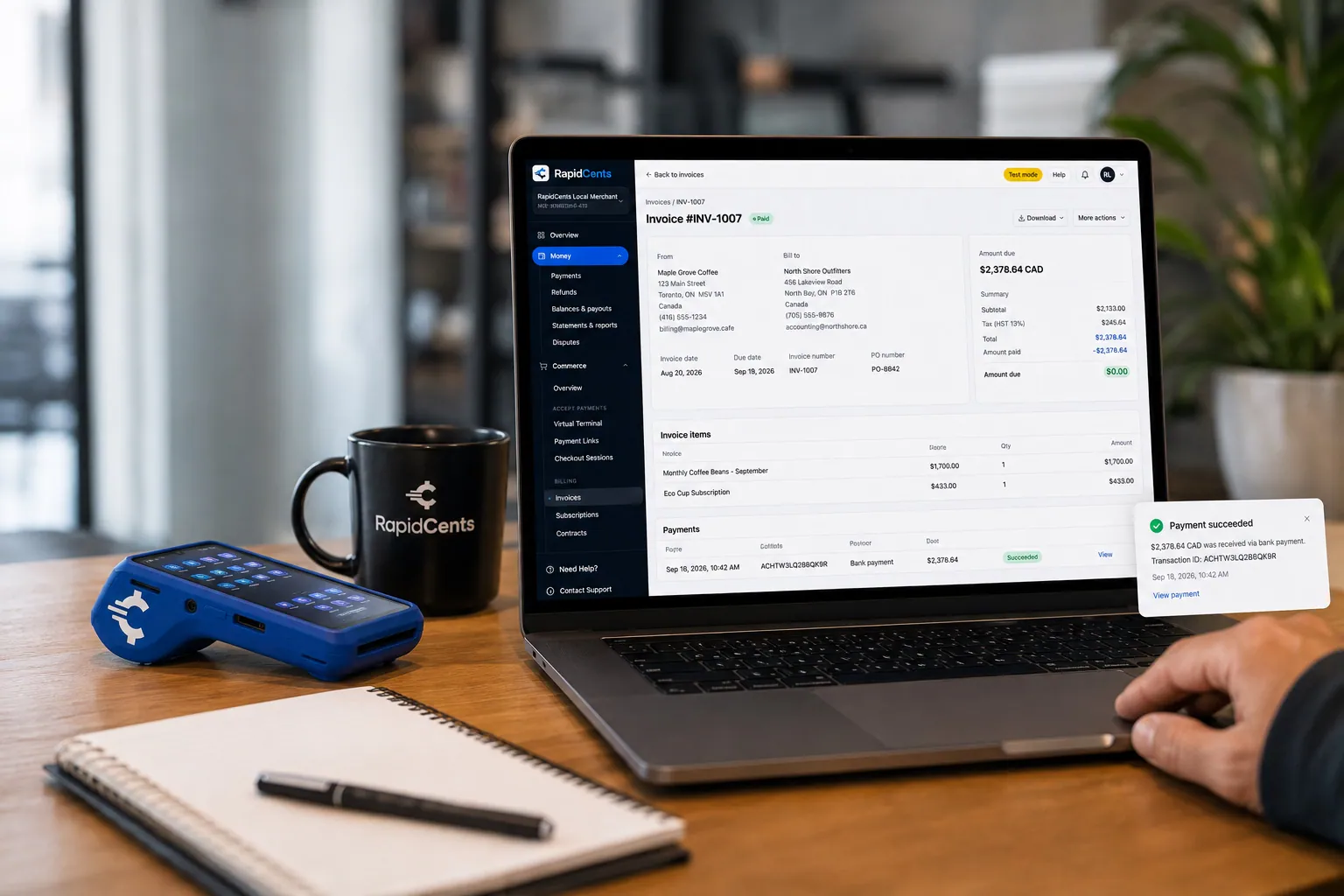
A merchant invoices a customer for bank debit through RapidCents, with card terminal capture available on the same desk. Bank Transfer / Bank Payments
Bank payments suit recurring and high-value invoices where card fees are the wrong tool. Collect directly…
Explore


How do you invoice corporate accounts and collect balances?
Sign shop invoice payment links and print shop balance collection cover the money that arrives after the work is done. RapidCents Invoicing puts a payment link on each invoice, so a contractor, school or office manager pays by card or bank payment, and the balance is matched back to the job.
Invoice on terms for your repeat accounts
Send a branded invoice with the purchase order number and a payment link, and track whether it is draft, sent or paid. Use Payment Terminals for the customer who prefers to pay when collecting. Bank payments suit larger runs and repeat accounts.
Plan for installs done in two visits
A sign package installed over two visits can be invoiced in two parts, with the second link sent after the install is signed off. Keep a card on file for later charges only with written customer authorization, and agree the amount and timing first.
Lobby signage for a property manager, $6,500
Say a property manager orders lobby signage for $6,500 and pays by bank payment from the invoice link. The shop sends the invoice with the purchase order number, the customer pays, and the settled payment is matched to the job at month end.
What drives payment processing fees for print and sign shops?
Fees depend on your card mix and how cards are taken, not only on the size of your print runs. We price every account on interchange-plus: interchange passes through at cost, you pay your RapidCents markup as set out in your Fee Schedule, and equipment or service fees apply where relevant. It is month to month, with no fixed term.
Card type and entry method move interchange
Debit, credit, premium and commercial cards carry different interchange, and a card tapped or inserted at your counter costs differently from one keyed over the phone or paid online. A shop with many corporate cards will see that mix in its costs.
Large tickets and refunds deserve a look
A single banner order on a commercial card weighs differently from many small copy jobs, and refunds or disputes on custom work add handling. Your RapidCents representative lists every cost line in writing, including terminals, gateway and any equipment fee, before you sign.
What to bring to Fee Check
Bring recent processing statements, your average ticket, the split between counter, phone, link and online payments, and your refund and dispute volume. Fee Check reads the statement and shows interchange separated from markup, so you compare real costs rather than a headline quote.
Does your print shop software work with RapidCents payments?
RapidCents integrates with many major platforms through APPIE and RapidBridge, so most print shops keep the shop software they run today. The right option depends on your vendor and version, and your RapidCents representative will walk you through it. Settled transactions, fees and refunds connect to QuickBooks Online and Xero.
Shop management software
Systems such as shopVOX and PrintSmith Vision quote jobs, track production and issue invoices. Tell your RapidCents representative which one you run, and they will show you how a deposit link or terminal sale reaches the job, through APPIE or RapidBridge as your version allows.
Print workflow and web storefront platforms
RapidCents integrates with many major platforms through APPIE and RapidBridge. If you run Printavo, InkSoft or OnPrintShop for proofs and web to print orders, your representative will walk you through whether a payment link, the Payment Gateway or a file import fits your version.
QuickBooks Online, Xero, SAP and NetSuite
RapidCents connects settled transactions, fees and refunds to QuickBooks Online and Xero, and SAP and NetSuite import settlement files. Ask your RapidCents representative for a sample settlement report, so your bookkeeper sees the layout before you start.
Payment options for print and sign shops by country
RapidCents serves merchants in Canada and the United States. The card options, bank-payment methods and settlement currency a print or sign shop uses depend on the country of its merchant account, and your RapidCents representative will walk you through what applies before you quote customers.
Cards at the counter and by link
Cards can be taken at the counter and by payment link in both countries, but debit networks differ, and the ones your terminal supports depend on your account.
Bank payments, currency and tax lines
Bank payments for large invoices, the currency your deposits settle in and the tax lines on receipts all depend on the country. Your RapidCents representative and your accountant can walk you through each.
How do you switch payment providers without disrupting open jobs?
You switch print and sign shop payments smoothly by moving in stages: list what is open, test a sale and refund, run both providers for a short period, then reconcile deposits to your job tickets. Saved cards move only when both providers agree to the transfer, so we plan that step with you.
Inventory before you move
List open deposits, unpaid invoices, recurring schedules, stored cards with their authorizations and pending refunds. Ask your current provider in writing whether card tokens can be exported. Ask customers again for any card kept without clear permission.
Test before live traffic
Once your account is approved, run a sale, a refund and a deposit link on a low-value job, check that the receipt shows the job reference, and train counter staff on the Virtual Terminal and terminal refund steps. Keep both setups open briefly if open jobs depend on the old one.
Reconcile to the ledger
Match each settlement to job tickets by transaction reference, separate gross sales from refunds, disputes and fees, and export the reports to your accounting system. A Friday with eleven pickups, for example, should reconcile to one settlement and one fee line.
Payment questions from print and sign shops
What should print and sign shops compare before choosing a payment processor?
Compare the whole acceptance workflow, not one headline price. Ask any provider, us included, to demonstrate a deposit link, a counter sale, an invoice payment and a refund on a job. Then compare total fees on your own statements, software fit, settlement reporting and support, and get the quote in writing.
How much does payment processing cost for print and sign shops?
It depends on your card mix, average ticket and how cards are taken, so the honest answer starts with your own statement. We price every account on interchange-plus: interchange at cost, your RapidCents markup in your Fee Schedule, and equipment or service fees where they apply, month to month. Upload a statement to Fee Check to see interchange separated from markup.
Can I use shopVOX with RapidCents payments?
RapidCents integrates with many major platforms through APPIE and RapidBridge, so most shops keep the software they run today. The exact option depends on your shopVOX edition and version. Tell your RapidCents representative how you quote and invoice, and they will show you how deposit links and terminal sales reach each job.
How can my shop handle print job deposit payments?
Send a payment link with the quote, or key the card in the Virtual Terminal, before you order materials. The customer pays, staff see the paid status, and the receipt and job ticket share a reference. Agree deposit terms in writing, keep a card on file only with the customer's permission, and issue a new link for any added work.
Which payment options are available to print and sign shops by country?
The options depend on the country of your merchant account. RapidCents serves merchants in Canada and the United States, and each country has its own debit networks, bank-payment methods and settlement currency. Cards at the counter and payment links for deposits are the common starting point. Before you promise a payment option to customers, ask your RapidCents representative how it works in your country.
What setup is needed for sign shop invoice payment links?
Set up branded invoices with a payment link, decide who may issue and refund them, and decide how the payment reaches your job record. Add the purchase order number for corporate accounts. Your RapidCents representative will walk you through the setup for your software and edition, and a low-value test invoice makes a good first link.
How should we manage a print proof approval payment workflow?
Tie approval and payment to the same job ticket. Staff send the proof, the customer approves it, and the deposit link goes out with the approval so production is released only on a paid status. Limit who can issue refunds or change a payment, log each attempt, and send a fresh link when a card fails.
Can one platform handle print shop balance collection and a web to print payment gateway?
Yes. RapidCents takes balances at the counter, by payment link and on invoices, and its Payment Gateway handles online orders by API. For a web storefront such as InkSoft or OnPrintShop, your RapidCents representative will walk you through the option that fits your vendor and version, so both channels reach one settlement report.
How do we reconcile card payments and bank deposits for print and sign shops?
Match each settlement to jobs by transaction reference. Separate gross sales from refunds, disputes and fees, then compare the net amount to the bank deposit. RapidCents reporting exports CSV and PDF, and settled transactions, fees and refunds connect to QuickBooks Online and Xero. SAP and NetSuite import settlement files.
How do we switch payment providers without losing saved cards or disrupting deposits?
Saved cards move only when both providers agree to a token transfer and the customer has authorized keeping the card. Review your contracts, ask your provider for written confirmation of export, test a sale, a refund and a deposit, then switch in stages and run both briefly. Where a transfer is not possible, customers re-enter their cards.
What MCC is used for print and sign shops?
Print and sign shops are usually set up under MCC 2741. We set your merchant category during onboarding based on what your shop actually sells, since a mix of printing, signs and retail goods can change the code, and your RapidCents representative guides you through it.
Related retail and commerce industries
Retail shops, furniture stores and gift shops also take deposits on special orders and balances at pickup, so their payment workflows overlap with yours. Compare their industries where the product or customer differs.
Retail
Take tap, chip and PIN payments at every register, sell on your website, refund returns…
Convenience Stores
RapidCents gives convenience stores countertop terminals for debit and credit taps, Tap…
Grocery
Credit, debit and contactless acceptance for supermarkets and independent grocers…
Liquor Stores
RapidCents gives liquor and wine retailers card terminals for the till, payment links for…
Jewellery Stores
Take high-ticket cards at the counter, collect repair and custom-order deposits, and…
Furniture Stores
Take order deposits at the desk, collect delivery balances by link or at the door, and…
Sporting Goods
Take cards at the till, the service desk and online, hold rental deposits, and reconcile…
Garden Centres & Nurseries
Take cards at the till, beside the shrubs and at the loading gate, and collect landscape…
Take the next step
Review how your print shop gets paid
Upload a recent processing statement to Fee Check and see interchange separated from markup, then review your deposit, invoice and pickup workflow with RapidCents.
- No obligation
- Payment specialists, not a call centre
- Secure statement upload



