


Payment processing for food distributors and grocery suppliers
Payment processing for food distributors means collecting from the grocery stores, restaurants and institutional kitchens you deliver to across three jobs: statement payments from accounts on agreed terms, standing orders charged to a card the account has authorized, and payments your drivers take at cash-on-delivery stops, all tied back to the right invoice.

- PCI DSS Level 1
- SOC 2 Type II
- All major cards: Visa, Mastercard, Amex, Discover, UnionPay, Diners Club & PIN Debit
- Interchange-plus available
- Specialist onboarding support
How grocery and food distributors get paid
Grocery and food distributors get paid by the independent grocers, chains, restaurants and institutional kitchens they deliver to, through five payment jobs. B2B food distribution payments follow the truck, from statements and standing orders to cash-on-delivery stops, first-order prepayments and credits for short deliveries. Grocery stores collecting from shoppers at the checkout have their own page.
Statements for grocery accounts on terms
Independent grocers and grocery chains with approved credit take several deliveries a week and pay a statement listing each delivery invoice, net of credits. The due date triggers an emailed payment link, paid by card or bank payment. If a store short-pays over a disputed invoice, receivables still needs to know exactly which invoices each payment covers.
Standing orders for restaurants and kitchens
Restaurants, cafes, caterers and institutional kitchens often repeat the same order each week from an order guide. Each confirmed delivery triggers a charge, for the accepted total, to a card the account has authorized you to keep on file. If a card is declined or expired, a payment link covers it. Every charge carries its delivery invoice number.
Cash-on-delivery stops and dock pickups
New accounts, accounts on credit hold and some small restaurants pay when the truck arrives. The driver collects the adjusted total on a mobile terminal, and customers who send their own van pay at your warehouse office. If a case is refused or a card is declined, the stop is adjusted on the spot. Each payment is recorded against its route, stop and invoice.
Phone orders and first-order prepayment
A new account may prepay its first orders until its credit is set up, and regular accounts phone in add-ons after the order cut-off. Your order desk keys the card into the Virtual Terminal with AVS and CVV checks, or sends a payment link. Verify a new business before releasing a large card-paid first order to a third-party pickup. The audit log shows which order-desk user took each payment.
Credits and refunds for shorts, damages and returns
A delivery can arrive short, with damaged cases, thawed frozen product or the wrong item picked, and stores sometimes return product under your return policy. Each accepted claim becomes a credit memo or revised invoice in your ERP, or a refund to the card if the account has already paid. Finance links every credit and refund to the original invoice and delivery receipt.
How do grocery and restaurant accounts pay their delivery invoices?
Grocery accounts on agreed terms usually pay a statement covering several delivery invoices through a payment link, while restaurants more often pay each delivery with a card they have authorized you to charge. Grocery distributor invoice payments are easiest to apply when each payment arrives with the account number and the invoices it clears, so your receivables team can post it without calling the store.
Statement accounts: from statement to payment link
Your ERP builds the statement: every delivery invoice in the period, every credit memo and the net amount due. Email it with a payment link for that total, created in Payment Links or Invoicing, with the account and statement numbers in the link's reference fields. The store owner or the chain's payables clerk pays by card or bank payment, and an emailed receipt confirms the payment.
Per-delivery accounts: a stored card, charged after sign-off
For restaurants that pay per delivery, keep the card in the Secure Card Vault only after the account signs an authorization. Since every delivery total differs, the authorization should say you charge the accepted amount on the signed delivery receipt, when you charge, and how the account cancels. Charge after the receiver signs, not when the order is picked. Account Updater can refresh a reissued card when the issuer participates.
One payment for several invoices, or several stores
A statement payment clears a week of deliveries only when someone allocates it invoice by invoice, credit memos included. Your RapidCents representative will show you whether your setup records that allocation or your receivables team applies it in the ERP. Chains often pay for every store from head office, so put the store number on each invoice, agree who may pay, and confirm any change to a payer's email by phone.
An independent grocer's week, eleven deliveries and one statement
Say an independent grocer with three stores takes eleven deliveries in one week, and two arrive with crushed cases. The distributor issues two credit memos, then emails Friday's statement showing eleven invoices, two credits and one net total. The owner pays it through the link with a business card, and receivables applies the payment across all eleven invoices so each store's ledger shows the week as paid.
How do shortages, damages and rejected items change the amount due?
Shortages, damaged cases and rejected items lower the amount due through a credit memo or a revised invoice, recorded before you ask for payment. The signed delivery receipt lists what the store accepted, your ERP issues the credit against that delivery's invoice, and you collect the balance. A processor refund is only for goods a customer already paid for and did not keep.
Confirm accepted quantities at the back door
At each stop, the driver and the receiver check the load against the invoice: case counts, mispicks, crushed or leaking cases, short-dated product and the temperature of chilled and frozen items. Each exception goes on the delivery receipt or the driver's handheld, signed by the receiver. That signed record sets the credit, and it is also your evidence if a card payment for the delivery is disputed later.
Credit memo or card refund: choose one
If the account has not paid, issue a credit memo against the delivery invoice, or revise the invoice, and collect the net amount, so no card transaction needs reversing. If the customer already paid, for example on a prepaid first order, either refund the card that paid or leave a credit for the next delivery. Use one remedy per adjustment, because doing both pays the customer twice.
Substitutions, catch weights and damage found later
A substitution the receiver accepts is billed as delivered, and one the receiver refuses is credited like a short. Catch-weight items, such as cheese or portioned meat, are invoiced at the weight actually delivered, so the charge follows the scale label rather than the order. Damage found after the truck leaves follows your written claim window before any credit is issued.
A frozen delivery with one rejected case
Say a restaurant's standing order of 40 cases arrives two cases short, and the receiver rejects one case of frozen fries that has started to thaw. The receiver signs for 37 cases, the distributor finalizes the invoice for 37, and the card on file is charged for that total once the stop is complete. The two missing cases ship on Thursday's truck under a new invoice.
RapidCents products for food distributors
These products cover a food distributor's receivables from truck to ledger: Invoicing and Payment Links for statements and delivery invoices, mobile terminals for driver collection and dock pickups, and bank payments for larger statements, with store, invoice and statement references on each link.

The RapidCents invoices screen: outstanding, overdue, paid and draft totals across the top, the invoice list below them, and a preview of one invoice on the right with its line items and a View & Record Payment button. Invoicing
RapidCents invoicing helps professional services, contractors and B2B suppliers create branded invoices…
Explore
The RapidCents payment links screen listing created links with their amount, status, click count and whether they have been paid, beside a phone showing the branded page a customer opens to pay $2,500.00. Payment Links
RapidCents payment links let staff generate branded pay-by-link URLs for invoices, deposits, balances and…
Explore
A staff member takes a card payment on a RapidCents handheld terminal, with the same sale appearing on the dashboard. Mobile Terminals
RapidCents mobile terminals are battery-powered wireless devices with LTE and Wi-Fi so staff accept payments…
Explore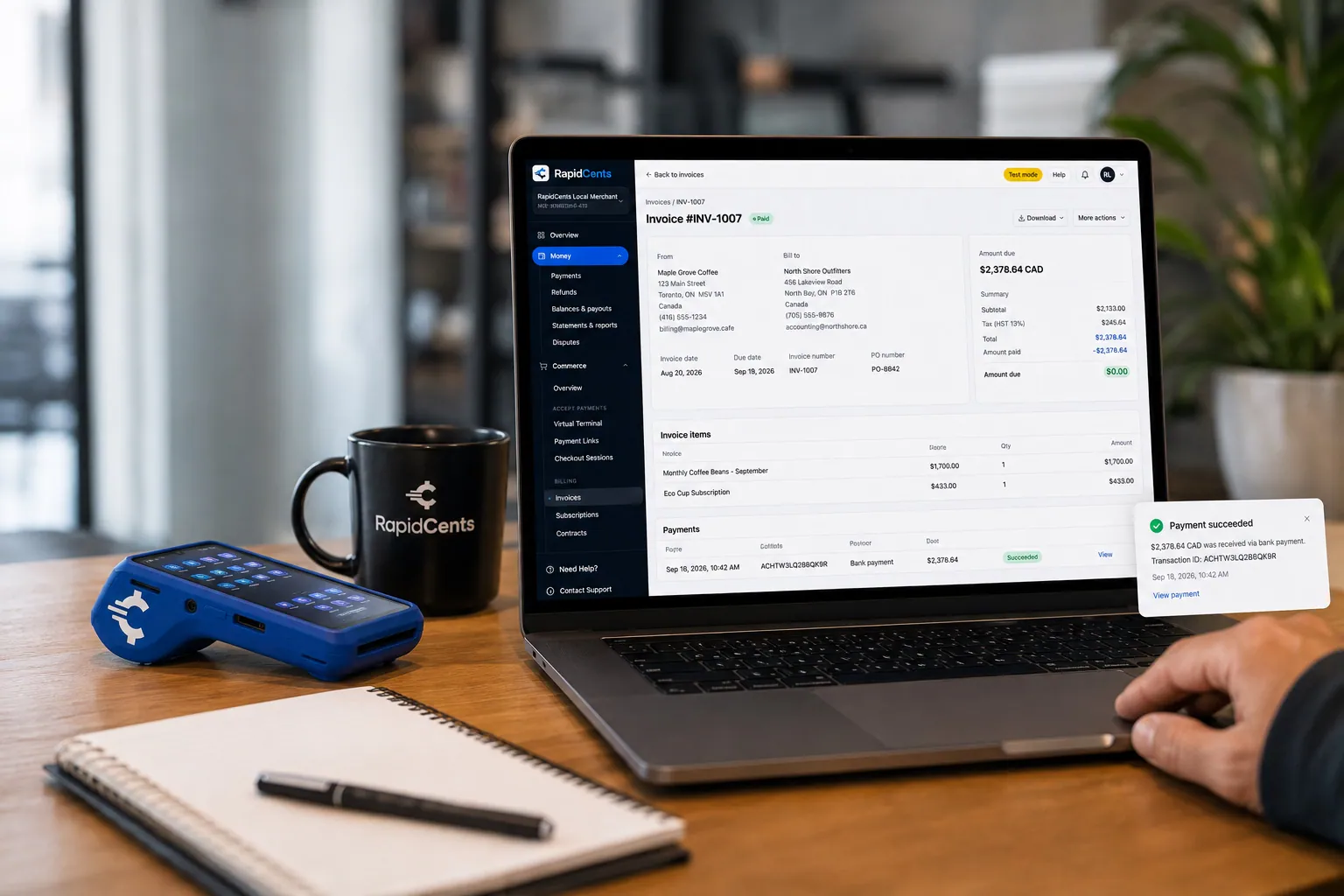
A merchant invoices a customer for bank debit through RapidCents, with card terminal capture available on the same desk. Bank Transfer / Bank Payments
Bank payments suit recurring and high-value invoices where card fees are the wrong tool. Collect directly…
Explore


How does driver collection work at cash-on-delivery stops?
Driver collection works when you set up the mobile workflow before the first route: a RapidCents mobile terminal on each truck, clear limits on what drivers may do with it, and a rule for which accounts pay at the door. Route delivery payments then reconcile stop by stop, because each transaction is matched to its route, customer and invoice rather than to one daily batch total.
How a collection runs at the stop
The route manifest flags which stops pay at delivery. At the stop, the receiver checks the load, the driver records any shorts, and then enters the adjusted invoice total on the mobile terminal. The customer taps or inserts the card and enters a PIN if prompted, receives a receipt, and the driver notes the transaction against the invoice before the truck moves on.
Set permissions and fallbacks first
Decide which accounts pay on delivery and what drivers may do on the terminal: take a sale, but not refund, void or key in a card number. Your RapidCents representative will walk you through which of those limits your terminals enforce. Agree a fallback for a declined card or a basement dock with no signal, such as holding the delivery or sending a payment link, and never write card numbers down.
Settle the route stop by stop
When the truck returns, route settlement compares each card payment with its stop and invoice. Driver collections appear in the Merchant Dashboard beside link and invoice payments. Before daily use, test how each one is matched, whether by a reference entered on the terminal, if your setup offers one, or by the transaction number recorded in your route software.
Three cash-on-delivery stops on an 18-stop route
Say an 18-stop route includes three cash-on-delivery accounts: two takeout restaurants and a corner grocery on credit hold. At the grocery, the receiver refuses one case of dented cans, so the driver collects the reduced total by contactless card. At check-in, the route clerk matches three payments to three invoices and the refused case to its credit memo before the next morning's trucks load.
What drives a food distributor's card processing costs?
Grocery supplier credit card processing costs depend on the cards your accounts use, whether each payment is taken at the truck or through a link or phone order, and the size and number of payments you collect each week. RapidCents prices on interchange-plus: interchange, set by the card networks, passes through at cost, and you pay the RapidCents markup listed in your Fee Schedule plus fees for equipment or services, if applicable. Agreements are month to month, with no fixed term.
Which cards your accounts use
Independent grocers and restaurant owners often pay with business or rewards credit cards, which generally carry higher interchange than debit cards. Chains, restaurant groups and institutional buyers such as schools or hospitals may use purchasing cards or bank payments instead. Compare several months, since a month of large chain statements looks very different from a month of small restaurant charges.
At the truck, by link or by phone
A card tapped or inserted on a driver's terminal or at your dock office is a card-present payment. A card entered through a statement link, or keyed by your order desk in the Virtual Terminal, is card-not-present, which generally carries higher interchange. Measure how payments divide between truck, link and phone, since that split often looks different for grocery accounts than for restaurants.
Payment size, volume and commercial-card data
A food distributor often collects many mid-sized payments each week rather than a few very large ones, so compare payment count and average size, not just monthly volume. Purchasing cards used by chains and institutions can carry tax and line-item detail as Level 2 or Level 3 data; check any interchange effect on your processing statements.
Refunds, surcharges and what Fee Check needs
Refunds on cards already charged and chargebacks on disputed deliveries add cost and staff time; crediting shorts before you charge keeps refunds down. Before adding a card surcharge to grocery or restaurant statements, check card network rules and the law that applies to your business. For Fee Check, bring two or three recent processing statements, your card and channel split, your average statement payment and cash-on-delivery ticket, and your refund and chargeback counts.
Will RapidCents work with your distribution ERP and route software?
RapidCents integrates with many major platforms through APPIE and RapidBridge, so most distributors keep the ERP, route software and accounting package they run today. RapidBridge takes payments inside web-based software without changing it, QuickBooks Online and Xero receive settled transactions, fees and refunds, and NetSuite and SAP import settlement files. Your RapidCents representative will walk you through the right option for your vendor and version.
NetSuite and SAP Business One
RapidBridge works with Oracle NetSuite and SAP Business One Web Client, so a card payment posts against the delivery invoice you already have open. Settled payments, fees and refunds also reach either ERP through settlement import files, which your team posts against open delivery invoices and credit memos. Your RapidCents representative will match the option to your edition and version, and to any payment add-on that already holds stored cards.
Acumatica, Epicor Prophet 21 and Dynamics 365 Business Central
RapidBridge works with Acumatica and Dynamics 365 Business Central, so each payment lands on the invoice you have open. For Epicor Prophet 21, RapidCents integrates with many major platforms through APPIE and RapidBridge, and the right option depends on your version. Some ERPs take payments only through their own add-on, so tell your representative which one you run and who holds the cards your restaurants keep on file.
Route accounting and delivery handheld apps
Route accounting and direct-store-delivery apps on drivers' handhelds often print or send the invoice at the stop and record shorts, returns and signatures. RapidCents integrates with many major platforms through APPIE and RapidBridge, and the right option depends on your app's vendor and version. Tell your RapidCents representative which app your drivers carry, and they will show you how a payment taken on a terminal reaches the invoice.
QuickBooks Online and Xero
Smaller distributors that keep their books in QuickBooks Online or Xero can connect RapidCents directly: settled transactions, fees and refunds map to either package. Agree with your bookkeeper how credit memos and short payments are applied, so each customer's ledger matches the statement you sent.
Your online ordering portal
If accounts order through your web portal or app, Hosted Checkout or the Payment Gateway API can take the card, and tokenization can save it when the customer agrees. The gateway supports authorize and capture, so you can authorize at ordering and capture the delivered amount. Your RapidCents representative will walk you through whether your portal needs a plugin or development work.
Payment options for food distributors by country
RapidCents serves merchants in Canada and the United States, and what a food distributor can offer its accounts follows its merchant account's country. Visa, Mastercard and American Express cards work through statement links, phone orders and drivers' mobile terminals; debit options, the bank-payment method and settlement currency follow that country. Your RapidCents representative will walk you through the details.
Cards on the route, by phone and by link
Accounts can pay delivery invoices and statements by card through a payment link, a phone payment keyed into the Virtual Terminal, or a driver's mobile terminal at the stop. Which card brands and debit types you can accept, and your transaction limits, follow your merchant account's country.
Bank payments for statements
Bank payments suit weekly statements because they do not depend on a card's credit limit. Which bank-payment method you can offer, the authorization a customer signs for it, and the currency your deposits arrive in all follow the country of your merchant account.
Accounts in more than one country
If your trucks deliver to accounts in more than one country, ask about International Payments and how currency is handled before you send those customers statement links.
How to switch processors without disrupting routes or standing orders
A food distributor can switch processors without disrupting routes or standing orders by moving one route at a time. First list every stored card and its authorization, open statement link, unapplied credit and truck terminal; then pilot the new setup on one route and keep the old account open until its refunds and disputes close.
Inventory what the old processor holds
List restaurants with stored cards and the authorization each signed, statements that still carry old payment links, credits not yet applied, and the terminals assigned to each truck. Card data moves to a new processor only when both providers agree to the transfer, so plan to collect fresh authorizations from some accounts, starting with the restaurants whose standing orders ship soonest.
Pilot one route before the rest
Once your account is approved, run a test sale, a refund, a statement link that includes a credit memo, and a driver collection on a mobile terminal. Then move one route and check that every payment carries its store and invoice reference into your ERP import or accounting connection. Add the remaining routes in waves once a full week on the pilot route reconciles cleanly.
Keep the old account open for a while
Refunds for shorts on payments taken through the old account normally go back through it, and chargebacks on those deliveries arrive there too. Keep it open until credits owed on old payments are settled and the dispute window on recent deliveries has passed. Reissue unpaid statement links from RapidCents so no account pays the same invoices through two systems.
Reconcile daily and tell your accounts
For the first weeks, match each day's settlement to the statement payments, standing-order charges and route collections inside it, using RapidCents transaction, settlement and fee reports exported as CSV or PDF or in accounting-import formats. Tell each account's bookkeeper about the new receipt format, the business name on their card statements, and where statement links will come from.
Payment questions from food distributors
What is the best payment processor for food distributors?
The best payment processor for a grocery or foodservice distributor is the one that fits your delivery-to-invoice cycle, so judge food wholesaler merchant services on that cycle rather than on a headline price. Look for statement payment links that carry store and invoice references, stored cards with signed authorization for standing orders, mobile collection for cash-on-delivery stops, and a clean route into your ERP or route software. Ask for interchange-plus pricing with no fixed term, and compare written quotes against the same recent processing statement.
How much does credit card processing cost for food distributors?
On interchange-plus pricing, credit card processing for food distributors costs interchange plus the provider's markup, so your total depends on your accounts' cards, your payment channels and your payment sizes. RapidCents charges interchange at cost, plus the markup in your Fee Schedule and any equipment or service fees that apply. Business and rewards cards generally carry higher interchange than debit, and link or phone payments usually cost more than cards tapped at the truck. Upload a statement to Fee Check to see your interchange and markup separately.
Can our distribution ERP or route software use a different payment processor?
Yes. RapidCents integrates with many major platforms through APPIE and RapidBridge, so most distributors keep the software they run today. RapidBridge works with Oracle NetSuite, SAP Business One Web Client, Acumatica and Dynamics 365 Business Central, QuickBooks Online and Xero receive settled transactions, fees and refunds, and NetSuite and SAP also import settlement files. For Epicor Prophet 21 or your route app, tell your RapidCents representative which version you run, and they will walk you through the right option.
How can food distributors switch processors without losing payment history?
Download your history before you move, and keep the old account open until disputes on past deliveries run out. Save transaction, refund and chargeback reports, list each stored card with the authorization behind it, and flag recent payments that may still need a refund for a short or a return, because those refunds normally go back through the old account. Card data moves only if both providers agree, so expect some restaurants to sign a fresh authorization. Invoices and credit memos stay in your ERP.
Which payment options are available to food distributors in Canada and the United States?
In both Canada and the United States, a food distributor can usually take cards through statement links, phone orders and drivers' terminals, and offer a bank payment for statements, but the specific methods follow the country where the merchant account is held. The two countries differ in debit options, in the bank-payment method and the authorization behind it, and in the currency you are paid in. Your RapidCents representative will walk you through what applies to your account before you list payment options on statements.
Can a grocery store pay its distributor invoice by credit card?
Yes. The usual route is a statement or invoice emailed with a payment link, which the store owner or bookkeeper pays by card. The payment identifies the store account and each invoice it settles. Paying by card leaves the agreed trade terms unchanged, and a large statement may suit a bank payment better. Your RapidCents representative will walk you through the cards and limits that apply to your account.
How are shortages and food returns reflected in the balance?
Shortages and returns reduce the balance through a credit memo or a revised invoice in your ERP or accounting software, not through the card processor. Confirm the accepted quantities from the signed delivery receipt, record the agreed credit against the original invoice, and only then request the remaining amount. A processor refund is a separate step for a customer who already paid for goods it did not keep. Keep the delivery record, the credit and any refund together under one invoice reference.
Can delivery drivers collect account payments?
Yes, through a mobile collection workflow with defined staff permissions and the customer's agreement to pay at delivery. Drivers carry RapidCents mobile terminals so the customer taps or inserts the card, and you decide what a driver may do on the terminal, such as taking sales but not refunds. Before daily use, test how each receipt and transaction is matched to the route, the customer and the invoice, so route settlement checks every stop instead of only a daily total.
Does offering online payment change a customer's net terms?
No. Net terms are a commercial agreement between you and your customer, and adding online payment leaves them as agreed. A payment link or stored card is a way to collect the amount due when it falls due, not an automatic credit policy or a financing arrangement, and RapidCents does not extend credit to your customers. If you want to change terms, credit limits or prepayment rules for a grocery or restaurant account, do it in the customer agreement, separately from the payment setup.
Can one payment clear several delivery invoices?
Yes, as long as the payment is allocated reliably to each invoice it covers. A week of deliveries paid in one statement payment needs an invoice-by-invoice allocation, including any credit memos, so the customer's balance and aging stay correct. Your RapidCents representative will show you whether your setup handles that allocation directly or your accounting team applies it, and you can test it with a statement that includes a credit before going live. The customer's next statement shows exactly which invoices are paid and which remain open.
Related food supplier pages
Produce wholesalers and meat and seafood wholesalers deal with the same delivery adjustments, with weight and quality in play, while restaurant suppliers sell equipment and smallwares to many of the same kitchens. The B2B & Wholesale hub covers distributor payments across categories, and the Grocery page covers supermarket checkout lanes for stores collecting from shoppers.
B2B & Wholesale
Collect net-terms invoices by payment link with the PO number attached, take commercial…
Restaurant Suppliers
For dealers and distributors that sell kitchen equipment, smallwares and consumables to…
Produce Wholesalers
Collect on final weights, apply quality credits to the right delivery, and keep…
Meat & Seafood Wholesalers
Invoice catch-weight orders, collect on scheduled deliveries and settle freshness credits…
Beverage Distributors
Collect route invoices, container deposits and account balances from the stores, cafes…
Bakery & Ingredient Suppliers
Collect from the bakeries and food manufacturers you supply: repeat flour orders…
Dental Suppliers
From monthly consumables reorders to chair and imaging deposits, collect what clinics…
Veterinary Suppliers
Get invoices, standing orders and equipment deposits paid by the veterinary practices…
Take the next step
See what your route and statement payments cost
Fee Check reads a recent processing statement and separates interchange from markup, so you can see what your statement payments, standing-order charges and driver collections cost today. Then bring your route count, account mix and ERP or route software to a review of your food distribution payment workflow.
- No obligation
- Payment specialists, not a call centre
- Secure statement upload



