


Construction payment processing for progress billing, retainage and change orders
General contractors rarely bill once. A job is drawn down in milestones, with retainage held back until substantial completion and change orders invoiced as the scope moves. RapidCents supports that with milestone invoicing, secure payment links a client's accounts payable can pay without a phone call, a virtual terminal for keyed and mail-order authorizations, and reporting that ties each payment back to its job. General construction contracting is classified under MCC 1520.

- PCI DSS Level 1
- SOC 2 Type II
- All major card brands: Visa · Mastercard · Amex · Discover · PIN debit
- Interchange-plus available
- Specialist onboarding support
Operational workflows
Contract signed, mobilization draw invoiced
Milestone draws billed as each phase closes
Change orders billed apart from the base contract
Holdback released and reconciled at substantial completion
Payment challenges
Holdback that sits for months
Part of every draw is withheld until completion, so billed, paid and retained have to be tracked as three separate numbers.
Change orders paid out of sequence
Extra work is approved on site and billed after the draw it belongs to, leaving invoices that no longer match the schedule of values.
A draw larger than the card
A single progress payment can exceed the owner's card ceiling, so the large ones move to ACH or get split.
Choose the right payment setup for Construction Contractors
Choose construction payment processing
For Construction Contractors, map the deposit, staged payments, and final balance, online checkout and remote payment, and the counter or service point before choosing a setup. Select channels that match those moments, then confirm that the chosen solution genuinely covers each channel.
Payment hardware for Construction Contractors
For Construction Contractors, start with the place customers pay in person: a countertop terminal, smart terminal, or portable device depending on the workflow. Verify that the hardware fits the real volume and workspace.
Compare payment processing fees
For Construction Contractors, request a written fee breakdown covering deposits and final balances and online checkout and dispute handling. Compare the effective cost across the real card and channel mix; do not choose on a headline rate alone.
Set up or switch Construction Contractors payments
To set up Construction Contractors payments, document the checkout, confirmation, and refund path, confirm compatibility before purchase, then test a real payment flow before going live.
Recommended products

The RapidCents invoices screen: outstanding, overdue, paid and draft totals across the top, the invoice list below them, and a preview of one invoice on the right with its line items and a View & Record Payment button. Invoicing
RapidCents invoicing helps professional services, contractors and B2B suppliers create branded invoices…
Explore
The RapidCents payment links screen listing created links with their amount, status, click count and whether they have been paid, beside a phone showing the branded page a customer opens to pay $2,500.00. Payment Links
RapidCents payment links let staff generate branded pay-by-link URLs for invoices, deposits, balances and…
Explore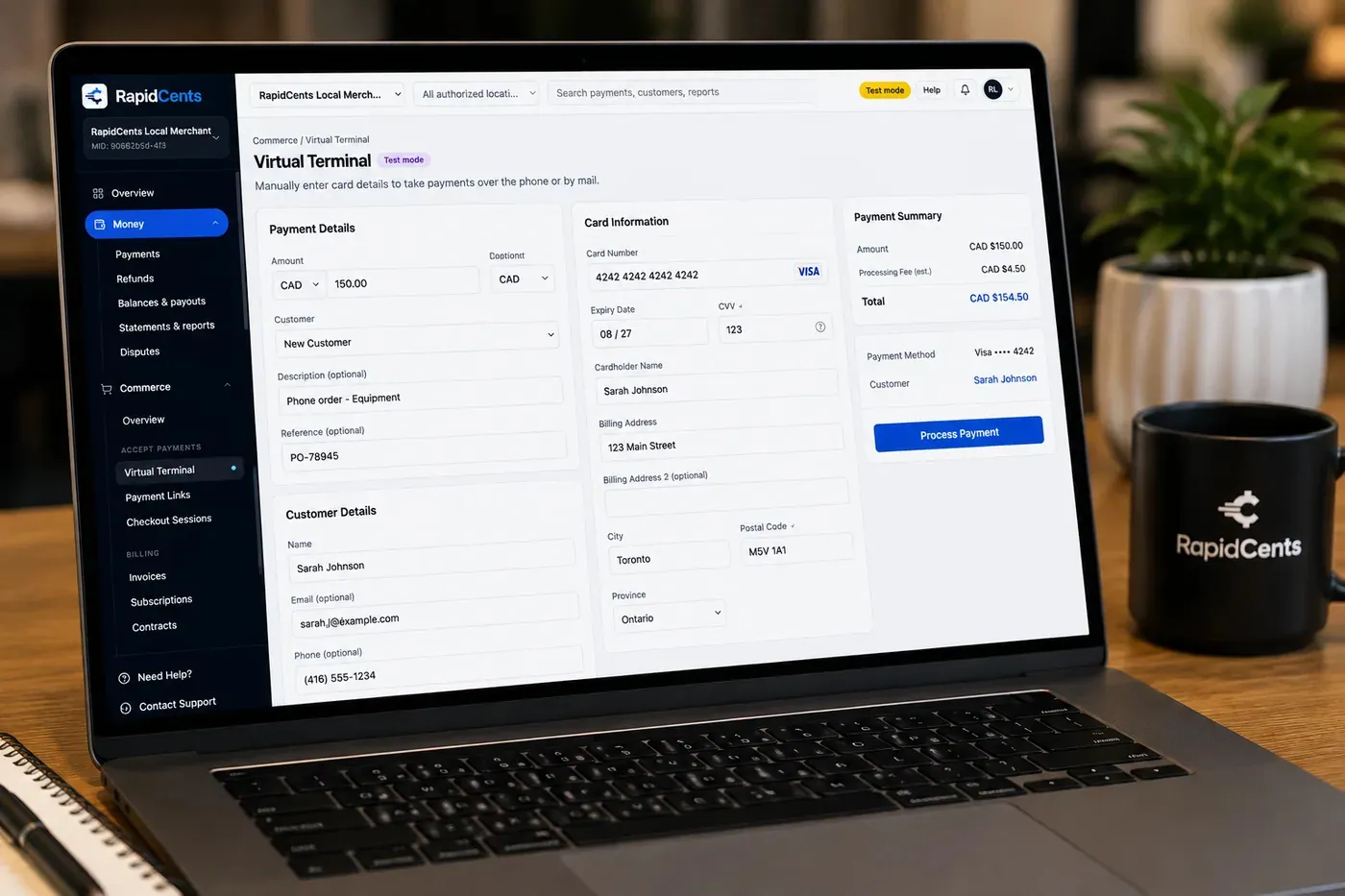
The RapidCents virtual terminal: payment details, card number, expiry and CVV keyed by hand on the left, with a payment summary on the right showing the amount, the estimated processing fee and a Process Payment button. Virtual Terminal
The RapidCents virtual terminal lets authorized staff enter mail-order and telephone-order payments through a…
Explore
A merchant reviews RapidCents reports for volume, mix and payouts, with the terminal that took the sales on the desk. Reporting
RapidCents reporting delivers customizable transaction, settlement and fee reports with CSV and PDF export…
Explore


How this gets set up
Schedule of values agreed first
The contract is broken into milestones before anything is billed, so each draw has an amount and a trigger both sides recognise.
Milestone invoiced as a link
Once a milestone is certified, the invoice reaches the client's accounts payable as a secure payment link they can settle by card without a phone call.
Change orders billed on their own
An approved change order is invoiced separately rather than folded into the next draw, so the paper trail matches the signed authorisation.
Retainage released last
The held-back balance is invoiced at substantial completion, once the deficiency list is cleared.
Integrations
Procore exports
Procore exports hand the payment detail over as a file for the project's cost records — a reconciliation export, not a live posting back into Procore.
Buildertrend
Buildertrend carries the client-facing selections and invoices, and a card payment posts onto the job so the owner's portal shows the draw as settled.
QuickBooks
QuickBooks receives the settled draws and change orders so job costing and receivables come from one set of numbers.
Operations, security and going live
Payments have to tie back to a job number
Reporting groups every draw, change order and retainage release under the project it belongs to, which is what keeps a job cost report reconcilable.
Keyed authorisations for owners who pay by phone
The virtual terminal handles a card read out by an owner or a developer's office, with the job reference recorded on the transaction.
Money taken before mobilisation
Deposits on a job not yet started are reported apart from earned progress billing, so the ledger does not treat them as completed work.
Live before the first draw is due
The account, the invoice templates and the milestone schedule are set up so the first certified draw is billed on time rather than after go-live.
Payment questions from Construction Contractors
What should businesses compare when choosing construction payment processing for Construction Contractors?
Compare construction payment processing against the real payment journey: the deposit, staged payments, and final balance, online checkout and remote payment, and the counter or service point. Start with the required channels and hardware, then confirm compatibility and support before committing.
What payment hardware is practical for Construction Contractors?
If Construction Contractors sells primarily online, do not choose physical hardware before validating checkout. Add hardware only for a clearly defined in-person payment need.
Which payment channels are relevant for Construction Contractors?
For Construction Contractors, start with the deposit, staged payments, and final balance, online checkout and remote payment, and the counter or service point. Keep only the channels that match those moments, then verify the complete customer flow before offering them.
How should payment processing fees be evaluated for Construction Contractors?
For Construction Contractors, compare costs related to deposits and final balances and online checkout and dispute handling using actual transactions. Request a written breakdown of fees and terms rather than relying on an advertised rate alone.
What should be confirmed before setting up payments for Construction Contractors?
For Construction Contractors, document the checkout, confirmation, and refund path, verify the needed compatibility, and test the flow before going live. This exposes manual steps and exceptions before customers encounter them.
How should deposits and high-value payments be planned for Construction Contractors?
Separate the deposit, staged payments, and final balance in the process. Confirm the authorization and refund rules that apply to the business before communicating terms to a customer.
What MCC category applies to Construction Contractors?
MCC 1520 is commonly associated with Construction Contractors. Our onboarding team confirms the correct category for your business.
Related industries
HVAC Contractors
HVAC companies collect estimate deposits, final job payments and maintenance plan billing…
Plumbing Contractors
Plumbers accept emergency call payments, job deposits and final invoices on-site with…
Electricians
Electrical contractors capture deposits before ordering materials and collect completion…
Home Services
Home service businesses collect payments in the field with Tap to Pay, payment links and…
Landscaping
Landscapers bill seasonal contracts, take spring deposits and accept on-site payments for…
Cleaning Services
Commercial and residential cleaners run recurring contracts, one-time deep cleans and…
Roofing Contractors
Roofers quote a job, take a deposit to schedule materials, then collect the balance on…
Painting Contractors
Painting crews work several sites a week, take a deposit up front and the remainder at…
Take the next step
Talk to a RapidCents specialist
RapidCents Fee Check reads a processing statement and shows interchange separately from the markup. Upload a statement for an instant breakdown, or open a merchant account and start accepting payments on one account.
- No obligation
- Payment specialists, not a call centre
- Secure statement upload



