


Payment processing for coworking spaces and flexible workspaces
Payment processing for coworking spaces covers the monthly membership charge plus the unpredictable ones: day passes, meeting-room hours, printing and private-office deposits. RapidCents bills memberships with Recurring Payments, sells day passes through Hosted Checkout, sends Payment Links for bookings and overages, and reports every payment in the Merchant Dashboard.

- PCI DSS Level 1
- SOC 2 Type II
- All major cards: Visa, Mastercard, Amex, Discover, UnionPay, Diners Club & PIN Debit
- Interchange-plus available
- Specialist onboarding support
How coworking spaces get paid
A coworking space collects one predictable charge and several unpredictable ones. Memberships renew on a schedule, while day passes, room hours and deposits arrive on demand. Each job uses a different RapidCents product, and all of them land in the same member record.
Monthly desk and office memberships
Members pay on a billing date. Recurring Payments charges the card the member authorized for an agreed amount, timing and cancellation terms, retries a decline, and sends notices. If a member changes plan mid-month, you charge or credit the difference. Finance receives a settlement report per billing run.
Day passes and guest visits
A guest or member buys a pass before arriving or at the front desk. Hosted Checkout takes the online purchase, and a terminal takes a tap at the desk. If a pass goes unused, you refund it under your own policy. The sale appears with its pass type in reporting.
Meeting-room bookings and overages
A member books a room or exceeds included hours or printing. The community manager sends a Payment Link or keys the amount in the Virtual Terminal. If a booking is cancelled, a partial refund goes back to the same card. Each charge carries the member reference.
Private-office deposits and invoices
A team signing for a private office pays a deposit before move-in. Invoicing sends a branded invoice with a Payment Link, and Contracts & eSignatures can capture the signed agreement first. If the team pays in two parts, each part is recorded. Finance sees invoice status next to the deposit.
How do coworking spaces handle membership billing?
Coworking membership billing works best as a recurring schedule on a card or bank account the member has authorized. RapidCents Recurring Payments charges the agreed plan fee on each billing date, retries declines, and keeps the result in the member's record so your community manager sees who paid and who needs a call.
How the monthly run works
The member signs up for a hot desk, dedicated desk or office plan and authorizes the card or bank account. On each billing date Recurring Payments charges the plan fee, sends the receipt and marks the result. Your coworking software still decides who owes what and when.
What to set up first
Capture the member's authorization for the amount, the billing date and how to cancel before the first charge. Storing a card needs that consent. Decide your retry pattern for declines and whether Account Updater should refresh expired cards, so members are not interrupted by a lapsed card.
Declines, plan changes and disputes
A declined renewal is retried on your schedule, then handed to staff for a personal message with a Payment Link. A mid-month upgrade is a new charge for the difference, set by you. A disputed membership charge goes through Disputes with the signed plan terms as evidence.
A $350 dedicated desk, one declined card
Say a thirty-desk space bills a $350 dedicated desk on the first of the month. One member's card is declined, the retry fails, and the community manager sends a Payment Link by text. The member pays that afternoon, and the dashboard shows the original failure and the later success.
How do coworking spaces take meeting-room payments?
Coworking meeting room payment processing separates what a plan includes from what a member buys on top. The community manager charges only the extra hours, either by Payment Link or in the Virtual Terminal, and each charge keeps the room, date and member reference so the invoice and the deposit match.
How a booking is charged
Your booking tool reserves the room and works out any hours beyond the plan. The community manager then sends a Payment Link to the member or keys the card in the Virtual Terminal. The member receives a receipt, and the payment is tagged with the booking reference.
What to set up first
Write your booking and cancellation terms where the member sees them before paying. Decide whether the room is charged at booking or after use. If you keep a card on file for overages, get the member's authorization for it, including when and how much you may charge.
Cancellations, no-shows and partial refunds
A cancelled booking inside your notice window can be refunded in part, and the refund returns to the original card. A no-show fee is charged only if your terms said so. A member who disputes a charge is answered with the booking record, the terms and the receipt.
Three extra boardroom hours, $180
Say a member on a plan with five included hours books the boardroom for eight on a Thursday. Three hours are extra, so the community manager sends a $180 Payment Link. The member pays from a phone, and the receipt shows the room and date for the member's accountant.
RapidCents products for coworking spaces
These products cover the coworking cycle: recurring membership billing, Payment Links for rooms and overages, Hosted Checkout for day passes, and the Merchant Dashboard where your community manager and finance lead see every payment by member.

The RapidCents recurring payments screen showing active subscriptions, monthly recurring revenue, failed payments and upcoming renewals, above a list of subscriptions with their plan, amount, frequency and next billing date. Recurring Payments
RapidCents recurring payments manage subscription plans, membership renewals and installment schedules with…
Explore
The RapidCents payment links screen listing created links with their amount, status, click count and whether they have been paid, beside a phone showing the branded page a customer opens to pay $2,500.00. Payment Links
RapidCents payment links let staff generate branded pay-by-link URLs for invoices, deposits, balances and…
Explore
A RapidCents hosted checkout page at checkout.rapidcents.com, with the order summary and totals on the left and the card fields on the right, footed by SSL and PCI DSS assurances. Hosted Checkout
RapidCents hosted checkout delivers PCI-scoped payment pages you redirect customers to or embed via iframe…
Explore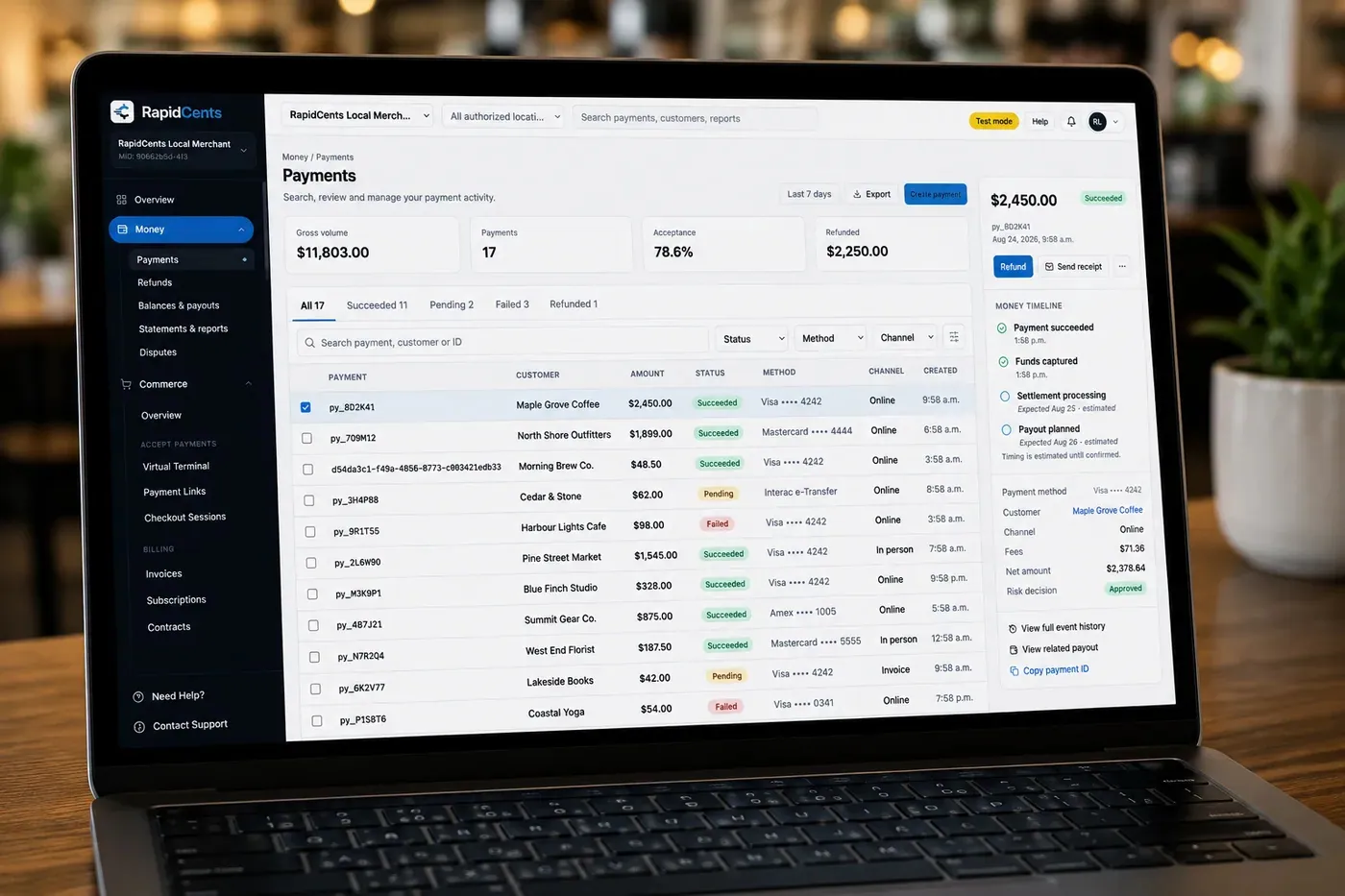
The RapidCents payments screen: gross volume, payment count, acceptance rate and refunds across the top, a filterable transaction list below, and a money timeline on the right tracing one payment from capture to planned payout. Merchant Dashboard
The RapidCents merchant dashboard gives owners, managers and finance staff a single signed-in view of live…
Explore


How do coworking spaces run day pass checkout?
Coworking day pass checkout lets a guest pay before arriving instead of queuing at the desk. Hosted Checkout takes the online purchase, a terminal or Tap to Pay takes walk-ins, and each pass is recorded with its date so the front desk can confirm entry and finance can see day-pass income apart from memberships.
How a day pass sale runs
The guest picks a date on your page, pays through Hosted Checkout and receives a confirmation. Walk-ins pay at the desk by tapping a card on your terminal. Both sales are recorded the same way, so reporting shows day passes separately from memberships and room hours.
What to set up first
Set the pass types you sell, such as a half day or full day, and the refund terms you show at checkout. Add your logo and receipt wording to Hosted Checkout. Decide whether guests of members pay at the desk or through a link the member forwards.
Refunds, repeat guests and fraud
An unused pass is refunded by your policy, and the refund returns to the original card. A guest who keeps coming back can be offered a membership, which starts a new authorization. Fraud Prevention and 3D Secure add checks to online passes where they apply.
A $35 day pass bought on Sunday night
Say a freelancer buys a $35 full-day pass on Sunday night for Monday. Hosted Checkout confirms the date, and the front desk sees the paid pass at arrival. The freelancer returns twice more that week and is invited to move to a membership, which needs fresh authorization.
What drives processing costs for a coworking space?
Your cost depends on the cards your members use and how they are taken. RapidCents prices on interchange-plus: interchange passes through at cost, your RapidCents markup is set out in your Fee Schedule, and fees for equipment or services apply if applicable. The agreement is month to month with no fixed term.
Interchange follows card type and channel
Interchange is set by the card networks and varies with debit, credit, premium or commercial cards, and with whether the card is tapped, inserted, keyed or taken online. A space with many corporate members and online passes will see a different mix from one with walk-in guests.
Your markup and any service fees
Your Fee Schedule shows your RapidCents markup and any fees for equipment or services, so you can compare the same lines on a competing quote. Ask every provider for the same itemized view. A quote that bundles everything into one figure hides what you are comparing.
What to bring to Fee Check
Bring recent processing statements, your split between recurring memberships, online passes and desk sales, your average ticket, and your refund and dispute volume. Fee Check reads the statement and shows interchange separately from markup, so you can compare real numbers, not headline promises.
Which coworking software can work with your payments?
Your coworking software decides who owes what, and RapidCents collects it. RapidCents integrates with many major platforms through APPIE and RapidBridge, so most spaces keep the software they run today. Your RapidCents representative walks you through the option that fits your vendor and version. Accounting follows a separate path through QuickBooks Online and Xero.
Nexudus
Nexudus handles memberships, bookings and invoicing for many spaces. The right connection depends on your Nexudus edition and version. Tell your RapidCents representative how you run it, and they will show you how payments and receipts connect.
OfficeRnD
OfficeRnD covers memberships, resources and billing. The right connection depends on your OfficeRnD edition and version, and your RapidCents representative will walk you through it. In the meantime you can collect through RapidCents products and match each payment to the member account by reference.
Cobot
Cobot manages members, bookings and invoices for flexible workspaces. RapidCents integrates with many major platforms through APPIE and RapidBridge. Tell your RapidCents representative how your Cobot account takes payments today, and they will show you which option lets you keep your workflow and collect through RapidCents.
Spacebring
Spacebring combines booking, memberships and billing. Your RapidCents representative will walk you through the option that fits your vendor and version, including how refunds and settlement map back to the member account. A Payment Link sent outside the software, matched by member reference, works in the meantime.
Optix
Optix runs community, bookings and payments in one app. Your RapidCents representative will explain the options for your version. For accounting, RapidCents connects settled transactions, fees and refunds to QuickBooks Online and Xero, while SAP and NetSuite import settlement files.
Payment options for coworking spaces by country
RapidCents serves merchants in Canada and the United States. The payment methods, bank-payment options and settlement currency a coworking space uses follow the country of the merchant account, and your RapidCents representative walks you through them before you build your membership and day pass pricing around them.
Cards at the desk and online
Cards are taken at the front desk on a terminal and online through Hosted Checkout or a Payment Link. The card brands and debit networks follow your country and account, and your RapidCents representative lists them for your space.
Bank payments and settlement currency
Bank payments for recurring memberships differ from one country to another, as do the authorization wording and the currency your deposits settle in. Your RapidCents representative will walk you through the method, the member authorization you need and the settlement currency.
How do you switch processors and reconcile coworking payments?
Switching works when you list what is stored before you move anything. Once your account is approved, inventory member authorizations, recurring schedules, open invoices and refunds, test one sale, refund and deposit, then reconcile deposits to your ledger. Moving stored cards between processors needs both providers to agree.
Inventory before you move
List every member on a recurring schedule, the authorization each gave, open invoices, pending deposits and refunds owed. Note which members have stored cards. Ask both providers in writing whether cards can be transferred. If they cannot, collect fresh authorizations in batches.
Test, then run in parallel
Run a day pass sale, a meeting-room charge, a membership renewal and a refund before you move members. Keep the old processor active for a period if needed, and move one plan type at a time. Give members a date only after a test run has succeeded.
Reconcile to your ledger
Map each payment reference to the member and invoice in your coworking software, then match each deposit to the ledger using the settlement report. A day pass, two room charges and a membership batch should each show up as separate lines. Accounting exports go to QuickBooks Online or Xero.
Payment questions from coworking spaces
What is the best payment processor for coworking spaces?
There is no single best processor for every space, so compare on your own payment mix. Weigh the channels you use, total fees, compatibility with your coworking software, service and reconciliation. Ask for a written, itemized quote and a walk-through of memberships, day passes and room charges, then compare the same lines across providers.
How much does credit card processing cost for coworking spaces?
It depends on your card mix, average ticket and how cards are taken. RapidCents prices on interchange-plus: interchange at cost, your RapidCents markup in your Fee Schedule, and fees for equipment or services if applicable, month to month with no fixed term. Upload a statement to Fee Check to see interchange separated from markup.
Can Nexudus use a different payment processor?
In most cases, yes. RapidCents integrates with many major platforms through APPIE and RapidBridge, and the right option depends on your Nexudus edition and version. Tell your RapidCents representative which edition you run, and they will show you how payments and receipts connect, whether through a Payment Link, an import or another route.
How can coworking spaces switch processors without losing payment history?
Keep your records by exporting reports before you move, and list stored authorizations, recurring schedules, open invoices and refunds. Test a sale, a refund and a deposit, then reconcile. Moving stored cards between processors needs both providers to agree, so ask in writing and plan to request fresh authorization if they cannot.
Which payment options can a coworking space offer by country?
The options follow the country of your merchant account. RapidCents serves merchants in Canada and the United States, and card acceptance, bank payments and settlement currency differ between them. Your RapidCents representative will walk you through the card brands, bank-payment method and currency for your account, and the authorization your members give for recurring memberships.
How can we bill desk memberships and meeting room usage together?
Bill the plan fee on a schedule and charge room hours on top through a Payment Link or the Virtual Terminal. Get the member's authorization for the amount, timing and cancellation first. Tag each charge with the member and booking reference so finance can match them, and let your coworking software calculate what is owed.
How can we take a day pass payment online?
Send guests to Hosted Checkout, where they choose a date, pay by card and receive a confirmation. Set your pass types and refund terms first, and add your logo and receipt wording. Record the pass date with the sale so the front desk can confirm entry and refunds return to the original card.
How can we collect a deposit for a private office?
Send a branded invoice with a Payment Link, or use Contracts & eSignatures to capture the signed agreement before taking the deposit. Write down what the deposit covers and when it is returned or applied. A part payment is possible, and the invoice status shows what is still open.
How can we prorate a workspace membership change?
Work out the difference in your coworking software or by your written policy, then charge or credit that amount. An upgrade is a one-time charge through a Payment Link or the next recurring run, and a downgrade is a credit or partial refund. Tell the member the new amount before the next billing date.
How can we match member payments to our coworking software?
Put the member or invoice reference on every charge, then match by that reference using the settlement report. RapidCents integrates with many major platforms through APPIE and RapidBridge, and your representative will walk you through the option for your software. For accounting, RapidCents connects settled transactions, fees and refunds to QuickBooks Online and Xero.
What MCC is used for coworking spaces?
MCC 6513 is commonly associated with this type of business. RapidCents sets the correct merchant category during onboarding, based on what your space actually sells, such as memberships, day passes, meeting rooms or private offices. Describe your services accurately on the application so the category matches your business.
Related industries
Chambers of commerce, professional associations, tutoring centres and yoga studios share the same recurring membership, deposit and drop-in payment workflows as coworking spaces.
Chambers of Commerce
Collect membership dues, event registrations and sponsorship invoices in one place, with…
Professional Associations
Take annual dues, exam fees, course registrations and employer invoices in one place…
Labour Unions
RapidCents helps union treasurers collect dues, initiation fees and arrears by card or…
Subscription Boxes
Charge subscribers on your ship schedule, recover failed renewals before boxes are…
Religious Organizations
Take lobby giving, online gifts, recurring pledges and event fees on one account, with…
Sports Leagues & Clubs
RapidCents helps league administrators and club treasurers collect registration fees…
Summer Camps
Collect booking deposits, spread tuition across payments before the session, add canteen…
Childcare & Daycare
Charge tuition on schedule, keep each parent's share and any subsidy portion on separate…
Take the next step
See what your coworking space really pays
Upload a processing statement to Fee Check and see interchange separated from markup, then compare it with your mix of memberships, day passes and room bookings.
- No obligation
- Payment specialists, not a call centre
- Secure statement upload



