


Payment processing for massage therapy clinics
Massage therapy payment processing lets your clinic hold a card at booking, take payment in the treatment room with Tap to Pay or a payment terminal, send a payment link to remote clients, and bill standing appointments on a recurring schedule. Receipts and settlement reports reconcile each therapist's day, and we set it up around your booking software.

- PCI DSS Level 1
- SOC 2 Type II
- All major cards: Visa, Mastercard, Amex, Discover, UnionPay, Diners Club & PIN Debit
- Interchange-plus available
- Specialist onboarding support
How massage therapy clinics get paid
RMT clinic card payments fall into four repeating jobs: a card held when the appointment is booked, payment taken in the treatment room, a receipt the client can submit to a benefits plan, and package or standing-appointment billing. Each job uses a different RapidCents product and leaves a record your administrator can match to the schedule.
Card on file at booking
A client books online or by phone and agrees to the cancellation policy. Your administrator saves the card to a customer profile, and a deposit or late-cancel charge follows only what the client agreed to. Finance sees the authorization, the charge and the booking reference together.
Payment in the treatment room
At the end of the session the therapist taps or inserts the client's card on the massage clinic payment terminal, or uses Tap to Pay on a supported phone. This also suits a mobile practitioner visiting a client's home. A declined card is retried at the desk, never in the room.
Receipts for plan claims
The client pays, then submits the receipt to a benefits plan. Your booking software or administrator prepares the receipt fields a plan asks for, and the card payment record backs it up.
Packages and standing appointments
A client buys a prepaid package or books the same slot every week. A payment link takes the package payment, and Recurring Payments bills the weekly slot on a schedule the client agreed to. These are collection schedules, not financing, and unused sessions follow your refund policy.
How do massage clinics handle appointment deposits and no shows?
A massage clinic handles appointment deposits and no shows by keeping the client's card on file in a customer profile, with the client's agreement to the cancellation policy. A deposit or late-cancel charge then follows that policy, and the payment record shows which booking it belongs to.
How a deposit or card on file runs
For massage appointment deposits, the client books and receives a payment link by SMS or email, then enters a card or pays the deposit against the booking reference. For a client who phones, your administrator keys the card in the Virtual Terminal. Write the cancellation window and charge amount in plain words on the confirmation.
Declines, late cancels and refunds
If a client cancels in time or the therapist is ill, release or refund the deposit under your policy. Evidence helps with a dispute, but the card issuer decides the outcome.
A $40 deposit on a 90-minute session
Say a sole practitioner books a 90-minute session and takes a $40 deposit by payment link. The client cancels with two hours' notice, which breaks the clinic's 24-hour window, so the deposit is kept. The profile shows the agreement, the charge and the booking reference.
How do you issue insurance receipts for massage therapy?
Massage therapy insurance receipts come from your booking or practice software, and the card payment record supports them. RapidCents gives the clinic a payment receipt and settlement reporting. The benefits plan, not the payment provider, decides what it reimburses, so check the receipt fields your clients' plans ask for.
How the receipt and payment fit together
The client pays at the end of the visit by tap, insert or payment link. Your booking software or administrator then issues the receipt showing the service, date, amount paid and practitioner details your regulator or the plan requires. The payment record confirms the money moved.
Corrections, refunds and split payments
If a receipt needs correcting, void or refund the card payment and re-issue both documents so they match. A client who pays part by card and part another way needs two lines, not one.
A $95 tap and a receipt that evening
Say a client pays $95 by tap after a 60-minute session. The administrator issues the receipt that evening and emails it with the practitioner's registration details. Weeks later the client asks for a duplicate, and the profile holds the original payment reference.
RapidCents products for massage therapy clinics
These products cover the clinic's main jobs: Tap to Pay for the treatment room, payment links for deposits and packages, Recurring Payments for standing appointments, and Customer Profiles to keep each client's cards and history in one place.

A café worker holds a phone running RapidCents Tap to Pay, showing an $18.75 sale and the contactless symbol, while a customer holds a Visa card to the screen. No separate card reader is present. Tap to Pay
RapidCents Tap to Pay turns supported iPhones and Android devices into contactless payment terminals without…
Explore
The RapidCents payment links screen listing created links with their amount, status, click count and whether they have been paid, beside a phone showing the branded page a customer opens to pay $2,500.00. Payment Links
RapidCents payment links let staff generate branded pay-by-link URLs for invoices, deposits, balances and…
Explore
The RapidCents recurring payments screen showing active subscriptions, monthly recurring revenue, failed payments and upcoming renewals, above a list of subscriptions with their plan, amount, frequency and next billing date. Recurring Payments
RapidCents recurring payments manage subscription plans, membership renewals and installment schedules with…
Explore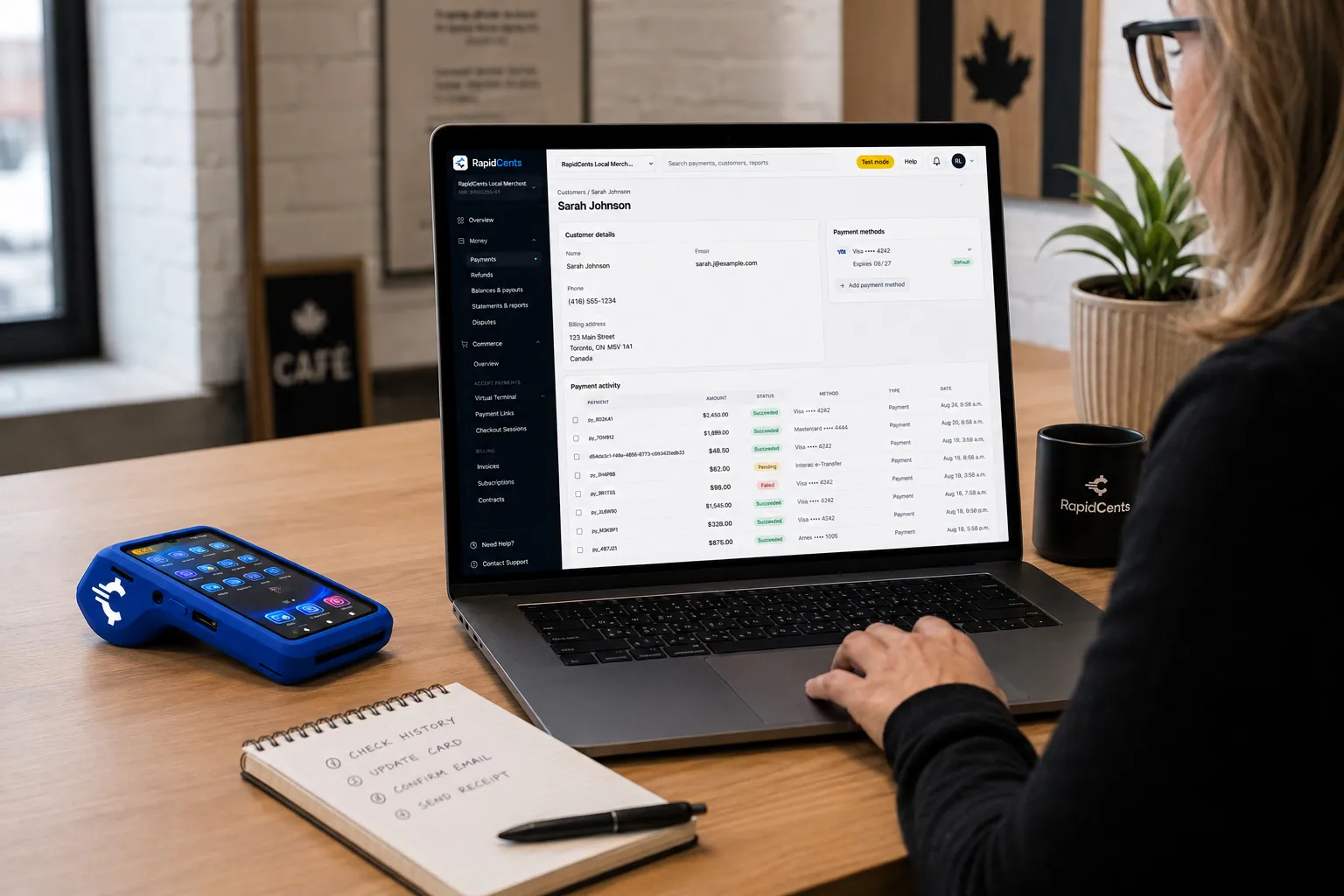
A RapidCents customer profile holds saved cards and invoices, so a return visit can be charged without re-keying the card. Customer Profiles
A customer profile ties together transactions, stored payment methods, subscriptions and disputes so staff…
Explore


How do you reconcile massage payments therapist by therapist?
You reconcile massage payments therapist by therapist by giving every payment a reference that names the therapist, the booking and the service. Your administrator then groups settled transactions, refunds and tips by practitioner and matches the total to the deposit. Payroll and room-rental splits stay in your own records.
How a clean daily match runs
Agree one reference format, such as therapist initials plus booking number, and use it on every terminal, link and keyed payment. At close, export the transaction and settlement reports, group by reference and compare each therapist's total with the booking schedule.
Refunds, tips and shared rooms
A refund issued days later must carry the original reference or it lands on the wrong therapist's day. Decide how tips are recorded and passed on, and how a room shared by two practitioners is split. Commission and rental calculations remain outside the payment record.
A $60 gap traced to one refund
Say three therapists share a clinic and each takes payments on a phone. At close the administrator finds one therapist's total is $60 short against bookings. A refund from the previous week had no reference, and adding it clears the difference.
How do you compare processing fees and total operating cost?
Compare fees for a massage clinic using your real payment mix, because cost depends on card type and how each card is taken. RapidCents prices every account on interchange-plus: interchange passes through at cost, your RapidCents markup is set out in your Fee Schedule, and fees for equipment or services apply if relevant. It is month to month, with no fixed term.
What drives cost for a clinic
Interchange is set by the card networks and varies with debit, credit, premium or commercial cards, and with whether the card is tapped or inserted rather than keyed or paid online. A clinic that mostly taps in the room has a different mix from one that takes remote payments.
What to bring to a comparison
Bring recent processing statements, your card mix, average session price, the split between in-room, link and phone payments, and your refund and dispute volume. Fee Check reads an uploaded statement and shows interchange separately from markup, so you can see both.
Costs beyond the transaction
Ask about terminal purchase or rental, any monthly or service fees, and refund and dispute handling. Compare written quotes on the same mix. With RapidCents you are month to month, so there is no fixed term to work around, and your representative will put the details in writing.
Will RapidCents work with Jane and other clinic software?
RapidBridge works with Jane App, Noterro, ClinicSense and SimplePractice, so a card payment can post inside the clinic software you already use without changing it. RapidCents also connects settled transactions, fees and refunds to QuickBooks Online and Xero, and SAP and NetSuite import settlement files. For MassageBook and anything else, your RapidCents representative will walk you through the options.
Jane
RapidBridge works with Jane App, so a RapidCents card payment can post against the client and appointment you already have open. Tell your RapidCents representative how your clinic uses Jane today, and they will show you where payments, receipts and reconciliation fit.
Noterro
Noterro handles scheduling, notes and billing for bodywork practices, and RapidBridge works with it. Card payments taken through RapidCents record inside the software your therapists already use, so the schedule and the payment stay together.
ClinicSense
ClinicSense manages bookings, intake and invoicing for massage practices, and RapidBridge works with it. Your administrator keeps working in ClinicSense while RapidCents takes the card, and your representative will walk you through how each payment lands on the invoice.
MassageBook
MassageBook covers online booking and client records. RapidCents integrates with many major platforms through APPIE and RapidBridge. The right option depends on your MassageBook plan and version, and your RapidCents representative will walk you through how a card taken on a terminal or link reaches your client records.
SimplePractice
RapidBridge works with SimplePractice, so card payments taken through RapidCents show up inside the practice software you already run. Your representative will walk you through how that supports your receipts and your daily reconciliation.
Payment options for massage therapy clinics by country
RapidCents serves merchants in Canada and the United States. The card brands, bank-payment options and settlement currency a massage therapy clinic can use depend on the country of its merchant account, and your RapidCents representative explains what applies to yours.
Cards and terminals
Most clinics take tapped or inserted cards on a terminal, or use Tap to Pay on a supported phone. The debit networks available differ by country, and your RapidCents representative will tell you which ones your account supports.
Bank payments and receipts
Bank-payment options for packages or standing appointments, the settlement currency and the tax lines your receipts need all depend on your country. Your RapidCents representative and your accountant can walk you through each one.
How do you switch massage clinic payments and reconcile the move?
Once your account is approved, switch a massage clinic's payments in three steps: list what is stored, test a sale, a refund and a deposit, then reconcile the first days against your ledger. Keep the old account open until open balances and stored-card arrangements are settled. Your RapidCents representative guides the setup with you.
Inventory before you move
List stored cards and their authorizations, standing weekly appointments, unused package balances, open invoices, pending refunds and every terminal. Saved cards may need a vendor-controlled migration, and both providers must agree. Ask clients to re-authorize where a transfer is not possible.
Test the full flow
Before moving live traffic, run a test sale, a refund and a deposit through each channel you use: terminal, Tap to Pay, payment link and Virtual Terminal. Check that each payment carries your therapist reference and appears in the settlement report.
Run in parallel and reconcile
Keep the old setup running for a short period if your software depends on it, and move one practitioner first. Map payment references to your booking software, then match the first settlements and fees to your ledger or to QuickBooks Online or Xero.
Payment questions from massage therapy clinics
How should a massage clinic handle appointment deposits and no shows?
Store the client's card on a customer profile with their authorization, and tie each charge to a booking. Write your cancellation window and charge amount where the client agrees to them. With RapidCents you can release or refund a deposit, view the agreement on the client's profile, and keep evidence for a dispute.
How should a massage clinic handle insurance receipts?
Look for a payment record that matches the receipt your booking software issues. The receipt, with the practitioner details a plan asks for, comes from your clinic software or administrator, while the payment provider records the card payment. A provider cannot decide what a plan reimburses, so check the refund and re-issue steps.
How should a massage clinic handle therapist by therapist reconciliation?
Give every payment a reference you control, such as therapist initials plus booking number, and use the same format on terminals, links and keyed payments. Put the original reference on every refund, then export settlement reports, group them by reference and match each therapist's total to the deposit.
How should a massage clinic handle prepaid massage packages?
Take the package payment by payment link or terminal, with terms the client accepts for expiry and unused sessions. Track the remaining sessions in your booking software, because the payment provider records the payment, not the balance. If you split the price into scheduled charges, the client must agree to the amounts and dates.
Which payment options are available to massage therapy clinics?
Card payments are available to massage therapy clinics in person, online and by phone, but the exact options depend on the country of your merchant account. RapidCents serves merchants in Canada and the United States, and bank-payment methods and settlement currency differ by country. Your RapidCents representative will walk you through what applies to your clinic.
Which payment processor is best for massage therapy clinics, and what should we compare?
No single processor is best for every clinic, so compare the same things in writing. Look at total cost on your real card mix, terminal and Tap to Pay options, deposit and stored-card features, reporting by therapist, support hours, software constraints and cancellation terms. Ask each provider for a written quote on the same statement, and we will put ours in writing too.
What fees should massage therapy clinics expect for in-person and online card payments?
Expect interchange, which varies with card type and with how the card is taken, plus your RapidCents markup in your Fee Schedule and fees for equipment or services, if applicable. Tapped or inserted cards and online or keyed payments are priced differently. Upload a recent statement to Fee Check to see interchange separated from markup.
Can we use RapidCents with Jane or Noterro?
Yes. RapidBridge works with Jane App and Noterro, so a card payment can post inside the clinic software you already run without changing it. RapidCents also integrates with many major platforms through APPIE and RapidBridge. Tell your RapidCents representative which edition you use, and they will walk you through how payments, receipts and reconciliation connect.
How can massage therapy clinics reduce payment disputes and protect stored card details?
Get clear authorization at booking, send a receipt for every charge and limit who on staff can charge a stored card. Use tokenized storage where supported rather than writing numbers down, and publish your refund policy. These steps give you evidence to submit, but they cannot promise that a dispute is decided in your favour.
How can massage therapy clinics switch payment providers without losing billing records?
List open balances, package credits, stored-card arrangements, terminals and software dependencies first. Then run a test sale, refund and deposit and reconcile them before moving live traffic. Saved card credentials may need a vendor-controlled migration that both providers agree to, so plan to ask some clients to re-authorize.
What MCC is used for massage therapy clinics?
MCC 8049 is commonly associated with this type of business. We set the correct merchant category during onboarding, based on what your clinic actually sells, such as treatments alone or treatments plus retail products. If your mix changes, tell your RapidCents representative so the category on your account stays accurate.
Related industries
Physio and chiropractic clinics, medical spas, salons and fitness studios also book by appointment, hold cards on file and reconcile by practitioner, so many of these workflows carry across.
Healthcare
Take visit payments at reception, send payment links for what insurance leaves unpaid and…
Dental Clinics
Take treatment plan deposits at the front desk or by text, run in-house installment plans…
Physio & Chiropractic
Collect visit fees and patient portions at the front desk or in the treatment room, sell…
Veterinary Clinics
Take deposits when owners sign surgery estimates, charge wellness plans monthly with…
Pharmacies
Collect the patient portion once your dispensing system has adjudicated the claim, ring…
Medical Spas
Collect treatment package deposits, bill monthly memberships and ring up retail at…
Optometry
Take exam fees and copays at checkout, deposits when frames and lenses go to the lab…
Gym & Fitness Studios
Bill monthly dues on stored cards, recover failed payments, sell class packs at the front…
Take the next step
See what your clinic pays to take cards
Upload a recent processing statement to Fee Check and see interchange separated from markup, based on your own deposits, in-room payments and refunds.
- No obligation
- Payment specialists, not a call centre
- Secure statement upload



