


Automotive payment processing for repair and collision shops
Automotive payment processing for a repair or collision shop has to cover a deposit before special-order parts are bought, phone-approved extra work, and a final balance paid at the desk, by text before pickup, or split with an insurer or a second card. RapidCents handles each one and ties it to the repair order.

- PCI DSS Level 1
- SOC 2 Type II
- All major cards: Visa, Mastercard, Amex, Discover, UnionPay, Diners Club & PIN Debit
- Interchange-plus available
- Specialist onboarding support
How automotive service shops get paid
Automotive service shops get paid in six ways: a diagnostic fee; a deposit for special-order parts; payment for extra work approved by phone; the balance at pickup; shares split with an insurer, a warranty company or a second payer; and monthly bills for fleet accounts. Each arrives at a different point in the job, so each needs a payment record the service manager can tie to the repair order (RO).
Diagnostic and inspection fees
The customer pays for scan-tool diagnosis, a road test or a pre-purchase inspection, whether or not any repair follows. Staff take it at drop-off or add it to the repair order and collect it on the desk terminal. Many shops credit the fee toward an approved repair, so finance needs it on its own line rather than mixed into parts.
Deposits for special-order parts
Before the shop orders an engine, a transmission, special-order tires or a dealer-only module, the owner pays a deposit by payment link or at the counter. If the supplier back-orders or substitutes a part, get the owner's approval for the change and keep the deposit on the same repair order rather than refunding and charging again. Finance sees the deposit held against the repair order until the job closes.
Extra work approved by phone
When the technician finds more work, such as a torn CV boot, the owner approves by phone and may pay on the same call. Staff send a payment link or key the card into the Virtual Terminal, never onto the repair order or a sticky note. If you cannot reach the owner, the work waits, since an unapproved charge is hard to defend. Finance needs the approval note and RO number on the payment.
The balance at pickup
When the car is ready, the owner pays what is left on the repair order, tapping or inserting a card at the service desk or paying a link texted before arrival. If a relative or employee collects the car and pays with their own card, any later refund goes back to that card, not the owner's. Finance sees the final payment beside the deposit, under the same repair order.
Repair orders with more than one payer
One repair order can have several payers: the owner and an insurer on a collision claim, the owner and a warranty administrator on a covered breakdown, or two relatives sharing a big bill. Each card share is its own transaction at the desk, by link or by phone. If hidden damage turns up after teardown, the supplement changes the insurer's share, so finance keeps the repair order open until every share is settled.
Fleet and commercial accounts
Contractors, delivery companies and other businesses with vehicles pay against a monthly invoice or a repair shop card on file that the account holder authorized in writing. Staff send a branded invoice with a payment link from RapidCents Invoicing, or charge the stored card after each job. Ask which card programs your account accepts before promising fleet cards, and record the unit or purchase order number with every payment.
Payment pages for specialized businesses
Some businesses in this sector take payments differently enough to need their own page. Each one covers its own payment jobs, software questions and buyer FAQs.
Auto Repair Shops
Take the diagnostic fee and parts deposit at the service counter, text a payment link when the car is ready…
Tire Shops
Take deposits on special-order tires, collect installation balances at the counter or by text, and renew…
Auto Glass Businesses
Take cards at the vehicle or by payment link, collect the customer's portion apart from insurer payments, and…
Commercial Truck Repair
RapidCents helps truck repair shops collect repair orders, parts deposits, fleet-office payments and roadside…
How do repair authorization and parts deposits fit together?
The repair authorization comes first and the parts deposit second: the owner approves the estimate, then pays a deposit only for parts the shop must special-order, and that deposit is applied to the final repair order. Car repair deposit payments handled this way protect the shop from non-returnable parts without charging for work not yet done, and RapidCents takes them by payment link, desk terminal or Virtual Terminal.
How the approval and the deposit run
The service advisor sends the estimate for approval from the shop software, or calls the owner and notes who approved, when and for how much on the repair order. For a special-order part, the advisor then sends a payment link for the deposit with the RO number in the reference field. The owner pays on their phone, gets an automatic receipt, and only then is the part ordered.
Terms to settle before the first deposit
Decide which parts need a deposit (engines, transmissions, electrical parts the supplier will not take back), how much you ask for, whether the deposit is refundable if the owner cancels before the part ships, and who absorbs a supplier's restocking charge. Print those terms on the estimate, so the owner agrees to the deposit and its conditions in one step.
Apply the deposit before taking the balance
When the job closes, apply the deposit as a credit on the final invoice in your shop software before you take the balance, so the owner pays only the remainder. Your records then show two payments, the deposit and the balance, adding up to the invoice total. If the balance goes on a different card, the deposit stays with the card that paid it, which matters if part of it is refunded later.
When the job changes
If the owner calls off the order before the part ships, refund the deposit to the same card from the Merchant Dashboard, following your terms. If the inspection turns up more work, get a fresh approval before the total grows. If the owner never comes back for the car, your written terms and local rules, not the processor, decide what happens to the deposit.
A $4,100 hybrid battery, deposit first
Say a hybrid sedan needs a new high-voltage battery, a $4,100 job. The owner approves the estimate by phone, the advisor notes the approval on the RO and texts a link for a $1,500 deposit, and the battery is ordered once the link shows as paid. At pickup the final invoice applies the deposit, and the owner taps a card for the remaining $2,600.
How does text to pay work before pickup?
Text to pay sends the final balance to the owner's phone as a secure payment link once the car is ready, so they can settle up before they arrive or after hours. With auto repair text to pay through RapidCents Payment Links, the RO number travels in the reference field, the receipt goes out automatically and the dashboard shows each link as open, paid or expired.
How a pickup payment runs
After the final road test, the advisor sends the invoice total and a payment link by SMS or email. The owner reviews the amount, pays by card on a mobile page and receives the receipt. Staff see the link change to paid in the Merchant Dashboard, mark the repair order paid in the shop software, and release the keys at the counter or the after-hours key drop.
Set up before the first link goes out
Collect the owner's mobile number and their agreement to receive texts at drop-off, choose how long links stay open, and decide which staff may send them. Write down your release rule, such as keys only after the dashboard shows the link as paid, so every advisor handles late-day pickups the same way.
Repair order payment links or the Virtual Terminal?
Repair order payment links let the owner type in their own card details, so nobody at the shop hears or writes down the number. The Virtual Terminal suits an owner who prefers to read the card out, or a warranty administrator paying by phone. Both are card-not-present payments, which generally carry higher interchange than a card tapped at the desk.
When the balance is questioned or only partly paid
If the owner questions a line after the link goes out, call them before they pay: correcting the bill and sending a new link is cleaner than refunding afterward. Payment Links accept a partial amount, so an owner can pay part now and the rest at the counter. If a link expires or a card is declined, send a fresh link instead of asking for the card number by phone.
A family's breakdown on a road trip
Say a family on a road trip has their crossover towed in with a failed alternator. The advisor gets approval by phone and, once the repair passes its road test, texts the balance with the RO number. The owner pays from the hotel that evening, the dashboard shows the link as paid, and the family picks up the crossover when the shop opens, with nothing left to pay at the counter.
RapidCents products for automotive service shops
Payment Terminals take counter and in-bay payments, the Virtual Terminal handles cards read out over the phone, Payment Links carry deposits and pickup balances by text, and the Merchant Dashboard lets the service manager find any payment by date, amount or card and export it for matching.

The RapidCents Rivo Go standing upright in its blue silicone case, showing the full-touch sale screen a customer reads across the counter. Payment Terminals
RapidCents payment terminals cover countertop, mobile and smart form factors so you can accept chip…
Explore
The RapidCents virtual terminal: payment details, card number, expiry and CVV keyed by hand on the left, with a payment summary on the right showing the amount, the estimated processing fee and a Process Payment button. Virtual Terminal
The RapidCents virtual terminal lets authorized staff enter mail-order and telephone-order payments through a…
Explore
The RapidCents payment links screen listing created links with their amount, status, click count and whether they have been paid, beside a phone showing the branded page a customer opens to pay $2,500.00. Payment Links
RapidCents payment links let staff generate branded pay-by-link URLs for invoices, deposits, balances and…
Explore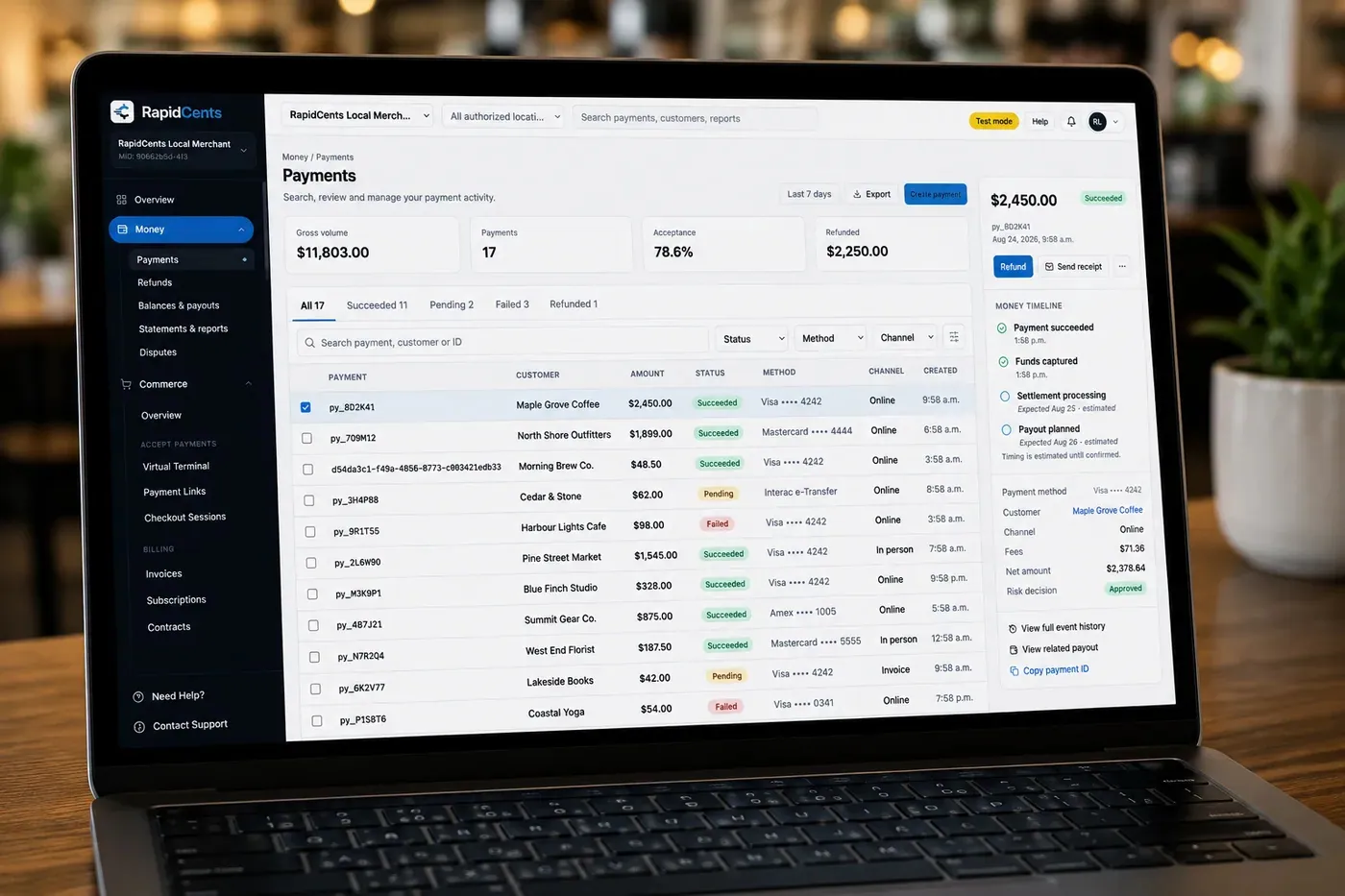
The RapidCents payments screen: gross volume, payment count, acceptance rate and refunds across the top, a filterable transaction list below, and a money timeline on the right tracing one payment from capture to planned payout. Merchant Dashboard
The RapidCents merchant dashboard gives owners, managers and finance staff a single signed-in view of live…
Explore


Split tender: two cards, a deductible or a warranty share
Split tender means one repair order is paid by more than one payment, with each card portion run as its own transaction for its own amount. For auto repair split payments, RapidCents takes each card share on the desk terminal, by payment link or in the Virtual Terminal, while your shop software tracks what each payer still owes until the balance reaches zero.
How a split payment runs
Agree on the split before anyone pays. Charge the first card for its share on the desk terminal, then the second card for the rest, each with its own authorization and receipt. For a payer who is not at the counter, send a payment link for their share only. Enter each tender on the repair order in the shop software so the open balance stays visible.
Insurer and warranty shares stay with the claim
RapidCents processes card payments; it does not submit, approve or adjust insurance or warranty claims. A collision insurer settles its share under the claim and the owner pays the deductible by card. Some extended warranty administrators pay the authorized amount by company card over the phone, which staff key in the Virtual Terminal with the claim authorization number as the reference.
Declines on engine and transmission bills
A decline on a big repair can come from the card's spending limit rather than a fraud flag. Instead of retrying the same card, offer a second card for the remainder, or send a link for the rest that the owner can pass to whoever is helping pay.
Refunds on a split bill
Refund each card against its own transaction, never more than that card paid, and note which tender the refund belongs to. When a comeback repair is discounted after pickup, credit the card that paid for that work and record the adjustment on the repair order; an insurer's share is corrected with the insurer, not through RapidCents.
A $4,350 collision repair with a $500 deductible
Say a body shop repairs a rear bumper and quarter panel for $4,350 on a policy with a $500 deductible, and the insurer settles $3,850 under the claim. At pickup the owner taps a card for the deductible, and the owner's partner pays $260 through a text link for an older door ding the claim did not cover, so the repair order balance reaches zero.
What drives card processing costs at an automotive shop?
At an automotive shop, your card mix and the way each card is taken drive most of the processing cost. RapidCents prices on interchange-plus: the interchange on each repair-order payment, set by the card networks, passes through at cost, plus your RapidCents markup shown in your Fee Schedule and fees for equipment or services, if applicable. Your agreement runs month to month with no fixed term. Interchange shifts with card type and channel, so compare quotes against your own statement.
Large tickets and premium cards
Repair orders run into the hundreds or thousands of dollars. When owners put those bills on rewards, premium or business credit cards, interchange is higher than on standard credit or debit cards, so your shop's card mix explains more of the cost than any headline price.
Counter, phone and link payments
A card tapped or inserted at the service desk generally falls into lower interchange categories than a card keyed in the Virtual Terminal or paid through a text link. A phone approval cannot be made card-present, but the pickup balance can go on the terminal whenever the owner is standing at the counter.
Fleet and commercial cards
Business and fleet cards carry commercial interchange, which differs from consumer card interchange, and some programs ask for extra transaction data. Ask your RapidCents representative which card programs your account accepts and what data your setup sends, rather than assuming commercial charges cost the same as consumer ones.
Refunds, disputes and equipment
Refunds for comebacks or goodwill adjustments, and chargebacks, can each add cost, and terminal costs depend on the hardware you choose. Read your Fee Schedule for dispute and equipment fees, then count the refunds and disputes your shop handled last quarter, so the comparison reflects your real exceptions.
Shop numbers to bring to a fee comparison
Bring three recent processing statements, your split of debit, credit and commercial cards, your average repair order, the share of payments taken at the counter versus by phone or link, and your refund and chargeback counts. Upload one statement to Fee Check to see interchange separated from markup before you ask anyone for a written quote.
Tekmetric, Shop-Ware and other shop software
RapidBridge works with Tekmetric, Shop-Ware, Mitchell 1 Manager SE, Shopmonkey and AutoLeap, so a card payment taken with RapidCents posts against the repair order you already have open, without changing the shop software you run. For any other system, RapidCents integrates with many major platforms through APPIE and RapidBridge, and your RapidCents representative will walk you through the right option for your vendor and version.
Tekmetric
RapidBridge works with Tekmetric, which runs your estimates and repair orders, so a card payment taken with RapidCents posts against the repair order you already have open. Your advisors keep working in Tekmetric the way they do today, with the payment link or desk terminal beside it. Your RapidCents representative will walk you through the setup for your plan.
Shop-Ware
RapidBridge works with Shop-Ware, the cloud shop management software that holds the repair order, inspection results and customer approvals. A payment taken with RapidCents lands on the repair order your service advisor already has open, so nobody retypes it. Your RapidCents representative will show you how deposits, balances and refunds appear there.
Mitchell 1
RapidBridge works with Mitchell 1 Manager SE, the shop management software that turns estimates into repair orders. Payments taken with RapidCents post against the open repair order, and settlement reports export to CSV for matching. If you run another Mitchell 1 product or version, your RapidCents representative will explain the option that fits it.
Shopmonkey
RapidBridge works with Shopmonkey, which keeps estimates, invoices and customer messages in the cloud, so a card payment taken with RapidCents posts against the order you already have open. Your advisors can send a RapidCents payment link for a deposit or a pickup balance and see it land on the same order.
AutoLeap
RapidBridge works with AutoLeap, the cloud shop management software for writing estimates and repair orders and messaging customers. A card payment taken with RapidCents posts against the repair order already open, deposits and refunds included. Your RapidCents representative will walk you through how the payment and refund flow runs for your plan.
QuickBooks Online and Xero
RapidCents connects settled transactions, fees and refunds to QuickBooks Online and Xero, so your bookkeeper sees each deposit and each fee without retyping. Shop management systems often sync to accounting as well, so decide which system posts payments, or the same deposit can be booked twice. Review a week of postings with your bookkeeper before you rely on them.
Payment options for automotive shops, by country
RapidCents serves merchants in Canada and the United States, and the payment options your shop can offer follow the country of your merchant account. Card brands are broadly shared, but debit networks, bank-payment methods and settlement currency differ, so confirm what is enabled on your account before you list payment options on estimates and invoices.
Cards at the counter and by link
Visa, Mastercard and American Express cards can be taken in each channel a shop uses: tap or chip on the desk terminal, phone payments in the Virtual Terminal and text links. How debit cards are accepted depends on the country where your account is held.
Bank payments for fleet accounts
Where your account supports bank debits, a fleet or commercial customer can authorize them for monthly repair invoices. The authorization form, notice periods and timing follow the banking rules of your account's country.
Repair rules are local
Rules on written estimates, approval of extra work and keeping a vehicle until the bill is paid differ by jurisdiction. RapidCents records each payment; the approvals and any tax lines belong in your shop software.
How to switch processors and reconcile repair orders
Once your account is approved, move your shop to RapidCents one payment channel at a time, and reconcile each day's settlement to your repair orders and ledger until they match without gaps. Before that, list what still depends on the old processor and test a deposit, a counter sale, a keyed payment and a refund on real repair orders. Close the old account only after its deposits and refunds are finished.
List what the old processor still holds
Write down open deposits for parts not yet installed, refunds still owed, saved cards for fleet accounts, recurring maintenance plans and any terminal lease or cancellation terms. Keep the old account open until those deposits are applied or refunded, because a refund normally runs through the processor that took the original charge.
Saved cards need fresh permission
Fleet cards on file move to a new processor only when both providers agree to migrate the tokens, so plan as if they will not. Ask each fleet and maintenance-plan customer to authorize a new card on file, with the amount, timing and cancellation terms in writing, before their next charge.
Pick hardware for each place money changes hands
Choose an auto shop credit card machine for every spot where payment happens: a countertop terminal at the service desk, a mobile terminal or Tap to Pay on a supported phone for the lot or mobile repairs, and a Rivo terminal with an active SIM where the shop Wi-Fi is weak, since the sale moves to cellular.
Test with real repair orders before moving traffic
Run a deposit by link, a counter sale, a keyed phone payment and a refund on RapidCents, using live repair orders. Check that receipts show your shop's name the way owners know it, that the RO number appears where you expect it, and that only the right staff can issue refunds.
Reconcile daily for the first month
Each morning, match the previous day's RapidCents settlement in the Merchant Dashboard to the bank deposit and to the repair orders marked paid. Export settlement and fee reports as CSV for the bookkeeper, and make sure only one system posts payments to QuickBooks Online or Xero.
Payment questions from automotive service shops
How should an automotive shop handle repair authorization and parts deposits?
Get the estimate approved before you charge for any repair, then take a deposit only for parts you must special-order and apply it to the final repair order. Record the approver, time and amount in your shop software. Collect the deposit by payment link with the RO number as the reference, or on the desk terminal if the owner is at the counter, and refund it to the same card, under your written terms, if the order is called off before the part ships.
How does text to pay before pickup work for a repair shop?
The advisor texts a secure payment link for the final balance when the car is ready, and the owner pays by card from their phone before coming in. The link carries the RO number, a receipt is sent automatically, and the Merchant Dashboard shows whether the link is open, paid or expired. Get permission to text at drop-off, and hand over the keys only once the payment shows as paid.
Can a customer split a repair bill across two cards or pay only the deductible?
Yes: each card is charged as a separate transaction for its share of the repair order, either on the terminal or through a payment link set to a partial amount. When an insurer or warranty company covers part of the bill, its share is handled through the claim, while the owner's deductible or uncovered work goes on a card. Log each tender on the same RO, and refund a card only up to what it paid.
How do we take card payments over the phone without putting card numbers at risk?
Send a payment link instead of asking for the number, so the owner types their card details on a secure page. When someone insists on reading a card out, key it directly into the Virtual Terminal, which runs AVS and CVV checks, and keep it off paper entirely. Role permissions limit who can key cards or refund, the audit log records every action, and a keyed payment still carries more dispute risk than a tapped card.
Which payment options can an automotive shop offer, and do they differ by country?
An automotive shop can usually take Visa, Mastercard and American Express at the counter, by phone and by link, while debit networks, bank-payment methods and the settlement currency differ by the country of the merchant account. RapidCents serves businesses in Canada and the United States and confirms which methods are switched on for your account during onboarding, so check that list before you print payment options on estimates.
How should a shop reconcile repair orders, deposits and card settlements?
Match every payment to its repair order first, then match each day's RapidCents settlement to the bank deposit. Payment links and Virtual Terminal payments carry the RO number as a reference; for a terminal sale, record the payment on the RO in your shop software at the moment of sale. Keep parts deposits visible as money held against open repair orders until each job closes, download the settlement and fee reports for your bookkeeper, and let the bookkeeper decide how deposits are booked.
Which payment processor is best for an automotive shop, and what should we compare?
The best fit is the processor whose total cost, hardware and reporting match how your shop actually collects money, so compare written quotes built on the same statement. RapidCents takes parts deposits, phone approvals, text-to-pay links and split payments, carries the RO number as the payment reference, and prices on interchange-plus, so you see interchange apart from our markup. Check equipment costs and whether your shop software ties you to its own processing; RapidBridge works with Tekmetric, Shop-Ware, Mitchell 1 Manager SE, Shopmonkey and AutoLeap.
What fees should an automotive shop expect for in-person and online card payments?
Expect interchange, which changes with the card type and with whether the card is tapped, inserted, keyed or paid online, plus the provider's markup and any equipment or service fees. With RapidCents, interchange passes through at cost, your markup is listed in your Fee Schedule, and the agreement is month to month with no fixed term. Counter payments generally carry lower interchange than phone and link payments, so ask for a written quote built on your own volume and channel mix.
Can we use RapidCents with Tekmetric or Shop-Ware?
Yes. RapidBridge works with Tekmetric and Shop-Ware, along with Mitchell 1 Manager SE, Shopmonkey and AutoLeap, so a card payment taken with RapidCents posts against the repair order you already have open, without changing your shop software. If you run something else, RapidCents integrates with many major platforms through APPIE and RapidBridge, and your RapidCents representative will walk you through the option for your vendor and version.
How can an automotive shop reduce payment disputes and protect stored card details?
Keep the approval, the receipt and the repair order together for every charge, and store cards only in the RapidCents Secure Card Vault with the customer's written permission. Take the pickup balance by chip or tap when the owner is present, attach inspection photos and the approval note to the RO, and answer alerts before their deadlines in Disputes and Chargeback Protection. Good records strengthen your response to a dispute, but no tool can promise the outcome.
How can we switch payment providers without losing repair order and billing records?
Keep the old account open until every deposit, refund and recurring charge it holds is finished, and move to RapidCents in stages. Export your transaction history from the old provider first. Saved fleet and maintenance-plan cards transfer only if both providers agree to a token migration; otherwise ask each customer for fresh permission to store a card. Test a deposit, a counter sale and a refund on real repair orders, then reconcile RapidCents settlements to your shop software every day.
What MCC is used for automotive service shops?
MCC 7538, automotive service shops (non-dealer), is the code commonly associated with independent repair and service shops. Related businesses can sit under other codes: body repair shops are commonly classified as 7531 and tire stores as 5532, while a franchised dealer's service department usually falls under the dealership's own category. RapidCents confirms the correct merchant category during onboarding, based on what your business actually sells.
Related automotive and transport industries
Car dealership service departments work from the same repair orders, towing companies collect at the roadside before a vehicle reaches the shop, and powersports and RV dealers take parts deposits much like a repair shop. The specialist pages for auto repair shops, tire shops, auto glass businesses and commercial truck repair go deeper on each trade.
Taxi & Transportation
Take card fares and tips in the vehicle, reconcile each driver's takings by shift and…
Parking
Take cards at booths and event gates, let drivers pay by plate or QR code, and bill…
Towing & Roadside
Take release fees at the yard gate, card payments at the roadside and invoices for…
Car Wash
Single washes at the pay station, unlimited plans on monthly autopay and the renewals…
Car Dealerships
Take holding deposits by payment link, ring service and parts tickets on terminals, and…
Limousine & Charter
Take a booking deposit, adjust for wait time and gratuity, and capture the final fare…
Courier & Delivery
Bill business accounts on terms, take card payments from walk-in senders and collect from…
Driving Schools
RapidCents helps driving schools sell lesson packages online, collect installments and…
Take the next step
See what your shop pays in interchange and in markup
Upload a recent statement from your shop to Fee Check to see interchange separated from markup. Then compare a RapidCents interchange-plus quote built on your shop's real mix of counter, phone and text-link payments.
- No obligation
- Payment specialists, not a call centre
- Secure statement upload



