


Catering payment processing: booking deposits, event balances and on-site cards
Catering money arrives in stages. A deposit confirms the date months out, the balance is due close to the event, and a final adjustment for extra guests or bar service is settled on site. RapidCents sends the deposit as a payment link with the proposal, keys card details taken by phone through the virtual terminal, invoices the event balance, and lets the lead take the on-site adjustment with Tap to Pay. Caterers are classified under MCC 5811.

- PCI DSS Level 1
- SOC 2 Type II
- All major card brands: Visa · Mastercard · Amex · Interac debit
- Interchange-plus available
- Canadian support
Operational workflows
Event quoted on headcount and menu
Booking deposit taken by payment link to hold the date
Final headcount confirmed, balance invoiced before the event
On-site additions and bar service charged the day of
Payment challenges
A date held on a promise
The kitchen turns down other contracts for a booked date, so the deposit is what makes the reservation real.
Headcount moves in the final week
Food is bought against a number that keeps changing, and the invoice has to be revised before the event rather than after it.
Booked by an assistant, paid by the company
A corporate event is arranged by someone who will not attend, on a card nobody at the venue can present.
Choose the right payment setup for Catering
Choose catering payment processing
For Catering, map the counter, service, and shift close, the deposit, staged payments, and final balance, and online checkout and remote payment before choosing a setup. Select channels that match those moments, then confirm that the chosen solution genuinely covers each channel.
Payment hardware for Catering
For Catering, choose hardware around the payment point: counter, service, or payment away from the counter. Start with the staff workflow, then confirm the suitable terminal options before purchase.
Compare payment processing fees
For Catering, request a written fee breakdown covering deposits and final balances and online checkout and dispute handling. Compare the effective cost across the real card and channel mix; do not choose on a headline rate alone.
Set up or switch Catering payments
To set up Catering payments, document the checkout, confirmation, and refund path and the service and shift-close workflow, confirm compatibility before purchase, then test a real payment flow before going live.
Recommended products

The RapidCents payment links screen listing created links with their amount, status, click count and whether they have been paid, beside a phone showing the branded page a customer opens to pay $2,500.00. Payment Links
RapidCents payment links let staff generate branded pay-by-link URLs for invoices, deposits, balances and…
Explore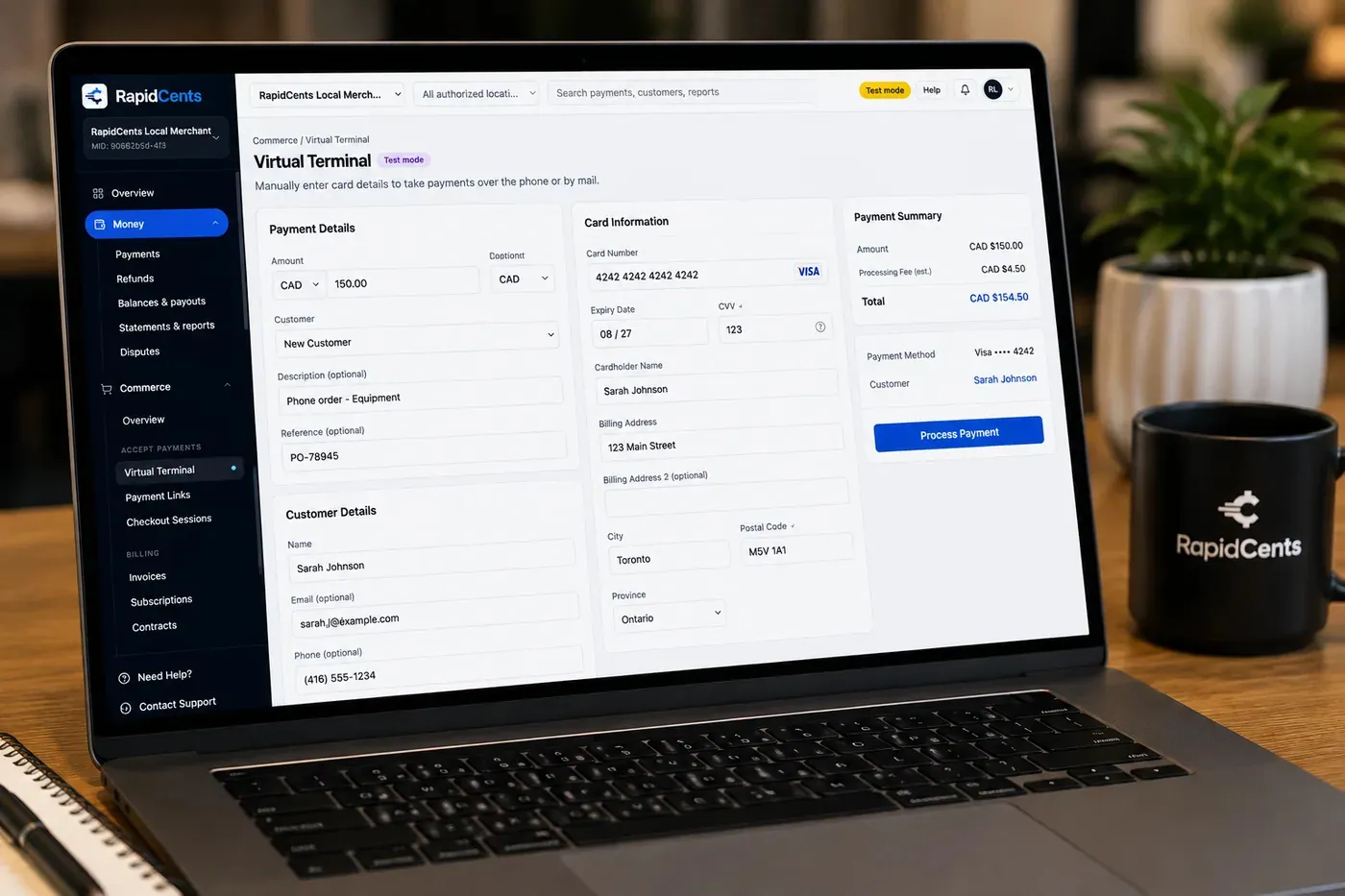
The RapidCents virtual terminal: payment details, card number, expiry and CVV keyed by hand on the left, with a payment summary on the right showing the amount, the estimated processing fee and a Process Payment button. Virtual Terminal
The RapidCents virtual terminal lets authorized staff enter mail-order and telephone-order payments through a…
Explore
A café worker holds a phone running RapidCents Tap to Pay, showing an $18.75 sale and the contactless symbol, while a customer holds a Visa card to the screen. No separate card reader is present. Tap to Pay
RapidCents Tap to Pay turns supported iPhones and Android devices into contactless payment terminals without…
Explore
The RapidCents invoices screen: outstanding, overdue, paid and draft totals across the top, the invoice list below them, and a preview of one invoice on the right with its line items and a View & Record Payment button. Invoicing
RapidCents invoicing helps professional services, contractors and B2B suppliers create branded invoices…
Explore


How this gets set up
The deposit holds the date
The proposal goes out with a payment link, and the date is only blocked once the deposit clears — months before any food is bought.
Balance invoiced before the event
The event balance is invoiced on the agreed schedule, with the guest count the kitchen is actually ordering for.
Phone cards keyed by the office
A client reading a card number down the phone is keyed into the virtual terminal rather than written on the function sheet.
On-site adjustment on service day
Extra guests, an extended bar or a late overtime hour is tapped on the event lead's phone before the load-out.
Integrations
Tripleseat
Tripleseat holds the event, the banquet order and the client, and deposits and balances post against that event so the booking shows what is still owed.
Caterease exports
Caterease exports move the event billing detail out as a file for the ledger — an export path, not a live two-way feed.
Operations, security and going live
A deposit is not revenue yet
Reporting separates money held against future events from balances collected on events already served, because a booked deposit is still an obligation.
Every payment belongs to an event, not a customer
A client who books three functions a year needs each deposit and balance traceable to its own date.
No card numbers on a function sheet
Keying into the virtual terminal keeps card details off the paperwork that circulates in the kitchen and at the venue.
In place before the calendar fills
Deposit links and invoice templates are set up ahead of the season, so a signed proposal can be paid the day it comes back.
Payment questions from Catering
What should businesses compare when choosing catering payment processing for Catering?
Compare catering payment processing against the real payment journey: the counter, service, and shift close, the deposit, staged payments, and final balance, and online checkout and remote payment. Start with the required channels and hardware, then confirm compatibility and support before committing.
What payment hardware is practical for Catering?
For Catering, hardware should match the point when staff collect payment: at the counter, during service, or elsewhere. Test each scenario before choosing a terminal form factor.
Which payment channels are relevant for Catering?
For Catering, start with the counter, service, and shift close, the deposit, staged payments, and final balance, and online checkout and remote payment. Keep only the channels that match those moments, then verify the complete customer flow before offering them.
How should payment processing fees be evaluated for Catering?
For Catering, compare costs related to deposits and final balances and online checkout and dispute handling using actual transactions. Request a written breakdown of fees and terms rather than relying on an advertised rate alone.
What should be confirmed before setting up payments for Catering?
For Catering, document the checkout, confirmation, and refund path and the service and shift-close workflow, verify the needed compatibility, and test the flow before going live. This exposes manual steps and exceptions before customers encounter them.
How should deposits and high-value payments be planned for Catering?
Separate the deposit, staged payments, and final balance in the process. Confirm the authorization and refund rules that apply to the business before communicating terms to a customer.
What MCC category applies to Catering?
MCC 5811 is commonly associated with Catering. Our onboarding team confirms the correct category for your business.
Related industries
Restaurants
RapidCents connects counter, tableside, online ordering and multi-location restaurant…
Fast Food & QSR
Quick-service and fast-food operators need high-throughput contactless terminals…
Food Trucks
Food trucks accept credit cards curbside with battery-friendly mobile terminals, Tap to…
Cafés & Bakeries
Cafés and bakeries combine fast counter contactless, pre-order pickup payments and…
Hotels & Hospitality
Hotels manage deposits, folio charges, multi-property settlement and contactless checkout…
Bars & Nightclubs
Bars run open tabs against a pre-authorized card, split large groups at close, and…
Breweries & Wineries
Producers sell at the taproom, at farmers markets and through a beer or wine club, so the…
Ghost Kitchens
Delivery-only kitchens run several brands from one line, with orders arriving from…
Take the next step
Talk to a RapidCents specialist
RapidCents Fee Check reads a processing statement and shows interchange separately from the markup. Upload a statement for an instant breakdown, or open a merchant account and start accepting payments on one account.
- No obligation
- Payment specialists, not a call centre
- Secure statement upload



